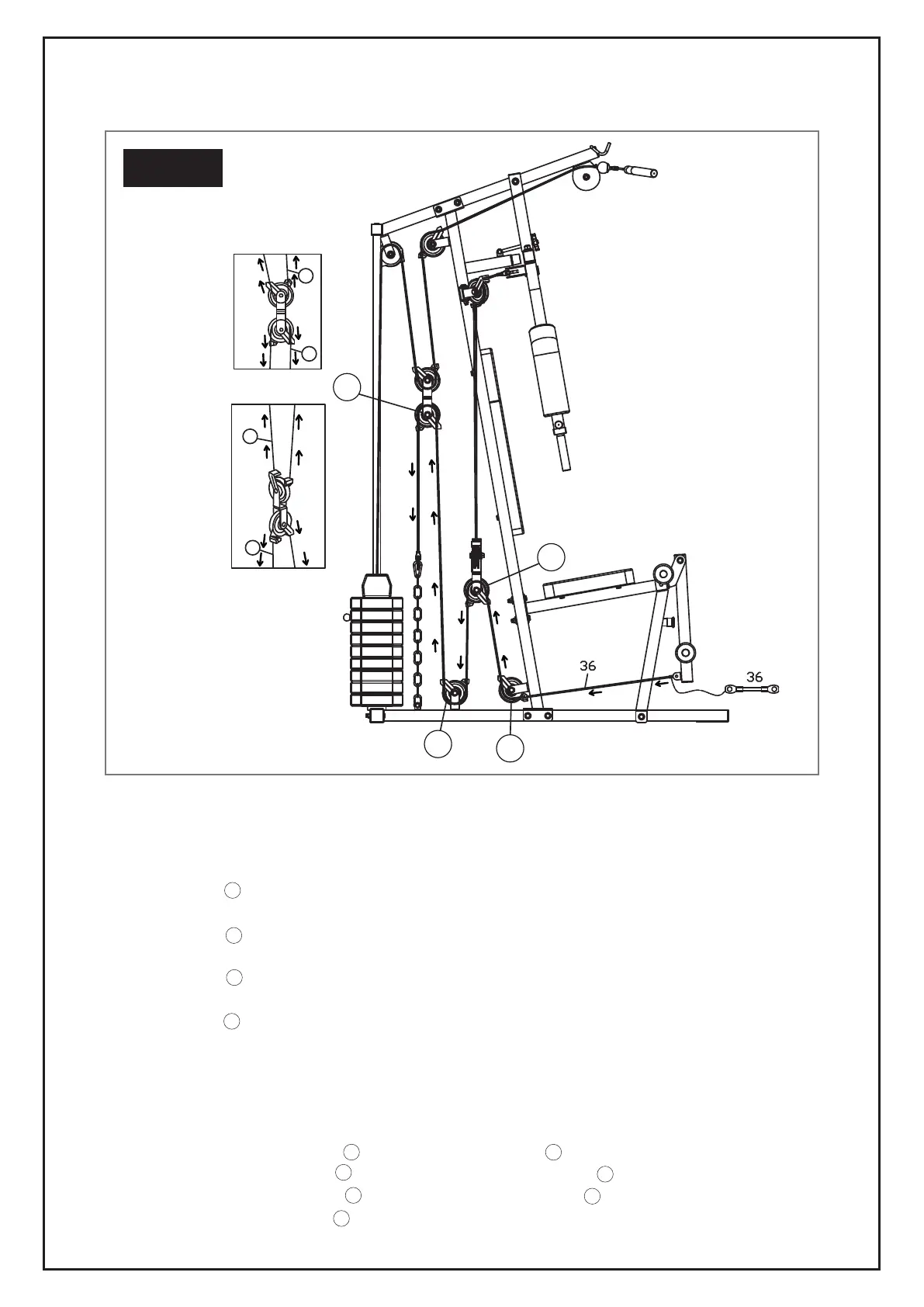
STEP 10: CABLE 36
Installing the pulley system:
1. Attach 1 open side of Cable 36 to the Leg Extension Frame (6) using 1 Hex Bolt (63), 2 Washers (68) and
1 Nylon nut (71) and thread cable under Pulley (J).
2. Install Pulley (32) J and 2 Pulley Hooks (55) to the Front Base Frame (2) using 1 Hex Bolt (59), 2 Washers
(67) and 2 Nylon Nuts (70).
3. Install Pulley (32) H and 2 Pulley Hooks (55) to the Reverse U (20) using 1 Hex Bolt (59), 2 Washers (67)
and 2 Nylon Nuts (70).
4. Install Pulley (32) K and 2 Pulley Hooks (55) to the Front Base Frame (2) using 1 Hex Bolt (59), 2 Wash-
ers (67) and 2 Nylon Nuts (70).
5. Install Pulley (32) L and 2 Pulley Hooks (55) to the Front Base Frame (2) using 1 Hex Bolt (59), 2 Washers
(67) and 2 Nylon Nuts (70).
6. Attach 1 x Chain (42) to the final open end of Cable 36.
7. Attach Chain (42) to Front Base Frame (2) using 1 x Pothook (29).
Threading the cable through the pulley system:
1. Thread Cable 36 under Pulley (32) J and up towards Pulley (32) H .
2. Thread Cable 36 over Pulley (32) H and back down towards Pulley (32) K .
3. Thread Cable 36 under Pulley (32) K and back up towards Pulley (32) L .
4. Thread Cable 36 over Pulley (32) L and back down.
EXERCISE INSTRUCTIONS
STEP 10
36
37
35
36
L
H
K
J
H
H
H
L
L
L
J
J
K
K
K
39



 To Next Page