9
Alarm Features and Functions
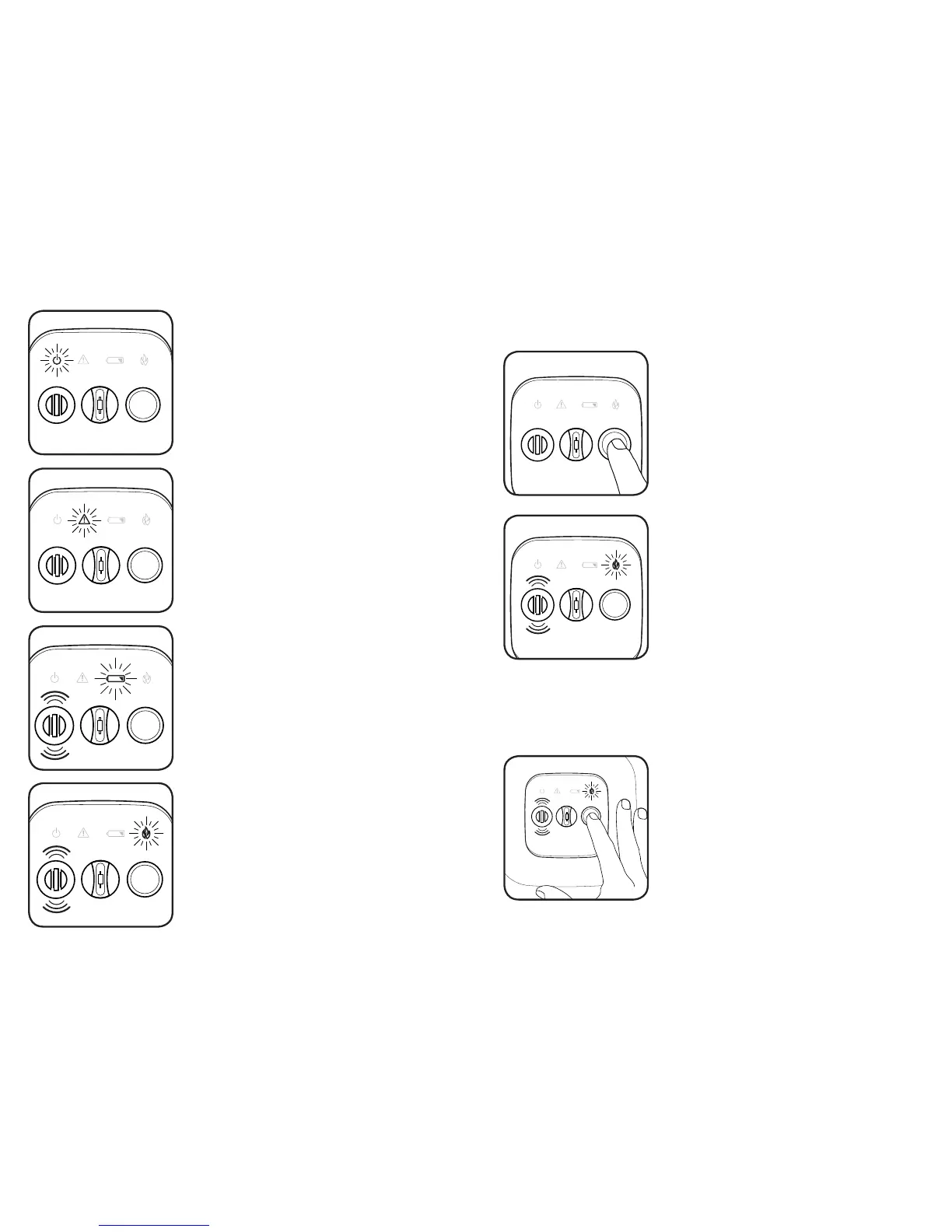
Power Indicator Light
On Model RF-360TB (Battery-Only powered),
the POWER icon will briefly flash once per
minute.
On Model RF-360TEB (AC with Battery Back-
up), the POWER icon will run continuously
while AC powered.
BATTERY will flash once per minute
accompanied by the horn chirp to indicate the
batteries must be replaced.
Replace batteries only with Energizer
E91 AA batteries.
Low Battery Warning Light
Warning/Trouble Light
WARNING will flash once per second to indicate
that the interLINX network is open to accept new
alarms.
WARNING can also indicate a problem with
the alarm’s smoke sensitivity. In this case,
the WARNING light will flash once per minute
accompanied by the horn chirp.
If this occurs, clean the alarm (as described in
this manual)
FIRE will flash when alarm detects sufficient
smoke or heat. This is accompanied by the
sounding of the horn.
FIRE will stay on continuously if the alarm was
triggered remotely by another alarm on the
interLINX network.
Fire Warning Light
10
Silencing Nuisance Alarms
Alarm Features and Functions
Testing the Alarm
Every alarm should be tested weekly to ensure proper operation.
To test the alarm, press and release the button on
the front face.
The alarm will sound with 3 or 4 beeps and FIRE will
flash rapidly.
All four icons will strobe to indicate proper function.
The alarm will then send out a network test comand
and all other alarms on the network will perform the
steps above.
If the alarm fails, the horn will sound. Clean the
alarm (as described in this manual) and retest. If the
alarm still fails, contact the manufacturer.
The Homefront family of alarms is equipped with a silence feature that will
decrease the sensitity of the alarm and silence nuisance alarms.
If in the course of normal activity, cooking smoke,
steam or other gases cause the alarm to activate,
the alarm can be silenced for ten minutes by
pressing the button on the front face of the
alarm.
The silence feature will also silence any alarms
that were triggered remotely. However, the
initiating alarm must be silenced directly.
If the quantity of smoke is too great, the
alarm will not silence until the air has
cleared sufficiently.



 To Next Page