EasyManua.ls Logo

homelabs HME020006N - User Manual

Default Icon
20 pages
Print Icon
To Next Page IconTo Next Page
Loading...
ENERGY STAR RATED
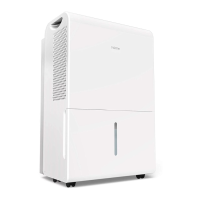
DEHUMIDIFIER
22, 35 and 50 Pint* Capacity Models
HME020030N
HME020006N
HME020031N
HME020391N
Thank you for purchasing our quality appliance. Please be sure to read the entirety of this user manual
carefully prior to use of the product. If you have any questions regarding the use of this product,
please call 1-800-898-3002.

Questions and Answers

  • S
    shelby02Aug 12, 2025
    How to troubleshoot a homelabs HME020006N Dehumidifier that does not start?
    • J
      John GarciaAug 12, 2025
      If your homelabs Dehumidifier isn't starting, ensure the plug is fully inserted into the outlet and check your house's fuse or circuit breaker box. Also, verify that the dehumidifier hasn't reached its preset level or that the bucket isn't full. Lastly, make sure the bucket is correctly positioned.
  • D
    david57Aug 16, 2025
    Why won't my homelabs HME020006N Dehumidifier start?
    • C
      cervantesparkerAug 16, 2025
      Your homelabs Dehumidifier might not start due to a few reasons. First, check your house's fuse or circuit breaker box. Also, ensure that the bucket is not full and is correctly positioned.
  • R
    Ryan BaileyAug 19, 2025
    What to do if homelabs HME020006N Dehumidifier does not dry the air as it should?
    • J
      Jason WrightAug 19, 2025
      If your homelabs Dehumidifier isn't drying the air properly, make sure enough time has passed for it to remove moisture. Ensure that curtains, blinds, or furniture aren't blocking the front of the unit. Check that the humidity level is set low enough and that all doors, windows, and other openings are securely closed. Also, make sure there isn't a kerosene heater or something else releasing water vapor in the room.
  • R
    Raymond MooreAug 25, 2025
    What to do if homelabs HME020006N pump indicator blinks?
    • N
      Nicole SchmidtAug 25, 2025
      If the pump indicator is blinking on your homelabs Dehumidifier (HME021004N model), it could be that the bucket is not in the correct position. Ensure the bucket is placed properly.
  • B
    bobby11Aug 27, 2025
    What to do if water does not drain from the hose of my homelabs HME020006N Dehumidifier?
    • L
      lucas32Aug 27, 2025
      If water isn't draining from the hose of your homelabs Dehumidifier, hoses longer than 5 feet might not drain correctly, so it's recommended to keep the hose as short as possible. Also, ensure the hose is smooth and without kinks.
  • M
    Melissa RogersAug 31, 2025
    Why is my homelabs HME020006N Dehumidifier not drying the air properly?
    • F
      Frank CookAug 31, 2025
      If your homelabs Dehumidifier isn't drying the air effectively, ensure you've allowed enough time for moisture removal. Check that curtains, blinds, or furniture aren't blocking the front or back of the unit. The humidity level setting might be too high, so adjust it accordingly. Confirm that all doors, windows, and openings are securely closed. Also, consider that the room temperature might be too low (below 41°F or 5°C), or there might be a source of water vapor, like a kerosene heater, in the room. Ensure the air filter is clean and that the dehumidifier is upright on a level surface.
  • T
    taraleeSep 3, 2025
    Why does my homelabs HME020006N Dehumidifier make a loud noise when operating?
    • N
      nathanhouseSep 3, 2025
      A loud noise during operation of your homelabs Dehumidifier is normal due to the auto-defrost feature. However, check that the dehumidifier is placed on an even floor.
  • M
    Matthew RiveraSep 7, 2025
    Why does frost appear on the coils of my homelabs HME020006N?
    • M
      Matthew BassSep 7, 2025
      The appearance of frost on the coils of your homelabs Dehumidifier is normal; it's due to the auto-defrost feature.

Summary

Important Safety Instructions

First Time Use Precautions

Key steps and notices for initial setup and operation of the dehumidifier.

General Safety Guidelines

Mandatory guidelines for safe operation and maintenance to prevent harm.

Electrical Safety Information

Details on grounding, power cords, and avoiding electrical hazards.

Operational Cautions

Warnings for safe operation, including child usage and cord management.

Parts Description

Front and Rear Components

Identifies and illustrates the front and rear parts of the dehumidifier.

Included Accessories

Lists and shows the accessories provided with the dehumidifier.

Operation

Placement and Environment

Guidelines for positioning the unit and recommended operating temperatures.

Smart Functions Overview

Explains automatic features like shut-off, defrost, and restart.

Control Panel Overview

Description of the control panel and its primary buttons.

Control Panel Details and Indicators

Explains display, error codes, indicator lights, and button functions.

Water Removal Methods

Instructions for bucket emptying, continuous draining, and pump draining.

Care & Cleaning

Routine Cleaning Procedures

Steps for cleaning the grille, case, bucket, and air filter for optimal performance.

Dehumidifier Storage

Guidance on preparing and storing the dehumidifier for long-term periods.

Troubleshooting

Warranty Information

Contact Us

homelabs HME020006N Specifications

General IconGeneral
Brandhomelabs
ModelHME020006N
CategoryDehumidifier
LanguageEnglish

Related product manuals