7
Add the processor into the HomeWorks Designer software.
Note: Ensure you are using the latest version of the HomeWorks Designer software.
For additional troubleshooting information, please see www.lutron.com/support
Step 5 — System Setup
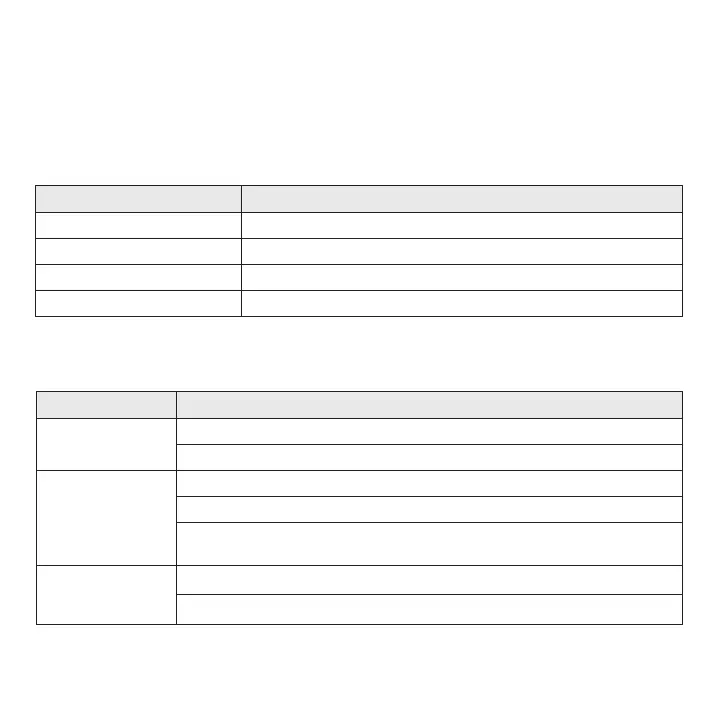
Symptom Probable Cause
Unit does not
power on
A PoE switch is not being used or is not configured as a PoE switch
The other end of the Ethernet cable is not connected to a PoE switch
Unit cannot be
found in software
The Ethernet cable is not connected to the same LAN as the wired processor
Model is not supported (Athena / myRoom vs. HomeWorks)
Ethernet run is longer than the supported 328 ft (100 m) and a PoE extender
is needed
Unit does not
control
surrounding lights
Lights are out of range of the wireless processor
Processor lost power / Ethernet wire run too long and PoE booster is required
Troubleshooting
Mode / Error LED Pattern Description
Normal Operation Status LED blinks green every 10 seconds
Software Update Status LED blinks blue
Error Status LED remains solid red
Processor Identify Status LED blinks green rapidly
LED Diagnostics


 To Next Page