EasyManua.ls Logo

Homtom HT17 - Getting Started; Overview; Key Explained; Starting up

Default Icon
15 pages
Print Icon
To Next Page IconTo Next Page
To Previous Page IconTo Previous Page
Loading...
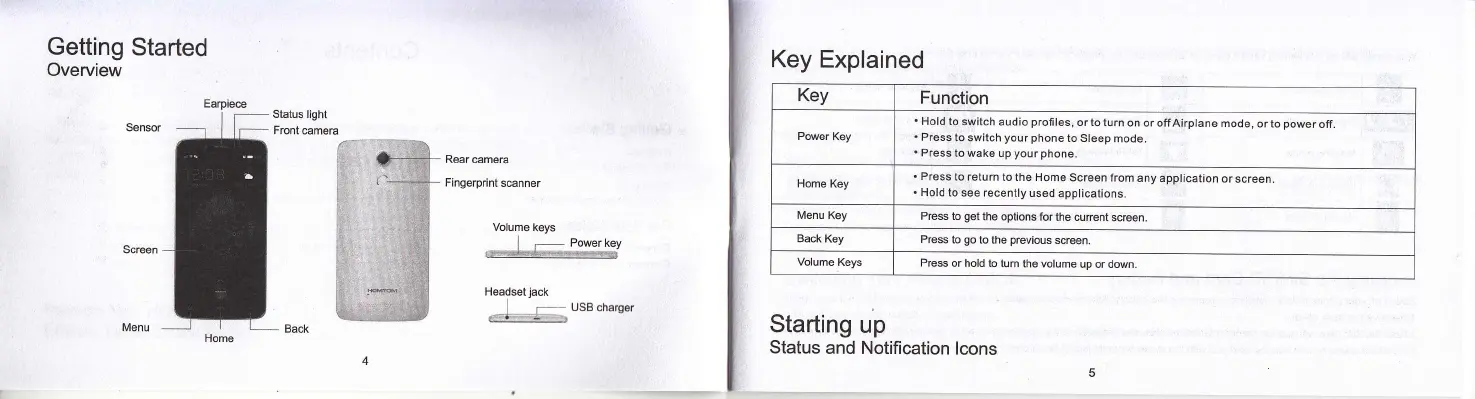
Getting
Started
Overview
Status Iight
Front
@mera
Rear camera
Fingerprint
s@nner
Volume
keys
] .-
P6pe1
1Gy
'*&41*^r<
Headsetjack
] .-
-usBcharger
._'a'
'i'
'I
Earpiece
Key Explained
Key
Function
Power
Key
Hold to
switch audio
profiles,
or to turn
on or offAirplane
mode,
or to
power
off.
Press to
switch
your
phone
to Sleep
mode.
Press
to wake up
your phone.
Home
Key
.
Press
to retum
to the Home
Screen from
any application
or
screen.
.
Hold to see recently
used
applications.
Menu Key
Press to
get
the options for
the current
screen.
Back Key
Press
to
go
to the
previous
screen.
Volume
Keys
Press
or hold to turn
the volume
up or down
Starting
up
Status
and Notification
lcons