Display Setting
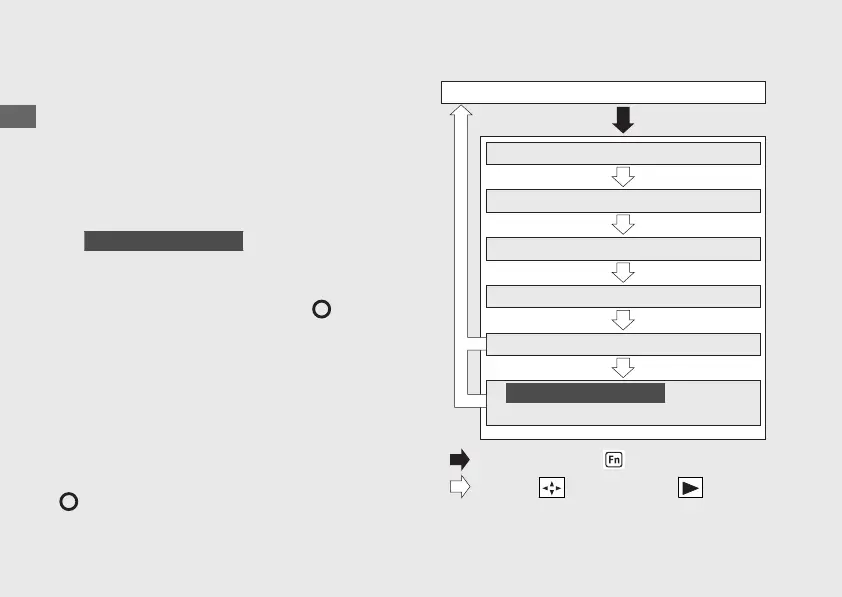
Following items to change sequentially.
• Time format setting
• Clock setting
• Backlight brightness adjustment
• Changing of mileage unit
• Changing of fuel mileage meter unit
•
III ED, Ⅳ ED type only
Bluetooth
®
pairing setting
If the ignition switch is turned to the (Off)
position or the button is not pressed for about
30 seconds, the control is automatically switched
from the setting mode to the ordinary display.
If the button is not pressed for about 30 seconds
items in the process of being set will be
discarded and only items where settings have
been finalized will be applied.
Only if the ignition switch is turned to the
(Off) position will items in the process of
being set and those that are finalized be applied.
20221109171351_32K2LA000_eng_BOOK Page 35 Wednesday, November 09 2022 17:20:28 JST
Operation Guide
32
Instruments (Continued)
Clock setting
Time format setting
Ordinary display
Press and hold the function switch
Press the sel switch to the
Changing of mileage unit
Changing of fuel mileage meter unit
Backlight brightness adjustment
Bluetooth
®
pairing setting
III ED, Ⅳ ED type only




 To Next Page