uuWhen DrivinguTire Pressure Monitoring System (TPMS)
530
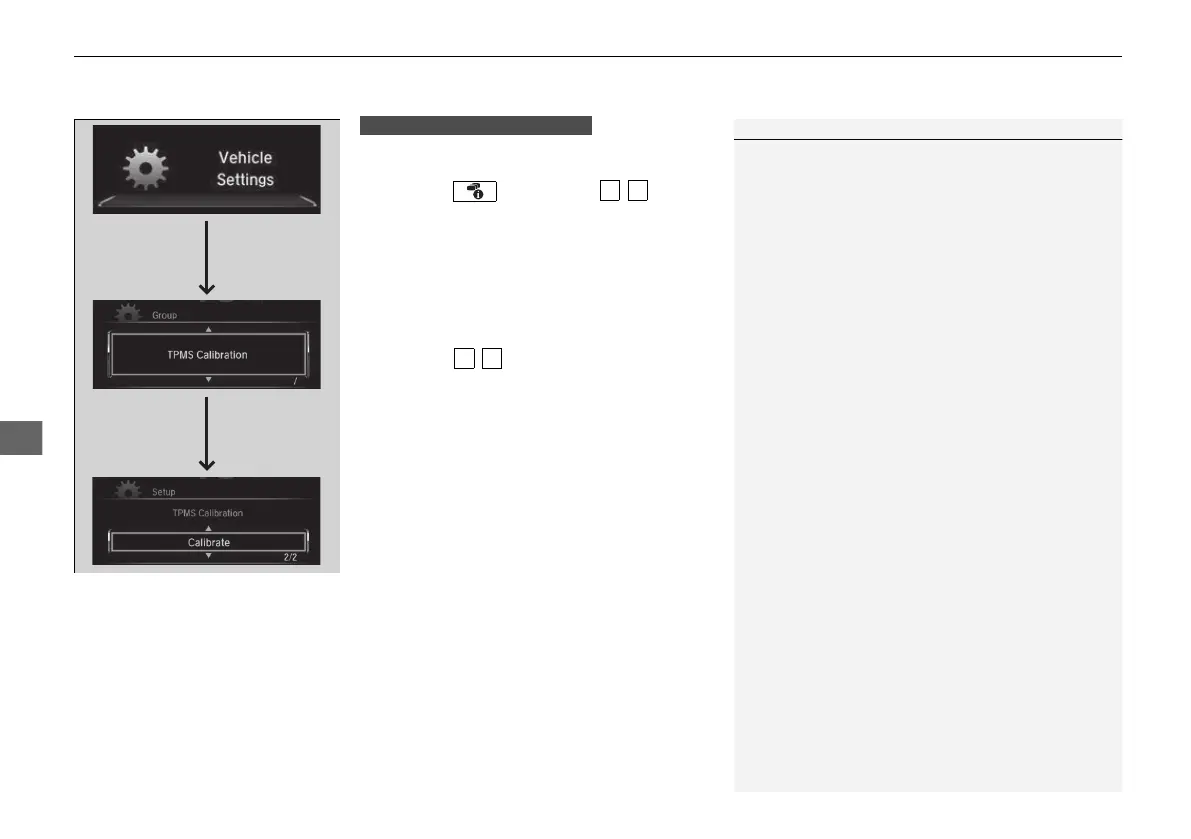
You can calibrate the system from the customized
features on the driver information interface.
1. Press the button then / button
to select Vehicle Settings, then press the
ENTER button.
u TPMS Calibration appears on the display.
2. Press the ENTER button.
u The display switches to the
customization setup screen, where you
can select Cancel or Calibrate.
3. Press the / button and select
Calibrate, then press the ENTER button.
u Calibration Started screen appears,
then the display returns to the
customization menu screen.
• If the Calibration Failed To Start message
appears, repeat steps 2-3.
• The calibration process finishes automatically.
1TPMS Calibration
The indicators for the Adaptive Cruise Control (ACC)
with Low Speed Follow, Road Departure Mitigation
(RDM), Vehicle Stability Assist
TM
(VSA®) system,
Vehicle Stability Assist
TM
(VSA®) OFF, low tire
pressure/TPMS, Collision Mitigation Braking System
TM
(CMBS
TM
), and Parking Brake and Brake System
(Amber) may come on along with a message in the
Driver Information Interface after reconnecting the
battery. Drive a short distance at more than 12 mph
(20 km/h). The indicator should go off. If it does not,
have your vehicle checked by a dealer.
Models with color audio system
21 CR-V PET ELP_MAP_HMIN_HCM-31TLA6400.book 530 ページ 2020年9月2日 水曜日 午後1時35分













 To Next Page