241
Continued
Colour Audio
Basic Operation
To use the audio system function, the power mode must be in ACCESSORY or ON.
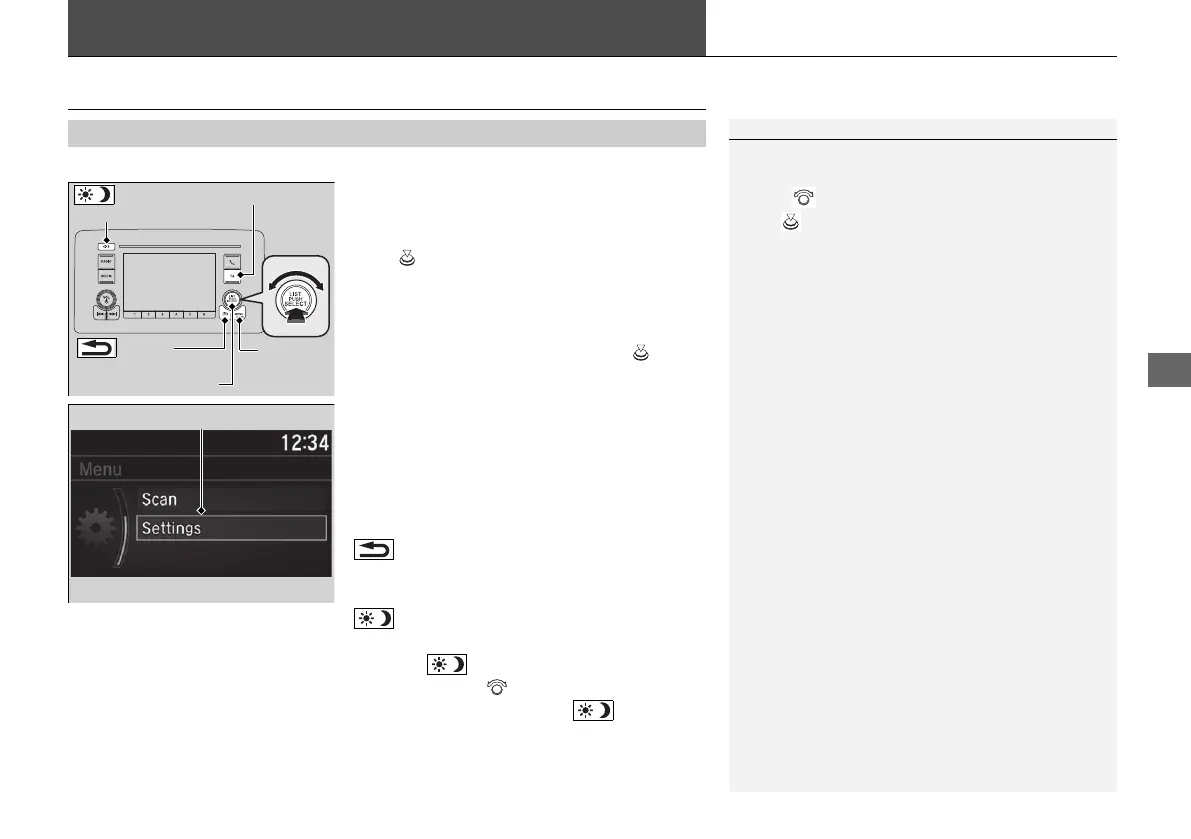
Use the selector knob or MENU/CLOCK
button to access some audio functions.
Press to switch between the normal and
extended display for some functions.
Selector knob: Rotate left or right to scroll
through the available choices. Press to set
your selection.
MENU/CLOCK button: Press to select any
mode.
The available modes include wallpaper,
display, clock, language setup, and play
modes. Play mode choices include scan,
random, repeat, and so on.
(Back) button: Press to go back to the
previous display.
TA button: Press to activate the TA station.
(Day/Night) button: Press to change
the audio/information screen brightness.
Press the button, then adjust the
brightness using .
u Each time you press the button, the
mode switches between the daytime
mode, nighttime mode and off mode.
■
Audio System Function
1Colour Audio
These indications are used to show how to operate
the selector knob.
Rotate to select.
Press to enter.
Menu Items
2 Adjust Clock P. 166
2 Wallpaper Setup P. 246
2 Adjusting the Sound P. 248
2 Display Setup P. 249
2 Customized Features P. 265
Press the button on the steering wheel to change any
audio setting.
2 Audio Remote Controls P. 243
(Back)
Button
Selector Knob
MENU/
CLOCK
Button
(Day/Night)
Button
TA Button
21 JAZZ HYBRID SSS-32TZA6000.book 241 ページ 2020年1月29日 水曜日 午前10時32分















 To Next Page