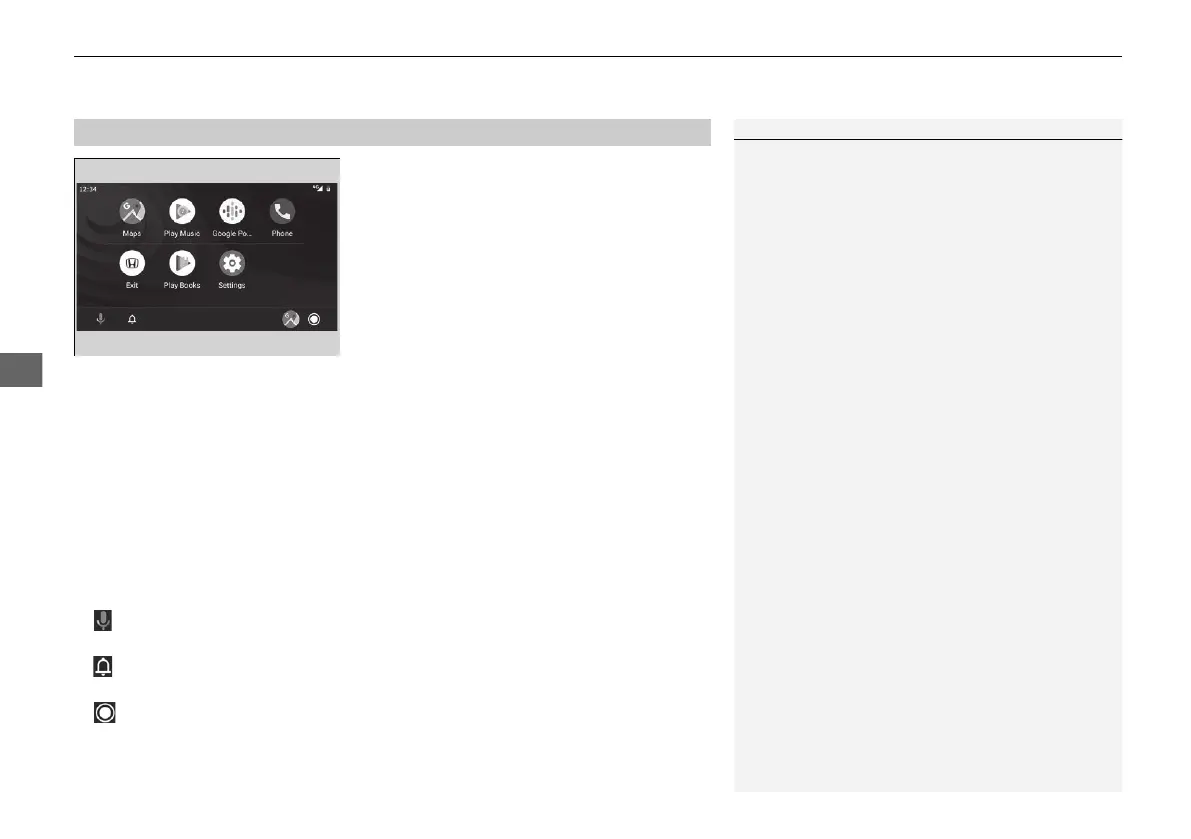
uuDisplay AudiouAndroid Auto
342
• Maps
Display Google Maps and use the navigation function just as you would with your
Android phone. When the vehicle is in motion, it is not possible to make keyboard
entries. Stop the vehicle in a safe location to undertake a search or provide other
inputs.
• Play Music
Play Google Play Music and music apps that are compatible with Android Auto.
To switch between music apps, press this icon.
• Phone
Make and receive phone calls as well as listen to voicemail.
• Exit
•
Operate Android Auto with your voice.
•
You can check Android notifications.
• (Android Auto Home)
Display useful information organised by Android Auto into simple cards that
appear just when they’re needed.
■
Android Auto Menu
1Android Auto
For details on countries and regions where Android
Auto is available, as well as information pertaining to
function, refer to the Android Auto homepage.
Android Auto Operating Requirements &
Limitations
Android Auto requires a compatible Android phone
with an active mobile connection and data plan. Your
carrier’s rate plans will apply.
Changes in operating systems, hardware, software,
and other technology integral to providing Android
Auto functionality, as well as new or revised
governmental regulations, may result in a decrease or
cessation of Android Auto functionality and services.
Honda cannot and does not provide any warranty or
guarantee of future Android Auto performance or
functionality.
It is possible to use 3rd party apps if they are
compatible with Android Auto. Refer to the Android
Auto homepage for information on compatible apps.
21 JAZZ HYBRID SSS-32TZA6000.book 342 ページ 2020年1月29日 水曜日 午前10時32分






 To Next Page