Geofence setting
The geofence is a theft alert function that notifies registered users and retailers by automatic notification
(email / in-app notification) when Miimo appears outside the set geo-fence (virtual boundary).
• The minimum size of the geo-fence is 100mx100m.
• If there is no mobile network connection, the geofence setting / notification function will not be
available.
• When the power of Miimo is off, you can get location information for up to 24 hours with the TCU
battery.
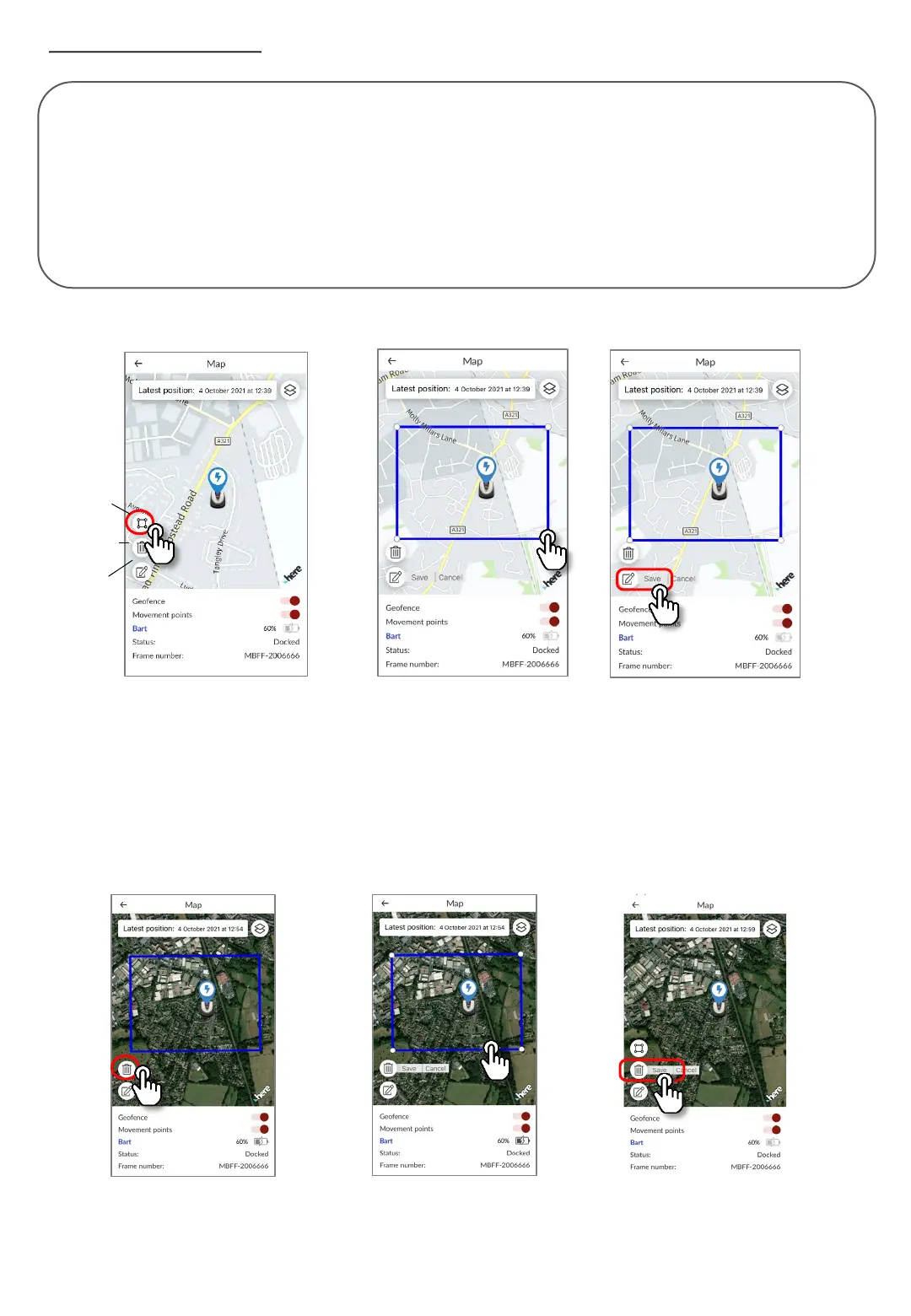
1. Click the create geofence icon.
2. Resize the geofence by dragging the four corners of the geofence.
3. Click the Save button to complete the geofence creation.
* You can change the size of the geo-fence from the edit icon.
* The minimum size of the geo-fence is 100m x 100m.
●Create/edit geofence
●Delete geofence
1. Click the geofence delete icon.
2. Select the geofence.
3. Confirm that the geofence has disappeared and save it to delete the geofence.
Create icon
Delete icon
Edit icon










 To Next Page