Remote control operation (Bluetooth only)
If you want to control Miimo manually, you can operate it with remote control by connecting the
Miimo unit and the app via Bluetooth.
To ensure Bluetooth connectivity, move your device to within 3m of Miimo.
When operating the remote control, check the precautions before operating.
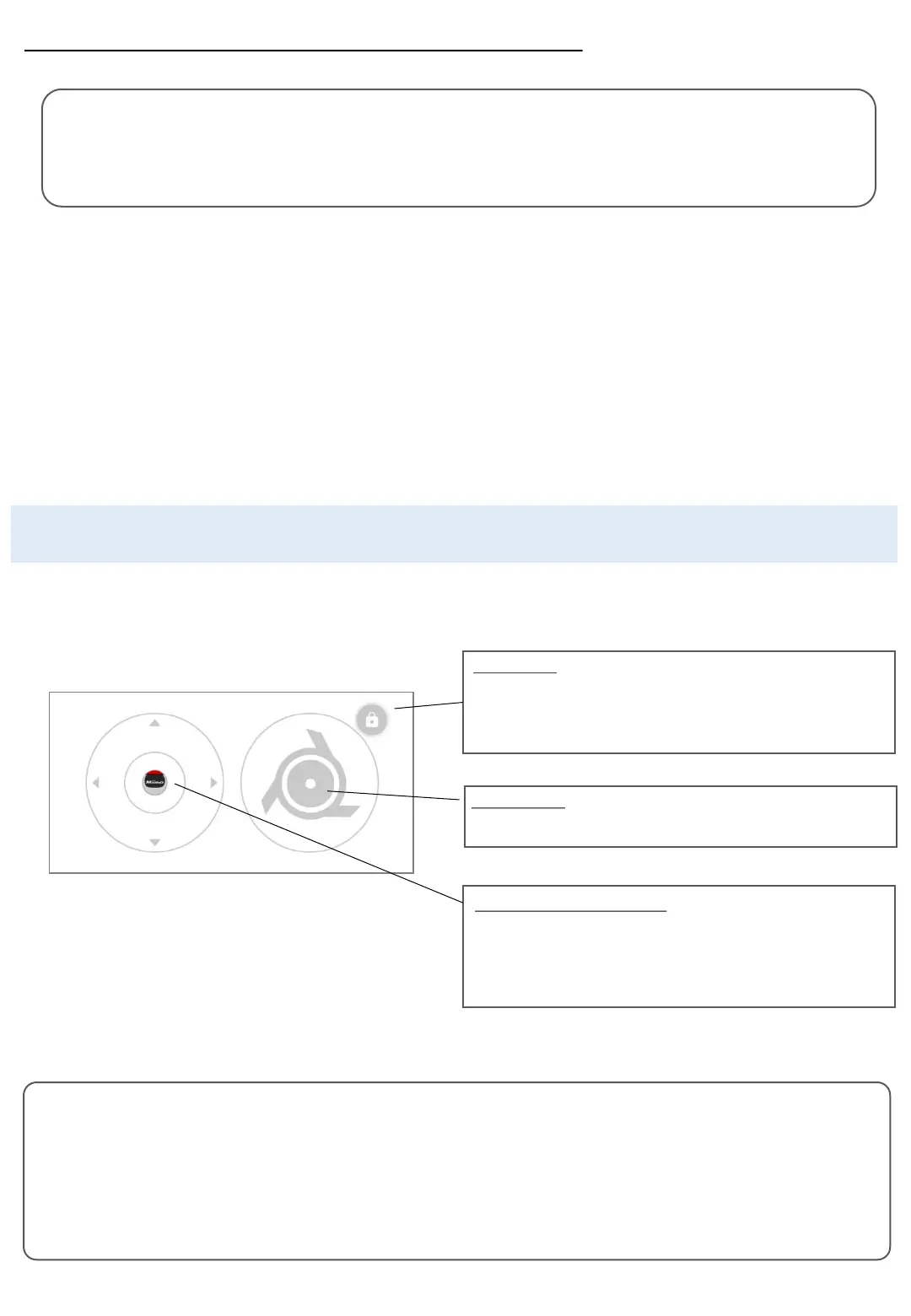
●How to operate Miimo
A button that locks the blade function.
The first tap will unlock it.
The second tap will lock the blade function again.
Lock button
You can control the movement of Miimo.
When you touch the joystick, the circle will move according to the
position of your finger. You can only move within a small circle.
When you release your finger, it will return to the center.
Operation button (Joystick)
To control the rotation of the blades.
Blade control
●Remote control on android (pairing)
If you cannot establish a connection, Bluetooth of Miimo or smartphone may be stopped. Turn off the power on
Miimo, turn off Bluetooth of the smartphone, restart it, and then perform the pairing procedure again.
1. Remove Miimo from the docking station
2. Turn on Miimo
3. Turn on Bluetooth on your smartphone
4. After a while, the search results for Bluetooth
connected devices will be displayed
5. Select the serial number of the unit to be paired
6. Open Mii-monitor – HRM3000 Live
7. Tap [remote control] on the home screen and follow
the on-screen instructions
Precautions when operating the remote control
• When operating the remote control, keep Miimo within the visible range (maximum 3m) for safety reasons.
• When operating the remote control, check the safety of the front, back, left and right before starting the operation.
• When operating the remote control, check the precautions displayed on the app before operating.
• When Miimo is in the station, remote control operation is not possible.
●Remote control on iOS
1. Remove Miimo from the docking station
2. Turn on Miimo
3. Turn on Bluetooth on your smartphone
4. Pre-pairing is not required in iOS
5. Open Mii-monitor – HRM3000 Live
6. Tap [remote control] on the home screen
and follow the on-screen instructions










 To Next Page