Continued
143
uuGauges and Driver Information InterfaceuDriver Information Interface
■
Vehicle Customization
Use the driver information interface to customize certain vehicle features.
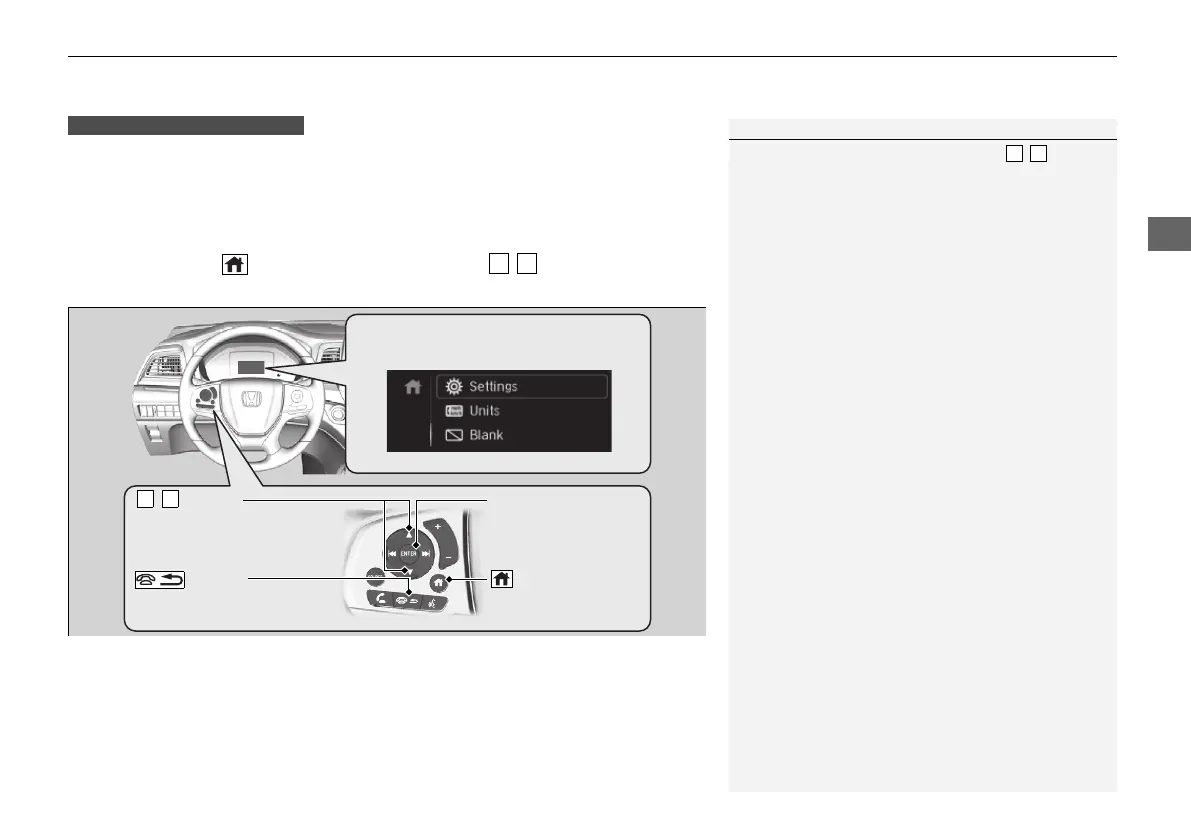
How to customize
First, make sure the vehicle is at a complete stop and that the power mode is set to
ON. Next, press the (home) button, then press the / button to select
Settings. Finally, press the ENTER button.
Models with color audio system
1Vehicle Customization
To customize other features, press the / button.
2 List of customizable options P. 146
2 Example of how to customize a setting
P. 150
Change to
(P before you attempt to change a
customized setting.
/ Button
Scroll through the menu
or items.
Button
Goes back to the previous
screen.
ENTER Button
Enters the selected
item.
Button
Goes to home
screen.
Driver Information Interface:
Goes to Settings.
21 US ODYSSEY-31THR6310.book 143 ページ 2020年6月17日 水曜日 午後2時46分


 To Next Page
 Loading...