267
uuAudio System Basic OperationuPlaying AM/FM Radio
Continued
Playing AM/FM Radio
*1:Some or all of the lists may not be displayed.
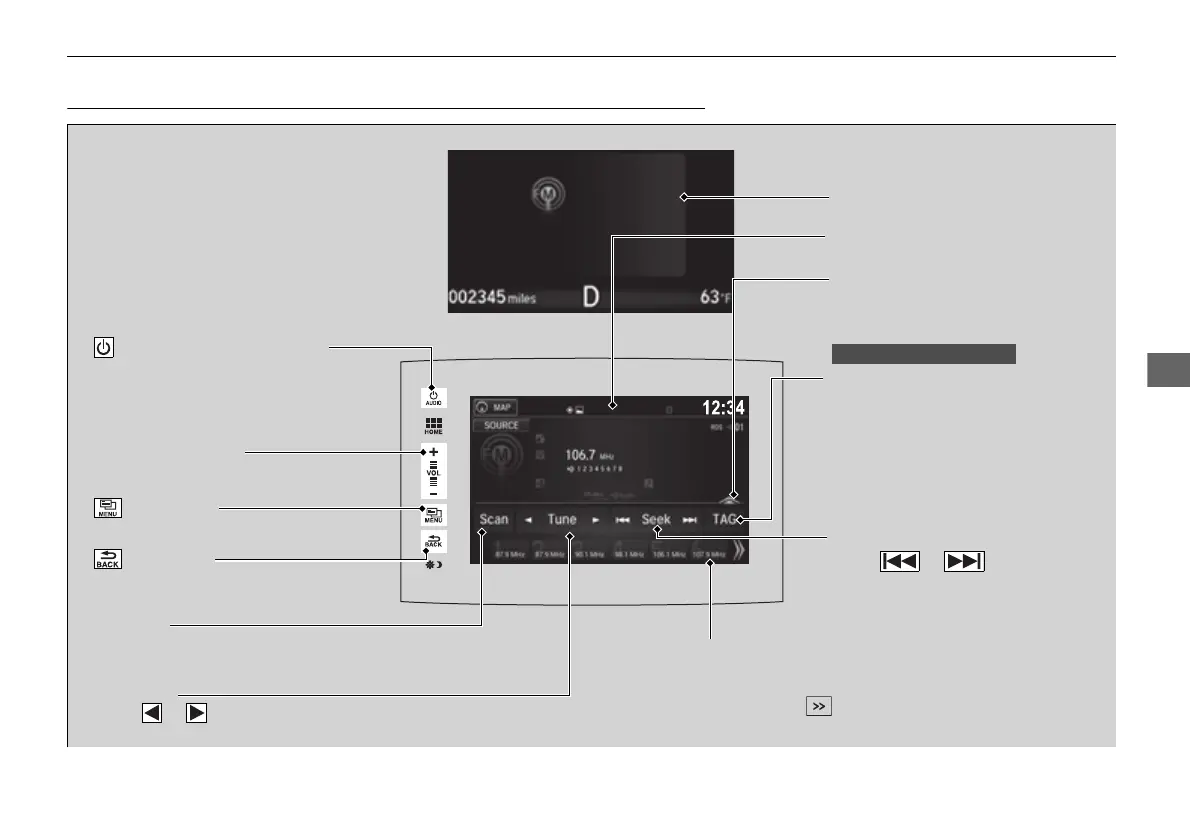
VOL (Volume) Icons
Select to adjust the volume.
(Back) Icon
Select to go back to the previous
display.
Seek Icons
Select or to search up
and down the selected band for a
station with a strong signal.
/AUDIO (Power/Audio) Icon
Select to turn the audio system
on and off.
Open/Close Icon
*1
Displays/hides the detailed
information.
(Menu) Icon
Select to display the menu items.
TAG
Select to tag the song if it is played
on an HD Radio
TM
station. The iPod/
iPhone should be connected to the
audio system to store the tagged
song information on your device.
Tune Icons
Select or to tune the radio
frequency.
Audio/Information Screen
Scan Icon
Select to scan each station with a strong
signal.
Preset Icons
Tune the radio frequency for preset memory.
Select and hold the preset icon to store that
station. Select to display preset 7 onwards.
Multi-Information Display
16 PILOT-31TG76000.book 267 ページ 2016年10月19日 水曜日 午後5時4分















 To Next Page