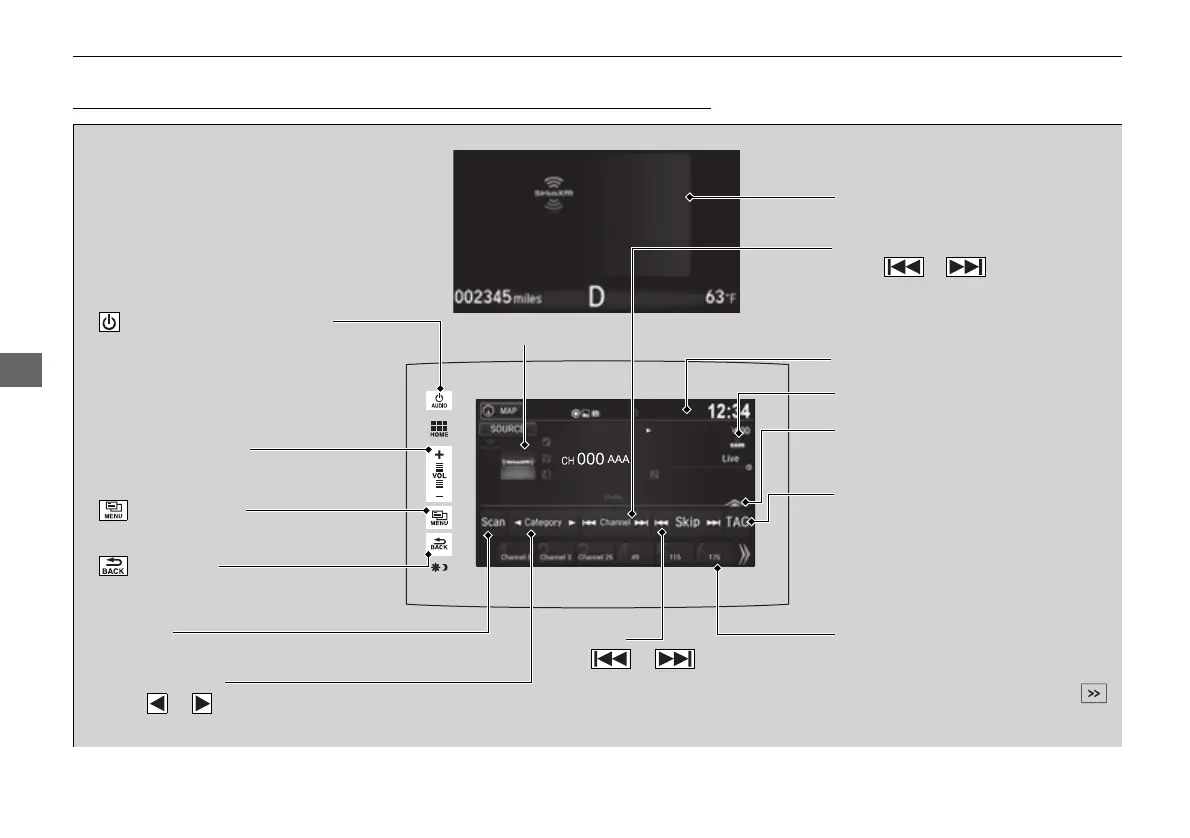
VOL (Volume) Icons
Select to adjust the volume.
(Back) Icon
Select to go back to the previous
display.
Channel Icons
Select or to the previous
or next channel.
Select and hold to rapidly skip 10
channels at a time.
/AUDIO (Power/Audio) Icon
Press to turn the audio system
on and off.
Open/Close Icon
*1
Displays/hides the detailed
information.
(Menu) Icon
Select to display the menu items.
TAG
Select to tag a song played at a
SiriusXM® Radio channel. The iPod/
iPhone should be connected to the
audio system to store the tagged
song information on your device.
Category Icons
Select or to display and select a
SiriusXM® Radio category.
Audio/Information Screen
Scan Icon
Select to scan each channel.
Preset Icons
Tune the radio frequency for preset
memory. Select and hold the preset
icon to store that station. Select
to display preset 7 onwards.
Skip Icons
Select or to change
section in the channel.
Select and hold to move rapidly
within the section.
Multi-Information Display
Album Art
Station Art















 To Next Page