#
Operation
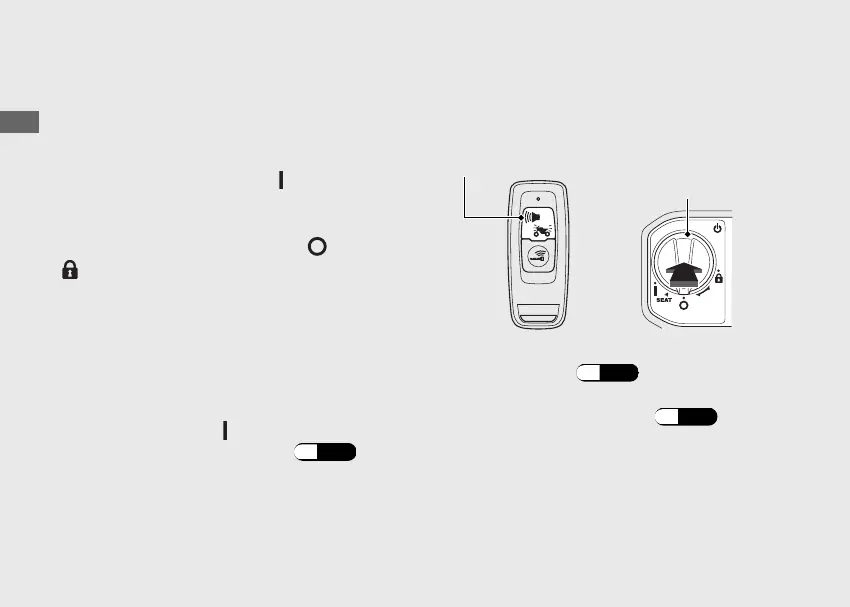
Press the Alarm/Answer back button on the
Honda SMART Key.
u Answer back system will not function when
the ignition switch is in the
(On) position.
u The answer back system will not function
when the alarm is not activated.
If the ignition switch is left in the
(Off) or
(Lock) position for more than 10 days, the
answer back system will no longer operate.
When the system is active and the vehicle
receives a signal from pressing the Alarm/
Answer back button, system activation will be
extended for 10 days.To reset the system,
unlock the ignition switch and turn the
ignition switch to the (On) position once.
u To unlock the ignition switch
(P.
39)
When the battery in the vehicle is weak, the
answer back system may not function.
#
Adjusting the Answer Back Buzzer
Sound Volume Level
You can select 3 buzzer sound volume levels.
a
Make sure that the Honda SMART Key
system is active.
(P.
35)
b
Push the ignition switch to authenticate the
Honda SMART Key system.
(P.
39)
u The Honda SMART Key indicator flashes.
20230106100355_32K2FD100_eng_BOOK Page 53 Friday, January 06 2023 10:07:46 JST
Operation Guide
50
Answer Back System (Continued)
Alarm/Answer back button
Ignition
switch


 To Next Page