uuHonda Sensing® u
Driving
■
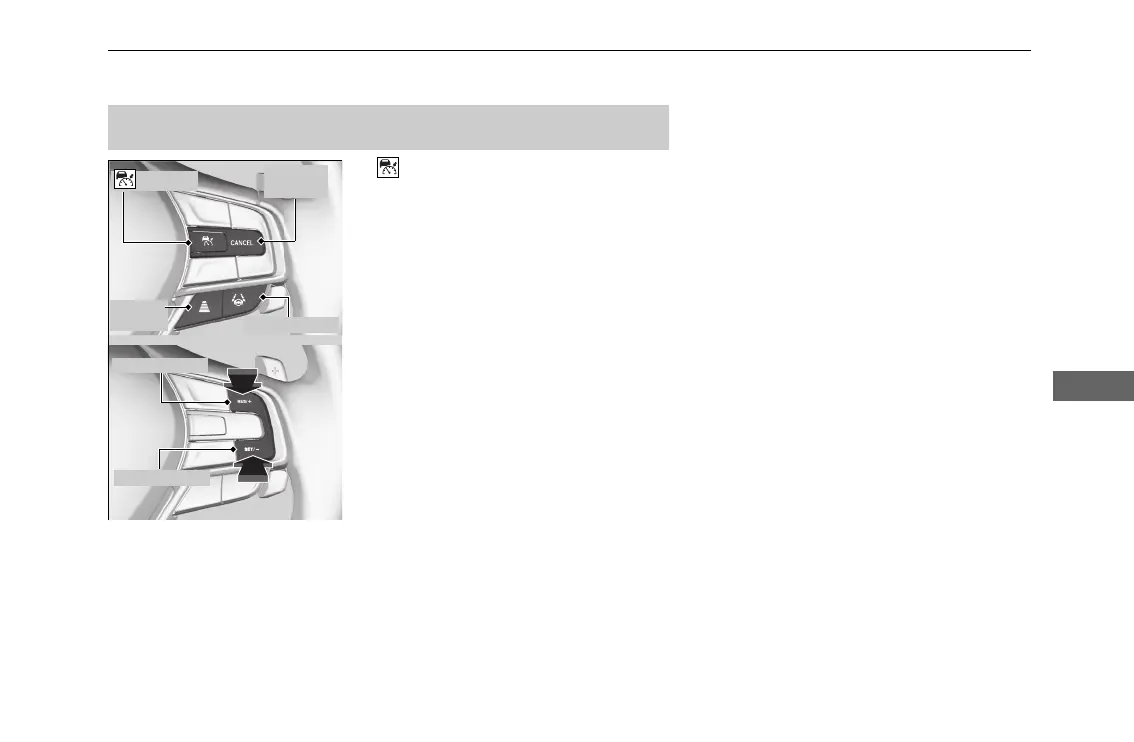
Button
Press to activate standby mode for ACC with
Low Speed Follow. Or press to cancel the
system.
■
LKAS Button
Press to activate standby mode for LK
AS. Or
press to cancel the system.
■
RES/+ and SET/- Buttons
Press RES/+ button to resume the ACC
with
Low Speed Follow or increase the vehicle
speed.
Press SET/− button to set the ACC
with Low
Speed Follow or decrease the vehicle speed.
■
Interval Button
Press to change the ACC with Low Sp
eed
Follow following-interval.
■
CANCEL Button
Press to cancel ACC with Low Speed Follow.
■
Operation Switches for the ACC with Low Speed Follow/
LKAS
button
Interval
Button
CANCEL
Button
LKAS Button
RES/+ Button
SET/- Button






 To Next Page