INSTALLATION
EN1B-0022 IE10 R0717 4
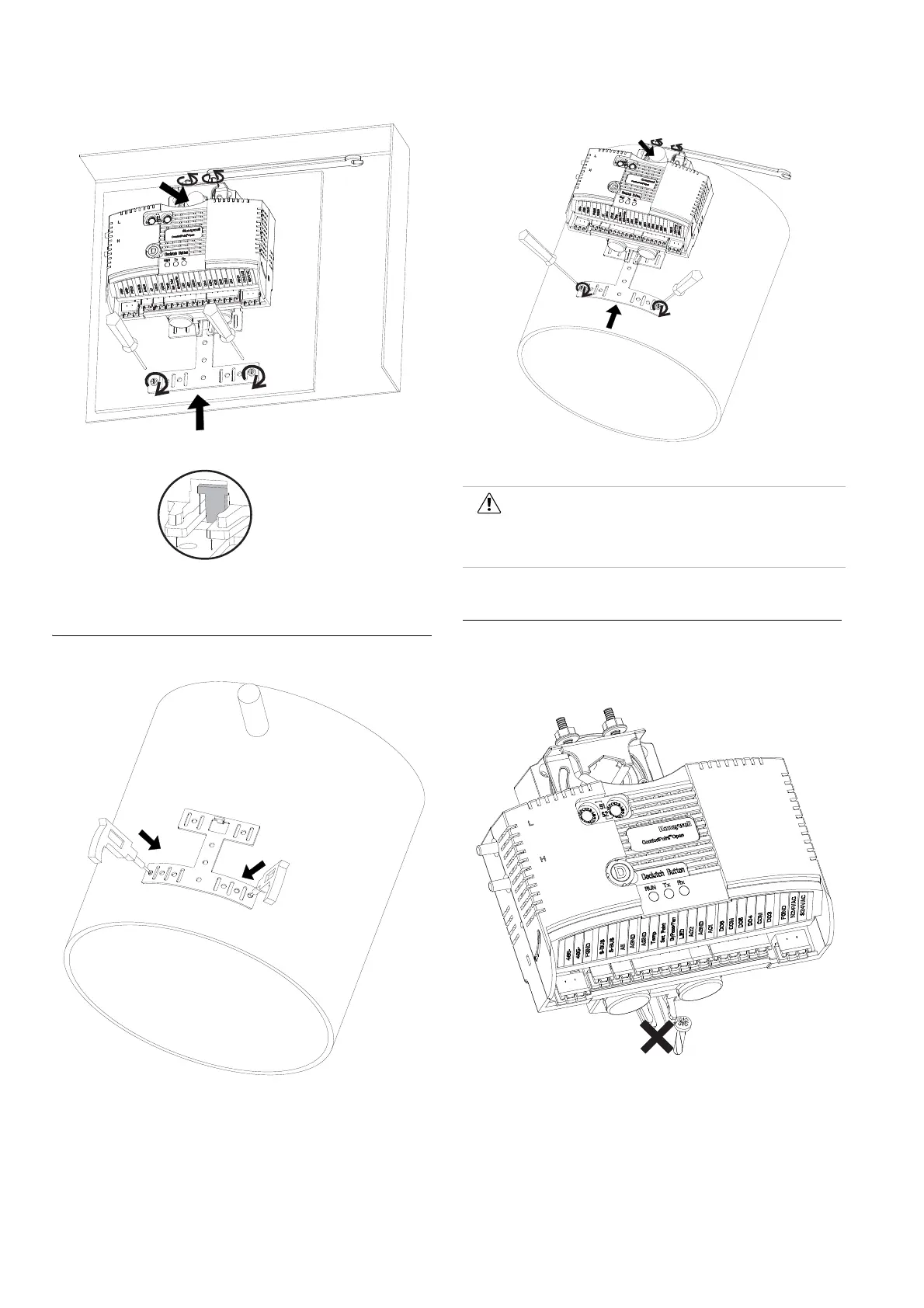
Figure 6 Fasten screws of bracket and U-Bolt to shaft
Mounting the CPO-VAV2A on round ductwork
Figure 7 Drill 2 holes for bended bracket
Figure 8 Attach controller to shaft and Fasten screws of bracket and U-bolt
Mounting Caution
Use the anti-rotation bracket and screws included in the unit
pack to mount the CPO-VAV2A. DO NOT use the single screw
to mount the CPO-VAV2A.
Figure 9 Do not use the single screw to mount the CPO-VAV2A
Mounting the CPO-VAV2A unevenly with damper housing can
damage actuator. Mount the actuator flush with the damper
housing or add a spacer between the anti-rotation bracket and
the VAV box damper housing.
Caution
Round ductwork installation is not applicable for
America and Canada without appropriate
enclosure.


 To Next Page
 Loading...