EasyManua.ls Logo

Honeywell HED1PR3 - User Manual

Honeywell HED1PR3
2 pages
Print Icon
To Next Page IconTo Next Page
Loading...
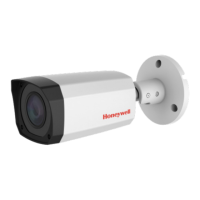
HED1PR3/HED3PR3 True Day/Night
Indoor/Outdoor IR Ball IP Camera
Quick Installation Guide
Document 800-21229V1Rev A — 10/2015
Thank you for purchasing a HED1PR3/ HED3PR3
camera. Follow the
instructions in this guide to
install and log in to
your camera. For instructions
on configuring the
camera, refer to the
Performance Series IP
Cameras User Guide on
the software and
documentation CD that came
with your camera. If
you require additional
assistance, please call the
number shown
below.
Cautions and Warnings
WARNING To ensure compliance with electrical safety standards this product is
intended for use with a Listed Power Adapter marked with “Limited Power Source”, “LPS”,
on the unit, output rated 12 V DC, minimum 0.33A, Tma=60Deg.C or from Power over
Ethernet (PoE) provided by Listed Information Technology Equipment meeting the IEEE
802.3af PoE standard.
The Ethernet connection is not intended to be connected to exposed (outside plant)
networks. Do not connect two power sources to the camera at the same time.
CAUTION
Invisible LED radiation (850 nm). Avoid exposure to beam.
Regulatory Statements
Information to the User: This equipment has been tested and found to comply with the limits for a
Class B digital device, pursuant to part 15 of the FCC Rules. These limits are designed to provide
reasonable protection against harmful interference in a residential installation. This equipment
generates, uses, and can radiate radio frequency energy and, if not installed and used in accordance
with the instructions, may cause harmful interference to radio communications. However, there is no
guarantee that interference will not occur in a particular installation.
If this equipment does cause harmful interference to radio or television reception, which can be
determined by turning the equipment off and on, the user is encouraged to try to correct the
interference by one or more of the following measures:
Reorient or relocate the receiving antenna.
Increase the separation between the equipment and receiver.
Connect the equipment into an outlet on a circuit different from that to which the receiver is
connected.
Consult the dealer or an experienced radio/TV technician for help.
Note Changes or modifications not expressly approved by the party responsible for compliance
could void the user’s authority to operate the equipment.
This Class B digital apparatus complies with Canadian ICES-003.
Cet appareil numérique de la Classe B est conforme à la norme NMB-003 du Canada.
Important Safeguards
Read and keep these instructions.
Do not aim the camera toward a bright light source for extended periods to prevent damage to
the imager. Avoid operating the unit under or close to unstable light sources (may cause
flickering), or close to fluorescent lamps or objects reflecting light.
Do not touch the camera lens.
Do not drop the camera or subject it to physical shock.
Do not use a strong or abrasive detergent when cleaning the camera.
Avoid operating or storing the unit in extremely humid, dusty, hot/cold environments, where the
operating temperature is outside the recommended range of -4°F to 140°F (–2C to 60°C).
Note Do not apply power to the camera before completing installation.
Note Confirm the installation surface can support at least three times the weight of the camera.
Document 800-21229V1Rev A – 10/2015 1
CAUTION
THIS SYMBOL INDICATES THAT
DANGEROUS VOLTAGE
CONSTITUTING A RISK OF
ELECTRIC SHOCK IS PRESENT
WITHIN THE UNIT.
CAUTION: TO REDUCE THE RISK OF ELECTRIC
SHOCK, DO NOT REMOVE THE COVER.
NO USER-SERVICEABLE PARTS INSIDE.
REFER SERVICING TO QUALIFIED SERVICE
PERSONNEL.
THIS SYMBOL INDICATES THAT
IMPORTANT OPERATING AND
MAINTENANCE INSTRUCTIONS
ACCOMPANY THIS UNIT.
RISK OF ELECTRIC
SHOCK
DO NOT OPEN

Question and Answer IconNeed help?

Do you have a question about the Honeywell HED1PR3 and is the answer not in the manual?

Overview

This document describes the Honeywell HED1PR3/HED3PR3 True Day/Night Indoor/Outdoor IR Ball IP Camera, providing a quick installation guide, regulatory statements, and important safeguards.

Function Description

The Honeywell HED1PR3/HED3PR3 is a True Day/Night Indoor/Outdoor IR Ball IP Camera designed for surveillance applications. It captures video footage and can be integrated into a network for remote monitoring and configuration. The camera features infrared (IR) capabilities, allowing it to operate effectively in low-light or no-light conditions, providing clear images both day and night. As an IP camera, it connects to a network, enabling access to its video stream and settings via a web browser or a Network Video Recorder (NVR). The camera is designed for both indoor and outdoor use, indicating its robust construction to withstand various environmental conditions.

Usage Features

The camera offers several usage features to facilitate installation, operation, and integration into a security system:

  • Power Options: The camera can be powered in two ways:
    • Via a 12V DC power source, requiring a Listed Power Adapter marked with "Limited Power Source" (LPS), with a minimum output of 0.33A and Tma=60°C.
    • Via Power over Ethernet (PoE) provided by Listed Information Technology Equipment meeting the IEEE 802.3af PoE standard. This simplifies installation by allowing both power and data to be transmitted over a single Ethernet cable. It is crucial not to connect two power sources to the camera simultaneously.
  • Network Connectivity: The camera connects to a network via an RJ-45 Ethernet port. It is important that the Ethernet connection is not exposed to outside plant networks.
  • Installation Flexibility: The ball camera design allows for flexible positioning and adjustment to achieve the desired field of view. The installation process involves mounting the camera base, connecting the Ethernet cable (and power if not using PoE), and then adjusting the ball camera body. A decorative ring is installed after the desired field of view is achieved, securing the camera in place.
  • Remote Access and Configuration: Once connected to a network, the camera can be accessed and configured remotely. For cameras connected to a PoE port of a Honeywell Embedded NVR, configuration can be done directly through the NVR. For PC access, users can install the Honeywell Config Tool from the provided software and documentation CD. This tool helps find the camera on the network and open its web browser for configuration. The default username is "admin" (case-sensitive) and the default password is "1234".
  • Day/Night Functionality with IR: The "True Day/Night" feature, combined with IR capabilities (850 nm invisible LED radiation), ensures continuous surveillance in varying light conditions. The camera automatically switches between day (color) and night (monochrome with IR illumination) modes to maintain optimal image quality.
  • Environmental Suitability: Designed for indoor/outdoor use, the camera is built to operate within a recommended temperature range of -4°F to 140°F (-20°C to 60°C). However, it should not be operated or stored in extremely humid, dusty, hot/cold environments outside this range.

Maintenance Features

The document outlines several important safeguards and cautions that contribute to the proper maintenance and longevity of the device:

  • Professional Servicing: The "CAUTION: RISK OF ELECTRIC SHOCK, DO NOT OPEN" warning emphasizes that the camera cover should not be removed by users. There are no user-serviceable parts inside, and all servicing should be referred to qualified service personnel. This ensures safety and prevents damage to the device.
  • Environmental Protection: To maintain optimal performance and prevent damage, users are advised to:
    • Avoid aiming the camera toward bright light sources for extended periods, as this can damage the imager.
    • Avoid operating the unit under or close to unstable light sources (which may cause flickering) or near fluorescent lamps or objects reflecting light.
    • Avoid operating or storing the unit in extremely humid, dusty, hot/cold environments outside the recommended temperature range.
  • Physical Handling:
    • Do not touch the camera lens to prevent smudges or damage.
    • Do not drop the camera or subject it to physical shock.
    • Ensure the installation surface can support at least three times the weight of the camera to prevent it from falling.
  • Cleaning: When cleaning the camera, do not use strong or abrasive detergents, as these can damage the camera's surfaces or lens.
  • Radiation Safety: A caution regarding "Invisible LED radiation (850 nm)" advises users to avoid exposure to the beam, indicating a need for awareness during installation or inspection of the IR emitters.
  • Pre-Installation Power Caution: It is noted that power should not be applied to the camera before completing the installation process. This prevents potential electrical hazards or damage during setup.
  • Compliance: The camera complies with Class B digital device limits (FCC Rules Part 15) and Canadian ICES-003, ensuring it meets regulatory standards for electromagnetic interference. Users are advised that changes or modifications not expressly approved by Honeywell could void their authority to operate the equipment.

These features and guidelines ensure the camera's safe and effective operation, prolonged lifespan, and compliance with relevant standards.

Honeywell HED1PR3 Specifications

General IconGeneral
SeriesPerformance Series
Resolution1920 x 1080
Weatherproof RatingIP66
HousingMetal
Lens TypeFixed
Night VisionYes
IR Distance30m (98ft)
Operating Temperature-30°C to 60°C (-22°F to 140°F)
Power Supply12VDC

Related product manuals