EasyManua.ls Logo

Honeywell RP-2002 - User Manual

Honeywell RP-2002
1 page
Print Icon
Loading...
WHEN AUDIBLE DEVICES ARE SOUNDING -
Discharge has occurred if DISCHARGE Indicator is on.
Discharge timer has timed out if DISCHARGE Indicator is flashing.
FOR AN ALARM
1. Evacuate the protected area
2. Notify the monitoring service and/or the Fire Department immediately. Tell them briefly what happened and what
your current status is.
Phones: ____________________________ _________________________________
Fire Department Monitoring Service
3. If the Fire Department is responding, be prepared to provide directions to arriving firefighters.
FOR TROUBLE ONLY
1. Notify the monitoring service and/or Fire department if this panel is connected to either one, and tell them
what is happening.
2. Silence audible devices by unlocking and opening the panel and pressing the ACKNOWLEDGE/STEP button. The
TROUBLE indicator will remain illuminated yellow. Contact authorized service personnel immediately! (See Below).
WARNING!
DO NOT ALLOW TROUBLE CONDITIONS TO REMAIN LOGGED IN THE SYSTEM. THE PROTECTION THE
SYSTEM OFFERS HAS BEEN COMPROMISED, OR ELIMINATED WHEN A TROUBLE CONDITION EXISTS.
To return to normal after an alarm
1. Do not enter the protected area until safe to do so.
2. Clear all initiating devices. Smoke detectors will not reset
if there is still smoke in the area.
3. Reset the control panel (PRESS the RESET button)
Manual activation (Fire Drill or otherwise)
Notification Appliance Circuits (NACs) can be activated by
pressing and holding the DRILL button for at least two
seconds.
NOTE: You may want to disconnect municipal box by sliding
DISCONNECT switch, located on 4XTM module, to its
disconnect position (to the right). If a DACT is con-
nected, notify the monitoring service before conducting
any fire drills or tests.
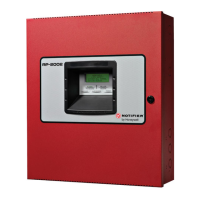
RP-2002 & RP-2002E Agent Release Control System
Operating Instructions
PANEL KEY - The key to open the panel can be found at the
following location:
NORMAL - Only AC POWER is illuminated green.
All other indicators are off. LCD display will read SYSTEM
ALL NORMAL.
Document #53172 Rev. A 3/05/07 ECN 07-132
THIS SHEET SHALL BE FRAMED ADJACENT TO
THE CONTROL PANEL
To test the indicators, LCD display and piezo
Press and release the RESET button and check all indicators/
LEDs. Every indicator/LED should be on, LCD shows all pixels
on, piezo sounder beeps.
For more information, refer to the RP-2002 & RP-2002E Manual,
Document #53039. It is kept in the following location:
Alarm Silencing
Notification Appliance Circuits may be silenced by pressing the
ALARM SILENCE button. ALARM SILENCED will turn on yellow.
Subsequent alarms will reactivate circuits. Press the RESET
button to clear the "silenced" condition.
NOTE: Notification Appliance Circuits may be programmed as
nonsilenceable. Also, Signal Silence Inhibit, if enabled, will
prevent silencing of NACs for one minute after an alarm (see
manual).
Name: _____________________________________
Company: _________________________________
Address: ___________________________________
Telephone Number: ________________________
In the event of trouble, contact the
local Notifier Service Representative
Power failure or brownout
If AC power drops too low or fails, AC POWER indicator will
extinguish, the system TROUBLE indicator will turn on yellow, and
the panel buzzer and any other audible trouble devices will sound.
Contact authorized service personnel immediately. See below.
Manual Release
Activation of Manual Release Switch will override Predischarge
Delay and override an active Abort Release Switch, resulting in an
immediate agent release.

Question and Answer IconNeed help?

Do you have a question about the Honeywell RP-2002 and is the answer not in the manual?

Overview

The RP-2002 & RP-2002E Agent Release Control System is a fire alarm and agent release control panel designed to protect an area by detecting fire conditions and releasing a fire suppression agent. It provides both audible and visual indications of system status, alarms, and trouble conditions, and offers features for manual activation, silencing, and system testing.

Function Description:

The primary function of the system is to monitor for fire conditions and, upon detection, initiate an alarm and release a fire suppression agent. It operates in several modes:

  • NORMAL: In this state, only the AC POWER indicator is illuminated green, all other indicators are off, and the LCD display reads "SYSTEM ALL NORMAL." This indicates that the system is fully operational and no alarm or trouble conditions are present.
  • ALARM: When an alarm condition is detected, audible devices will sound. If the DISCHARGE indicator is on, it signifies that a discharge has occurred. If the DISCHARGE indicator is flashing, it means the discharge timer has timed out, indicating an imminent or ongoing discharge. In an alarm situation, occupants are instructed to evacuate the protected area and notify monitoring services and/or the Fire Department, providing a brief description of the event and their current status. If the Fire Department is responding, directions should be prepared for their arrival.
  • TROUBLE: A trouble condition indicates a system malfunction or impairment that may compromise its protective capabilities. When a trouble condition occurs, audible devices may sound, and the TROUBLE indicator will illuminate yellow. Users are instructed to notify monitoring services and/or the Fire Department if the panel is connected to either, and to describe the situation. Audible devices can be silenced by unlocking and opening the panel and pressing the ACKNOWLEDGE/STEP button, though the TROUBLE indicator will remain yellow. It is critical to contact authorized service personnel immediately, as the system warns that "DO NOT ALLOW TROUBLE CONDITIONS TO REMAIN LOGGED IN THE SYSTEM. THE PROTECTION THE SYSTEM OFFERS HAS BEEN COMPROMISED, OR ELIMINATED WHEN A TROUBLE CONDITION EXISTS."
  • Manual Activation (Fire Drill or otherwise): Notification Appliance Circuits (NACs) can be activated for drills by pressing and holding the DRILL button for at least two seconds. During such drills, it is recommended to disconnect the municipal box by sliding the DISCONNECT switch on the 4XTM module to the right. If a DACT (Digital Alarm Communicator Transmitter) is connected, the monitoring service should be notified before conducting any drills or tests.
  • Manual Release: The system allows for immediate agent release through a Manual Release Switch. Activating this switch will override any Predischarge Delay and an active Abort Release Switch, ensuring the prompt release of the fire suppression agent.

Usage Features:

  • Alarm Response: Clear instructions are provided for responding to an alarm, including evacuation, notification of emergency services, and providing directions for firefighters.
  • Trouble Response: Guidance is given for handling trouble conditions, emphasizing immediate notification of service personnel and the importance of resolving issues promptly.
  • Alarm Silencing: Notification Appliance Circuits can be silenced by pressing the ALARM SILENCE button, which will illuminate ALARM SILENCED in yellow. Subsequent alarms will reactivate the circuits. The "silenced" condition can be cleared by pressing the RESET button. Note that NACs can be programmed as nonsilenceable, and Signal Silence Inhibit, if enabled, will prevent silencing for one minute after an alarm.
  • System Reset: After an alarm, the system can be returned to normal by clearing all initiating devices (e.g., smoke detectors), ensuring the protected area is safe, and then pressing the RESET button on the control panel. Smoke detectors will not reset if smoke is still present.
  • Panel Access: The location of the key to open the panel is specified as "at the following location," implying a designated storage spot for quick access.

Maintenance Features:

  • Trouble Condition Resolution: The system strongly advises against allowing trouble conditions to persist, highlighting that unresolved issues compromise system protection. This implies that regular maintenance and prompt repair of trouble conditions are essential.
  • Power Failure/Brownout Indication: In the event of AC power loss or low voltage, the AC POWER indicator will extinguish, the system TROUBLE indicator will turn yellow, and audible trouble devices will sound. This immediate notification of power issues facilitates timely intervention by authorized service personnel.
  • Indicator and Display Test: The system includes a self-test feature for its indicators, LCD display, and piezo sounder. By pressing and releasing the RESET button, all indicators/LEDs should illuminate, the LCD should show all pixels, and the piezo sounder should beep. This allows for quick verification of the system's visual and audible alert mechanisms.
  • Documentation: The manual refers to a more comprehensive "RP-2002 & RP-2002E Manual, Document #53039," which is kept in a specified location, indicating that detailed technical information and maintenance procedures are available for authorized personnel.
  • Service Contact Information: A dedicated section is provided for recording the Name, Company, Address, and Telephone Number of the local Notifier Service Representative, ensuring that contact information for professional assistance is readily available in case of trouble. This sheet itself is intended to be framed adjacent to the control panel for easy reference.

The system is manufactured by NOTIFIER by Honeywell, a known entity in fire safety, suggesting a level of reliability and industry standards compliance. The document itself is identified as Document #53172, Rev. A, dated 3/05/07, ECN 07-132, providing version control and traceability for the operating instructions.

Honeywell RP-2002 Specifications

General IconGeneral
BrandHoneywell
ModelRP-2002
CategoryControl Systems
LanguageEnglish

Related product manuals