EasyManua.ls Logo

Honeywell VISIONPRO TB8220U - User Manual

Honeywell VISIONPRO TB8220U
16 pages
Print Icon
To Next Page IconTo Next Page
Loading...
INSTALLATION INSTRUCTIONS
62-3070-07
TB8220U
Commercial VisionPRO™
Programmable Thermostat
APPLICATION
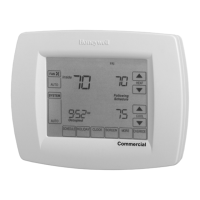
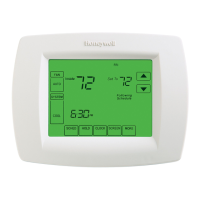
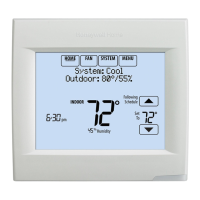
The TB8220U Programmable Thermostat provides electronic control of 24 Vac heating and cooling systems.
See Table 1 for a description.
Table 1. TB8220U Thermostat Description.
MERCURY NOTICE
If this control is replacing a control that contains
mercury in a sealed tube, do not place your old
control in the trash. Dispose of properly.
Contact your local waste management authority
for instructions regarding recycling and the
proper disposal of an old control.
INSTALLATION
When Installing this Product...
1. Read these instructions carefully. Failure to follow
them could damage the product or cause a
hazardous condition.
2. Check ratings given in instructions and on the
product to ensure the product is suitable for your
application.
3. Installer must be a trained, experienced service
technician.
4. After installation is complete, check out product
operation as provided in these instructions.
CAUTION
Electrical Shock or Equipment Damage
Hazard.
Can shock individuals or short equipment
circuitry.
Disconnect power supply before installation.
Select Thermostat Location
Select a location for the thermostat about 5 ft (1.5m)
above the floor in an area with good air circulation at
average temperature. See Fig. 1.
Feature Description
Powering Methods Battery only
Direct connection to a 24 Vac transformer only
Direct connection to a 24 Vac transformer with battery backup
System Types Conventional (up to 2 Heat, 2 Cool stages)
Heat Pump (up to 3 Heat, 2 Cool stages)
Changeover Manual or automatic changeover (selectable)
System Setting Heat-Off-Cool-Auto
Fan Setting Auto-On

Questions and Answers

  • L
    lori85Aug 19, 2025
    How to fix a Honeywell Thermostat when the display doesn't come on?
    • K
      Kelly SmithAug 19, 2025
      If the display of your Honeywell Thermostat doesn't come on, the thermostat might not be getting power. Check that there is 24 Vac between C and Rc. Also, make sure the AAA batteries are correctly installed and have enough charge.
  • L
    Lori CrossAug 21, 2025
    What to do if heating or cooling does not come on with my Honeywell Thermostat?
    • M
      Mr. Joel HooperAug 21, 2025
      If your heating or cooling system isn't turning on with your Honeywell Thermostat, there might be a few reasons: * The thermostat's minimum off-time might be active. Wait up to five minutes for the system to respond. * The system selection might not be set to Heat or Cool. Ensure the system selection is in the correct position. * The system type selection could be incorrect. Verify Installer Setup Number 0170 to ensure the correct system type is chosen.
  • B
    Bradley GarzaAug 23, 2025
    Why is my Honeywell VISIONPRO TB8220U calling for heat or cool, but nothing is running?
    • A
      April MillerAug 23, 2025
      If your Honeywell Thermostat indicates it's calling for heat or cool, but the system isn't running, the heating or cooling equipment might not be operating. Check the wiring, and verify Installer Setup Number 0170 to ensure the correct system type is selected. You can also verify the operation of the equipment in System Test mode.
  • M
    Mark ChoiAug 26, 2025
    How to unlock temperature settings on Honeywell VISIONPRO TB8220U Thermostat?
    • J
      jessicajacobsAug 26, 2025
      If the temperature settings on your Honeywell Thermostat aren't changing, it could be due to a couple of reasons. First, the upper or lower temperature limits might have been reached, so check the temperature setpoints and modify Installer Setup Numbers 0600 and 0610 as needed. Alternatively, the keypad might be fully locked. In that case, check Installer Setup Number 0670 to change the keypad locked options.
  • K
    Kim BrockAug 28, 2025
    What to do if heat does not turn on with my Honeywell VISIONPRO TB8220U Thermostat?
    • S
      Susan BradfordAug 28, 2025
      If the heat isn't turning on even when 'Heat On' is displayed on your Honeywell Thermostat, it could be due to heating equipment failure or a loose/broken wire connection. Check for 24 Vac at the equipment on the secondary side of the transformer between power and common. If voltage is not present, check the heating equipment to find the cause of the problem. Also, check for 24 Vac between the heat terminal (W) and transformer common. If voltage is not present, check the wire connection between the thermostat and the heating equipment.
  • A
    Alison DavisAug 29, 2025
    Why does my Honeywell Thermostat say 'Wait'?
    • A
      Amy AlvarezAug 29, 2025
      If 'Wait' is displayed on your Honeywell Thermostat, the compressor minimum off timer is active. Wait up to five minutes for the cooling or heating (heat pump) equipment to turn on.
  • M
    Mr. Derek WatkinsSep 2, 2025
    Why is my Honeywell Thermostat heat pump blowing cool air in heat mode?
    • W
      williamdickersonSep 3, 2025
      If your heat pump is putting out cool air when in heat mode and warm air in cool mode, the Changeover Valve (Installer Setup Number 0190) might not be configured correctly. Set the Changeover Valve (Installer Setup Number 0190) to match the changeover required by the installed heat pump.
  • B
    barbara39Sep 4, 2025
    Why is my Honeywell VISIONPRO TB8220U heating in cool mode?
    • J
      Jennifer JordanSep 4, 2025
      If your heating equipment is running in the cool mode, it's possible that the heating equipment is not a heat pump, but the System Type (Installer Setup Number 0170) is set to Heat Pump. To resolve this, set the System Type (Installer Setup Number 0170) to match the installed heating and/or cooling equipment.
  • E
    Edward WolfSep 6, 2025
    What causes Honeywell VISIONPRO TB8220U to keep heating when set below room temperature?
    • T
      Thomas WebsterSep 6, 2025
      If your heating equipment doesn't turn off, and the heat temperature setting is below room temperature, it might be because the heating equipment isn't a heat pump, but the System Type (Installer Setup Number 0170) is set to Heat Pump. Set the System Type (Installer Setup Number 0170) to match the installed heating and/or cooling equipment.
  • R
    Renee SimsSep 8, 2025
    Why doesn't the fan turn on when heat is on in my Honeywell VISIONPRO TB8220U Thermostat?
    • H
      Holly ShafferSep 8, 2025
      If the fan doesn't turn on when there's a call for heat with an electric furnace, the Fan Control in Heating might be set to Gas or Oil Furnace (Setting 0180). Change the Fan Control in Heating to Electric Furnace (Setting 0180).

Summary

Application Overview

Installation Guide

Covers general installation steps, safety precautions, and location selection.

Electrical Safety Precautions

Warning about potential electrical shock and equipment damage.

Wiring Instructions

Terminal Identification for System Types

Diagrams showing terminal assignments for conventional and heat pump systems.

Conventional System Wiring Diagrams

Single Transformer 1 H;1 C Wiring

Example wiring for a single transformer 1-Heat, 1-Cool system.

Dual Transformer 1 H;1 C Wiring

Example wiring for a dual transformer 1-Heat, 1-Cool system.

Single Transformer Multistage Wiring

Dual Transformer Multistage Wiring

Wiring for a dual transformer system with multiple heating and cooling stages.

Heat Pump System Wiring Diagrams

Single-Stage Heat Pump Wiring (No Aux Heat)

Wiring for a 1H/1C heat pump system without auxiliary heat.

Thermostat Power Options

Wiring the 24 Vac Common

Instructions for connecting the common wire for 24 Vac power.

Setting Calendar and Time

Guide to setting the current date and time on the thermostat.

Installer Setup Menu and Tests

Performing Installer System Tests

Instructions for testing heating, cooling, and fan functions.

Installer System Test Caution

Warning regarding potential equipment damage during system tests.

Installer Setup Options Part 1

System Selection and Configuration

Setting up system type, economizer, reversing valve, and changeover.

Installer Setup Options Part 2

Sensor and Lockout Settings

Configuring remote sensors, heat pump compressor/auxiliary lockouts.

Installer Setup Options Part 3

Installer System Tests

Performing tests to verify heating, cooling, and fan operation.

Minimum Off-Timer Protection

Heat Pump Temperature Lockouts

Dual Fuel Heat Pump Setup

Setup for dual fuel heat pumps involving outdoor sensors and balance points.

Heat Pump with Auxiliary Heat

Configuration for heat pumps with auxiliary heat and outdoor sensors.

Troubleshooting Guide

Heating or Cooling Not Activating

Diagnosing why the heating or cooling system is not starting.

Troubleshooting (Continued)

Honeywell VISIONPRO TB8220U Specifications

General IconGeneral
BrandHoneywell
ModelVISIONPRO TB8220U
CategoryThermostat
LanguageEnglish

Related product manuals