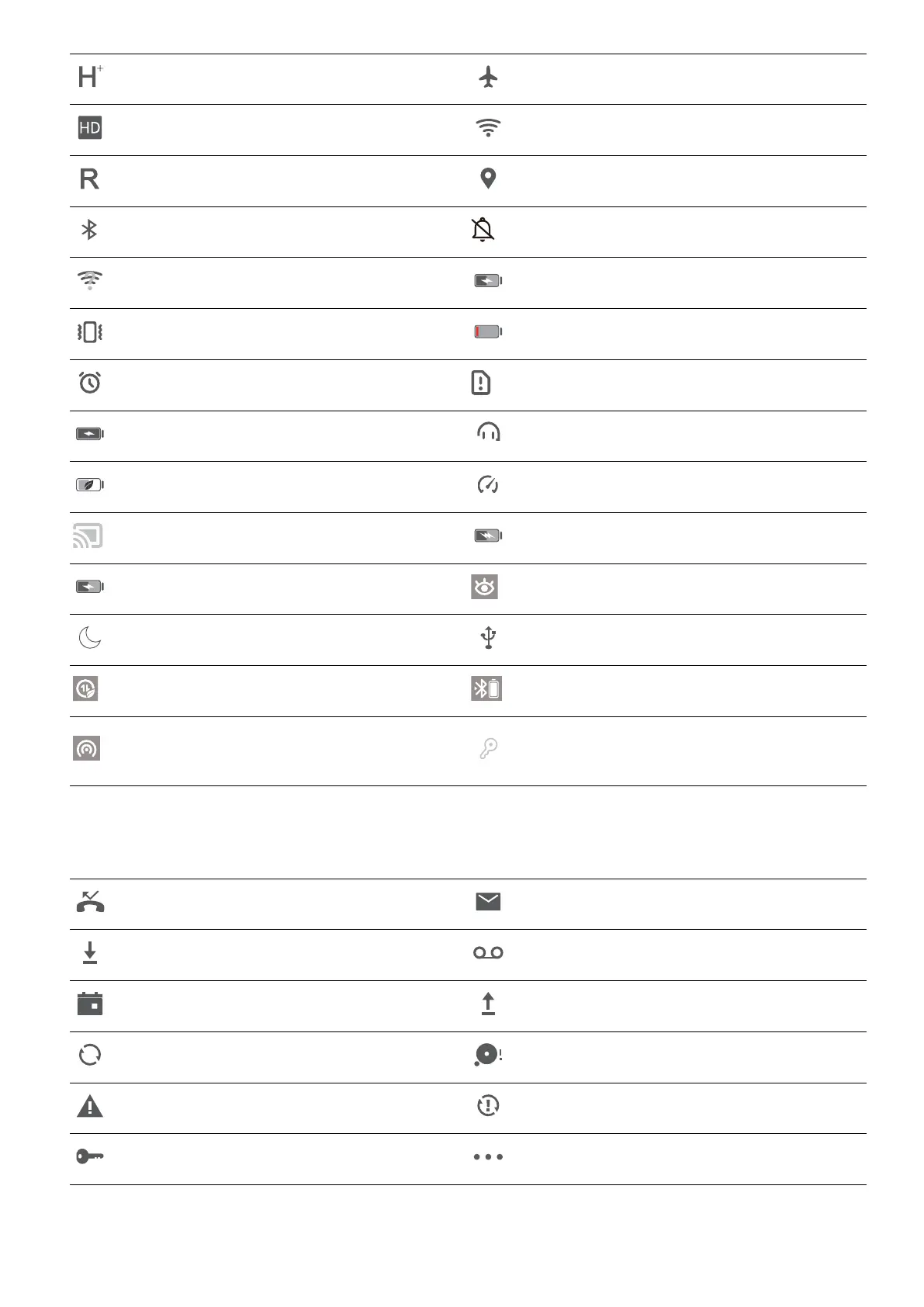
HSPA+ network connected Airplane mode enabled
VoLTE available Wi-Fi network connected
Roaming Receiving location data from GPS
Bluetooth enabled Silent mode enabled
Wi-Fi network detected Charging
Vibration mode enabled Battery level low
Alarm enabled No SIM card detected
Battery fully charged Headset plugged in
Power saving mode enabled Performance mode enabled
Wired or wireless projection in use Super charging
Quick charging Eye comfort mode enabled
Do not disturb mode enabled USB connection
Data saving mode enabled Bluetooth power
Hotspot enabled
New notication from Phone
Manager
Notication icons: When there is a new message, notication or reminder on your device, the
relevant icon will be displayed in your status bar.
Missed call
New emails
Downloading data New voicemails
Event reminder Uploading data
Synchronising data Device memory full
Sign-in or synchronisation problem Sync failed
VPN connected More notications
Home Screen
15



 To Next Page