Setting up user information
Recommended users
This device is designed for measuring the weight and body fat rate of people in their daily
life.
This device is not suitable for individuals with an implanted medical device, such as a
pacemaker or cochlear implant, or for pregnant women.
The fat rate of patients who have a fever, suer from osteoporosis with very low bone
density, edema, use an articial kidney, and people who work in the tness or exercise
industry is dierent to that of ordinary people. Measured data is for reference only.
Due to physiological reasons, users aged 18 and below and users aged 65 and above can
only measure their weight and heart rate.
Adding users, deleting users, and editing user
information
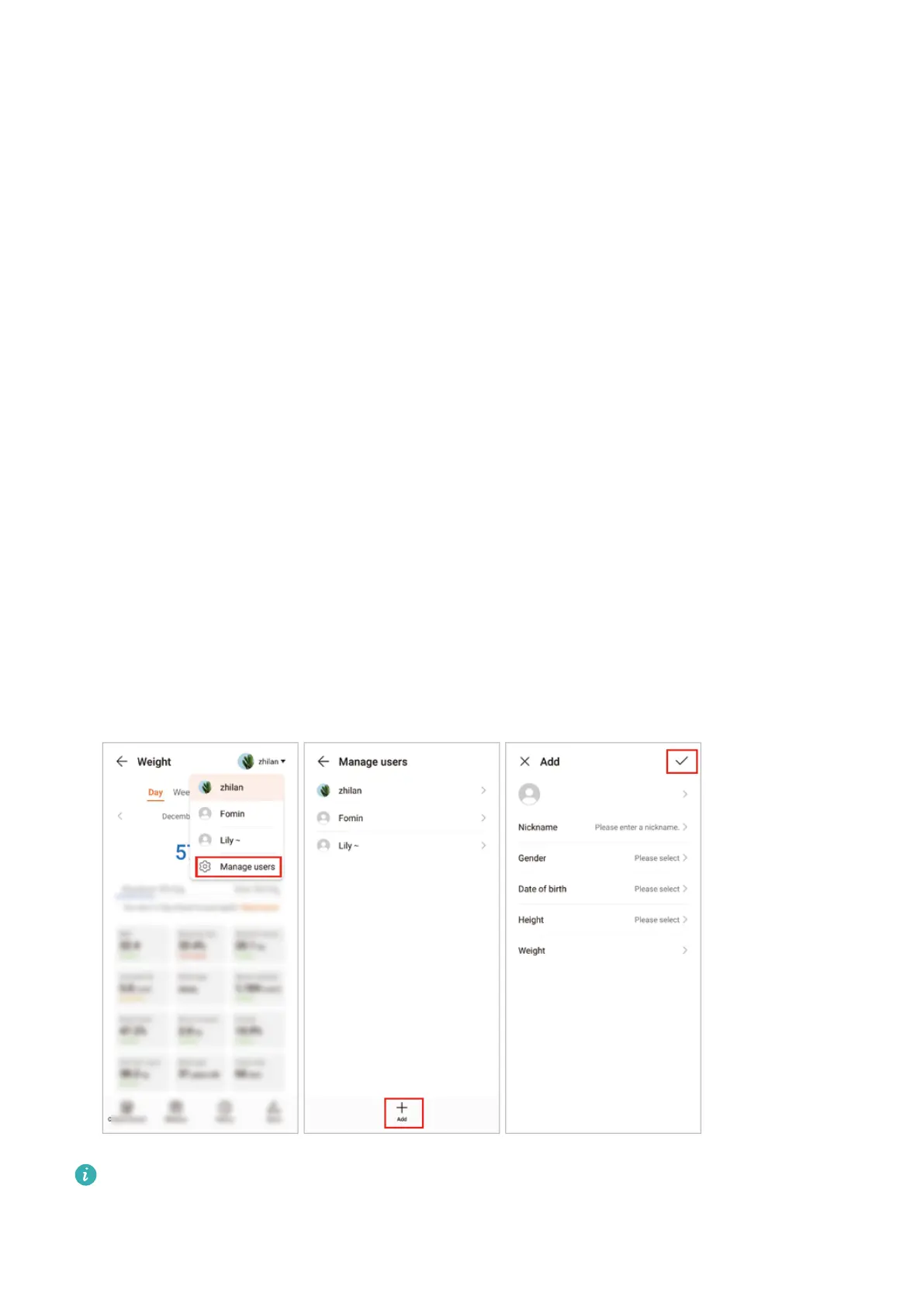
Adding users:
1 Open the Huawei Health app and touch Weight.
2 Touch the
prole icon in the top-right corner, go to Manage users > Add, and follow the
onscreen instructions to add users. Then touch √ to complete.
• A maximum of 10 users can be added.
• Please enter the correct gender, date of birth, height, and weight, as incorrect
information will aect the measurement data.
2


 To Next Page