08
07
1. Scan the barcode to pair with your host device.
Bluetooth SPP Mode
2. Scan the barcode to return to default setting.
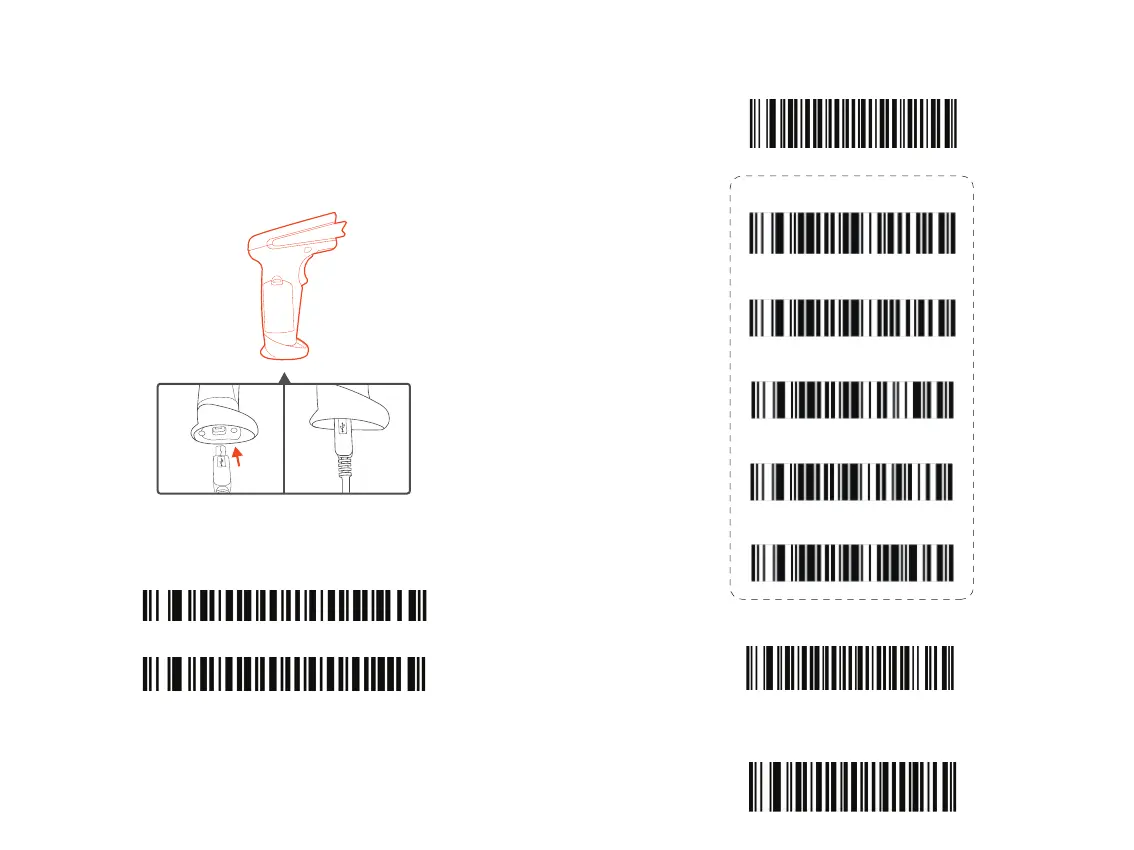
Wired Connection
1. Plug the cable connector into the data port on the bottom of the scanner handle.
2. Gently tug the cable to ensure the connector is properly secured.
3. Connect the other end of the interface cable to the host computer.
4. Your PC will install the driver automatically. Once the driver installation is completed,
the scanner is ready for use.
Pair the Scanner with a Device
Scan the following barcodes to switch from wireless into wired mode to enable / disable
wired mode.
Wired Mode On *
Wired Mode Off
Bluetooth Connection
Bluetooth HID Mode *
Bluetooth Keyboard Speed (15)*
Bluetooth Keyboard Speed (30)
Bluetooth Keyboard Speed (40)
Bluetooth Keyboard Speed (50)
Bluetooth Keyboard Speed (60)


 To Next Page