P4
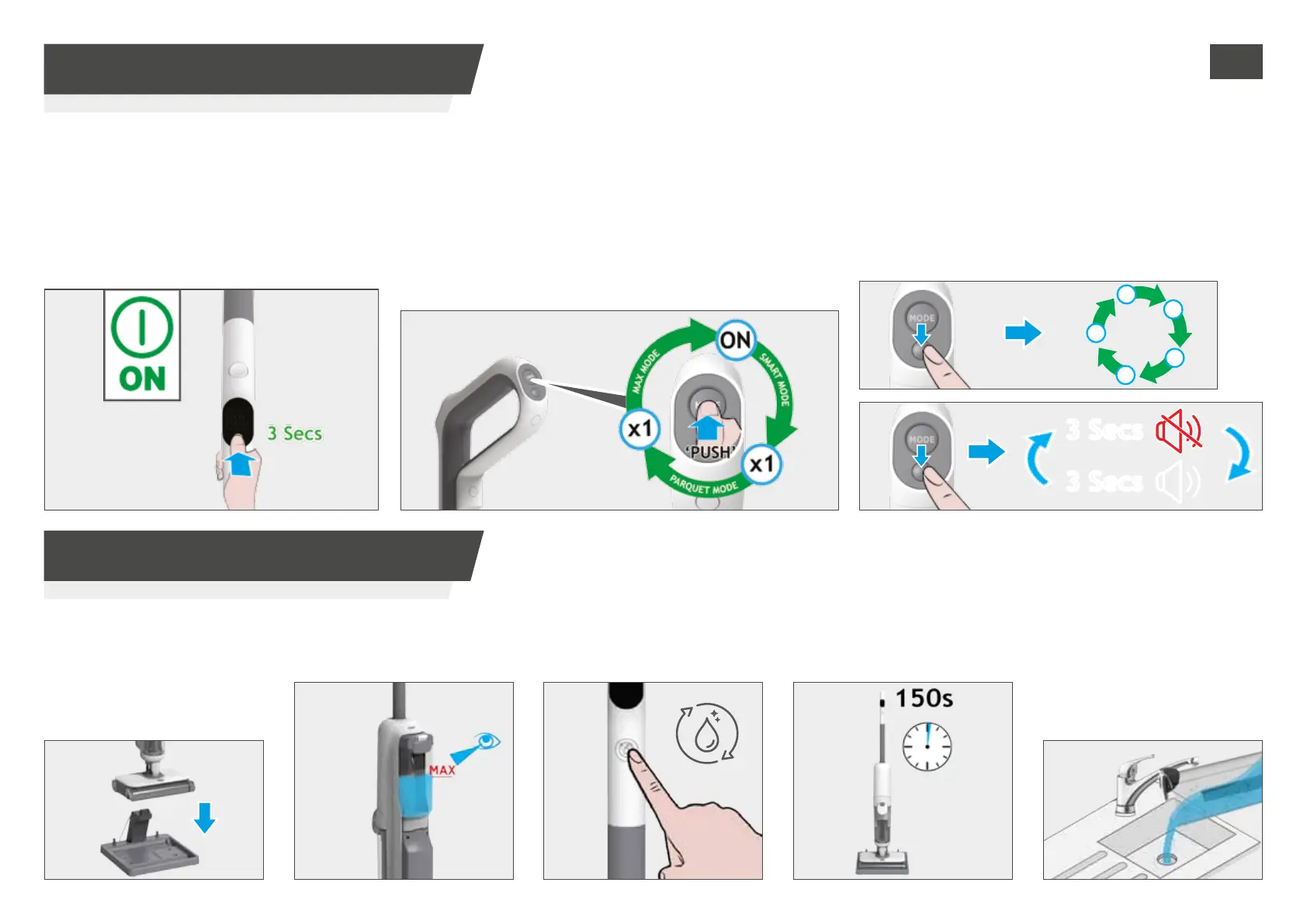
3 Secs
3 Secs
3. USING YOUR CLEANER
3.1 MODE BUTTON / VOICE PROMPT
To use your product:
STEP 1:
Once the product is fully charged, press 3 Secs
the ON/OFF button to operate your cleaner:
The cleaner will start by default in smart mode.
The voice prompt is on and the language is GB.
The display will turn on.
STEP 2:
Press the MODE button to change the mode:
Smart mode: suction power and water ow are automatically
adjusted based on the amount of dirt detected.
Parquet mode: medium suction and low water ow. We
recommend using this one on delicate but well sealed oors.
Max mode: max suction and max water ow.
STEP 3:
VOICE PROMP BUTTON:
Short press: to switch between languages (GB/FR/DE/
ES/IT).
Long press (3 seconds): to turn on/o the voice prompt.
3. USING YOUR CLEANER
3.2 AUTO-CLEAN
STEP 1:
Put your product onto the docking
station and check the cord and
adapter are both plugged in.
Please ensure the dirty water
tank is empty before starting
the auto-clean.
STEP 3:
Press the auto-clean button.
STEP 4:
The auto-clean process takes
about 150s to complete.
STEP 5:
Once the auto-clean process
is completed, empty the dirty
water tank to get ready for
another cleaning session.
For dirty water tank maintenance, please
refer to “4.1 DIRTY WATER TANK” section.
STEP 2:
Fill the clean water tank to
the MAX line.
IMPORTANT: We recommend performing the auto-clean after each cleaning session to
ensure optimum performance.
GB


 To Next Page