Standby
Name 00:00:00
CH1
Standby
00:00:00
CH2
0 mAh
22.84 V
0.0A 0W
3.991V
3.989V
1
4
3.991V
3.989V
2
5
3.991V
3.989V
3
6
09
F6 4-Channel DC Smart Charger
Operation and Setup
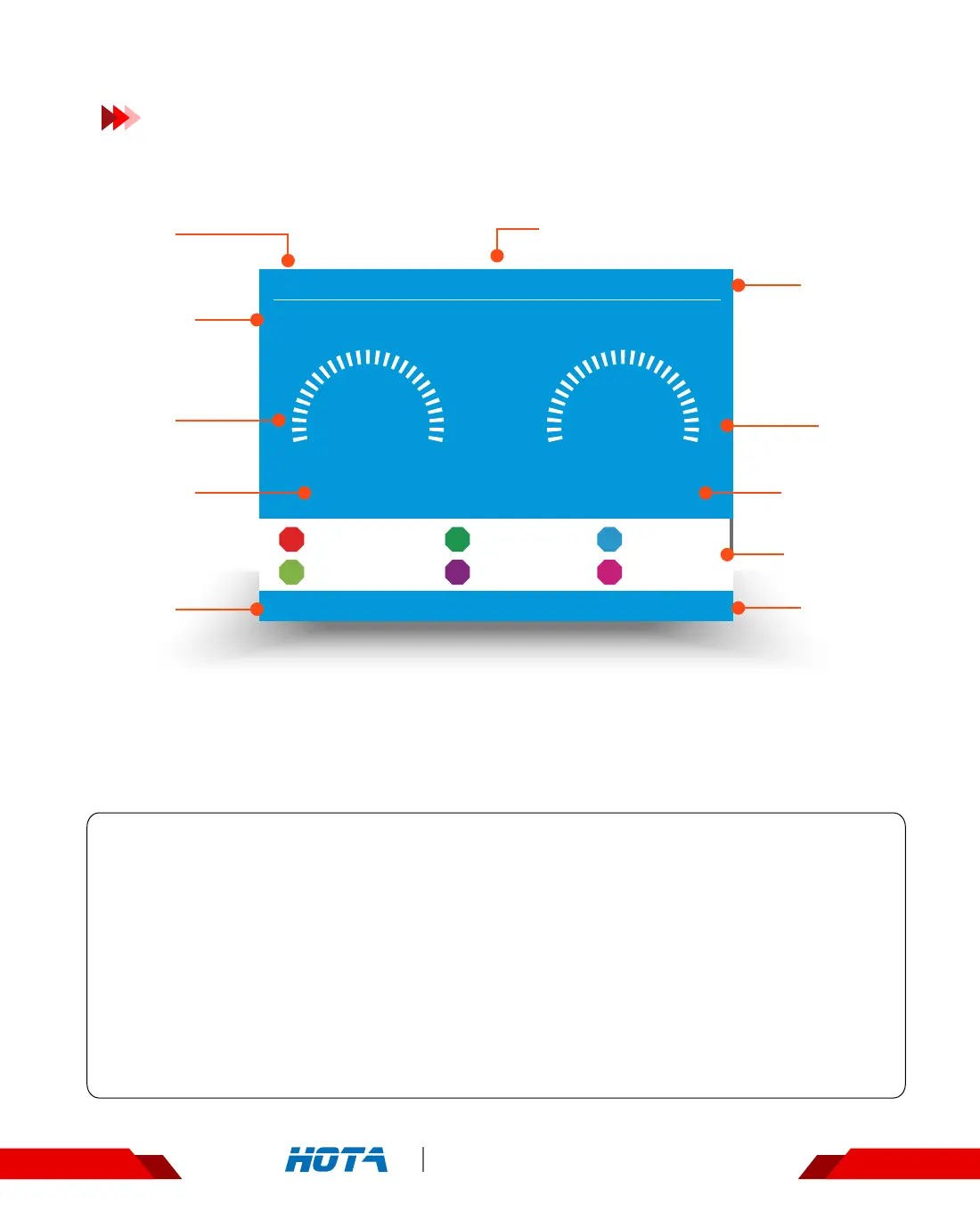
Working parameters Display
Standby
Operation
Time
Operation
time
Capacity
charged
Task status
Output
Current
Output
Power
Total Battery
Voltage
Cell Voltage
Device Name
Current
channel
Current
channel
Standby State : Simple Operation
1.Connect power supply to the charger, wait for the system to complete its self-checking.
Connect the battery to the charger in the standby interface;
2. In the standby state, the screen is in blue color .At that time, the output current, total
battery voltage ,capacity completed and operation time are all shown as zero .
Scroll the speed shuttle key can switch the display information in the lower half of the screen, which are cell voltage and the
operating data.
3. After selecting the corresponding channel, short press the speed shuttle key can pop up
the "Task Settings" menu.
4. Short press CH key can switch the channel ;
5. Long press the speed shuttle key to enter the “Charger Settings” menu.


 To Next Page