EasyManua.ls Logo

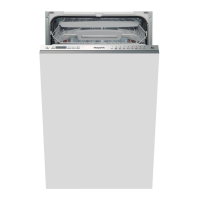
Hotpoint LSTF 9H123 - User Manual

Hotpoint LSTF 9H123
16 pages
Print Icon
To Next Page IconTo Next Page
Loading...
GB
English
Operating instructions
DISHWASHER - Contents
Operating instructions, 1
Precautions and advice, 2-3
Product Data, 3
Installation, 4-5
Description of the appliance, 6
Refined salt and rinse aid, 7
Loading the racks, 8-9
Detergent and dishwasher use, 10
Wash cycles, 11
Special wash cycles and options, 12
Care and maintenance, 13
Troubleshooting, 14
Product guarantee and repair information, 15
LSTF 9H123

Questions and Answers

  • P
    paula04Aug 15, 2025
    Why my Hotpoint LSTF 9H123 does not start?
    • L
      lsmithAug 15, 2025
      If your Hotpoint dishwasher doesn't start or respond, ensure the water supply tap is open. Try turning the appliance off and on again after a minute, then reset the wash cycle. Check that the dishwasher is properly plugged in and try another socket. Also, make sure the dishwasher door is fully closed.
  • M
    Michael KingAug 18, 2025
    What to do if no water drain out of Hotpoint LSTF 9H123 Dishwasher?
    • E
      Elizabeth GriffinAug 18, 2025
      If your Hotpoint dishwasher isn't draining water, it could be due to several reasons. First, check if the wash cycle has completed. Inspect the water drain hose for any bends. Make sure the drain duct isn't clogged. Also, verify that the filter isn't clogged with food residues and confirm the drain hose height is correct.
  • P
    pwhiteAug 22, 2025
    Why Hotpoint dishwasher leaves dishes not clean?
    • R
      Rickey BrennanAug 22, 2025
      If dishes and glasses from your Hotpoint dishwasher are not clean, it could be due to several factors. Ensure the crockery is arranged properly and that the spray arms aren't blocked by dishes. Select a more intensive wash cycle. Check that you're not using too much detergent or an unsuitable type, which can cause excessive foam. Verify that the rinse aid compartment lid is closed correctly and that the filter isn't dirty or clogged. Also, ensure the refined salt level is adequate and the height of the dishes is compatible with the rack adjustment. Finally, inspect the spray arms for clogged holes.
  • M
    Mark ValdezAug 25, 2025
    Why Hotpoint crockery has not been dried properly?
    • I
      iriveraAug 26, 2025
      If your Hotpoint crockery isn't drying properly, it could be because you selected a wash cycle without a drying program. Also, check if the rinse aid has been used up or if the rinse aid dispenser setting isn't suitable. Note that water drops are normal on crockery made from non-stick material or plastic.
  • D
    Dr. Lorraine BirdAug 28, 2025
    Why Hotpoint dishwasher won’t load any water and it is blocked with flashing lights?
    • S
      Scott LynchAug 28, 2025
      If your Hotpoint dishwasher won’t load water and shows flashing lights, ensure the main water supply is on and the tap is open. Check the water inlet hose for bends. Clean any clogs in the filters and drain duct. After checking and cleaning, try switching the dishwasher off and on, then start a new wash cycle. If the issue continues, it is recommended to turn off the water tap, remove the plug and call the Service Centre.
  • P
    patrick82Sep 1, 2025
    Why Hotpoint LSTF 9H123 Dishwasher leaves dishes and glasses covered in a white film?
    • M
      Michael AbbottSep 1, 2025
      If your Hotpoint dishwasher leaves a white film or limescale deposits on dishes and glasses, ensure you're using refined salt. Adjust the water hardness setting to a suitable level. Check that the salt and rinse-aid dispenser caps are properly closed. Also, make sure the rinse aid hasn't run out or the dosage is sufficient.
  • C
    Cynthia DuranSep 4, 2025
    Why Hotpoint LSTF 9H123 Dishwasher leaves dishes and glasses streaked?
    • H
      Heidi CookSep 4, 2025
      If your Hotpoint dishwasher leaves dishes and glasses streaked or with a bluish tinge, the rinse aid dosage might be too high.
  • M
    Melissa ElliottSep 8, 2025
    Why my Hotpoint Dishwasher makes excessive noise?
    • C
      Courtney LopezSep 8, 2025
      If your Hotpoint dishwasher is making excessive noise, it might be because dishes are rattling against each other or the spray arms. Make sure dishes are properly placed and the spray arms can rotate freely. Too much foam, caused by using too much detergent or an unsuitable detergent, can also cause noise.
  • V
    Vickie CainSep 12, 2025
    What to do if Hotpoint LSTF 9H123 door won’t close?
    • S
      Scott HoltSep 12, 2025
      If your Hotpoint dishwasher door won’t close, ensure the racks are fully inserted. Also, make sure the lock is released, and then push the door firmly until you hear a “clacking” noise.

Summary

Precautions and Advice

General Safety

Essential safety guidelines for operating the appliance, including warnings for children and user responsibilities.

Disposal Information

Instructions for environmentally responsible disposal of packaging and old appliances according to WEEE directive.

Saving Energy and Environment

Saving Water and Energy

Tips for efficient water and energy consumption, such as running full loads and selecting appropriate cycles.

Product Data (Product Fiche)

Installation Guide

Positioning and Levelling

Ensuring the dishwasher is stable and correctly aligned on the floor for optimal operation.

Water Supply and Drain Connections

Details on connecting the water inlet and drain hoses, including safety measures.

Anti-Flooding Protection

Explanation of the safety system preventing water leaks or floods during operation.

Electrical Connection

Guidelines for safely connecting the appliance to the electrical power supply socket.

First Wash Cycle Advice

Water Softener Settings

Instructions on setting the water hardness level for optimal performance of the water softener.

Technical Data

Appliance Description

Overall View

Identification of the main components and parts of the dishwasher.

Control Panel Overview

Explanation of the buttons, indicators, and display functions on the control panel.

Salt and Rinse Aid Management

Refined Salt Usage

Guidance on using refined salt to prevent limescale formation and maintain appliance function.

Water Hardness Setting

Instructions for adjusting the water softener based on local water hardness for optimal results.

Rinse Aid Usage and Adjustment

Information on filling the rinse aid dispenser and adjusting the dosage for better drying.

Loading the Racks

General Loading Tips

Advice on preparing crockery and arranging items for effective washing and drying.

Cutlery Basket Placement

Instructions for correctly placing cutlery in the basket for optimal cleaning.

Lower and Upper Rack Loading

Guidance on distributing dishes, pans, and glasses across the upper and lower racks.

Adjustable Tip-Up Compartments

Information on using and adjusting the rack compartments for better crockery arrangement.

Rack Adjustments and Crockery Guidelines

Tray Loading

Details on using the sliding tray for small crockery and cutlery, with loading precautions.

Upper Rack Height Adjustment

Instructions for adjusting the upper rack height to accommodate different types of crockery.

Unsuitable Crockery and Damage

Identifying items not suitable for dishwashing and potential causes of damage to glassware.

Detergent and Dishwasher Use

Measuring Detergent

Guidance on correctly measuring detergent based on soil level and wash cycle for optimal results.

Starting the Dishwasher

Step-by-step instructions for initiating a wash cycle, including loading and selecting options.

Modifying and Interrupting Cycles

How to change a cycle in progress or add items, and how accidental interruptions are handled.

Wash Cycles

Cycle Selection and Detergent Dosage

Information on selecting appropriate wash cycles and recommended detergent quantities for various loads.

Special Wash Cycles and Options

Multi-functional Tablets Option

How to use the option for optimizing wash and drying results with multi-functional tablets.

Delayed Start Option

Instructions for setting a delayed start time for the wash cycle, from 1 to 12 hours.

Start 2 End Light Feature

Details on the indicator light that shows the current wash cycle phase.

Half Load Option

Using the option to save resources when washing smaller loads in the upper or lower rack.

Care and Maintenance

Preparation and General Cleaning

Steps for safely shutting off power/water and cleaning the exterior, interior, and seals.

Component Cleaning

Instructions for cleaning the spray arms and the filter assembly for optimal performance.

Hose and Storage Advice

Maintenance of the water inlet hose and guidelines for leaving the machine unused.

Product Guarantee and Repair Information

Guarantee Details

Information on the 12-month parts and labour guarantee, including terms and exclusions.

Recycling and Disposal Information

Guidance on responsible disposal of packaging and old appliances to minimize environmental impact.

Repairs and After Sales Support

Contact information for product help, repairs, spare parts, and accessories.

Hotpoint LSTF 9H123 Specifications

General IconGeneral
Energy Efficiency ClassA++
Noise Level49 dB
Number of washing programs6
Delayed start timerYes
AquaStop functionYes
Drying Efficiency ClassA
Delay StartYes
Half Load OptionNo
Water Consumption9 L
Washing programsEco, Intensive, Rapid
Water consumption per cycle9 L

Related product manuals