Adjust the oven thermostat--Easy to do yourselff
Youmay find that your new oven cooks differently than the one it replaced. Useyour new oven for a few weeks to become
more familiar with it. Ifyou still think your new oven is too hot or too cold,you can adjust the thermostat yourself.
Do not use thermometers, such as those found in grocery stores, to check the temperature setting of your oven.
These thermometers may vary 20-40°F.
NOTE:This adjustment will not affect the broiling or the self-cleaning temperatures (on some models). The adjustment will
be retained in memory after a power failure.
Front of OVENTEMPknob
(knob appearance may vary)
iik_ i _ x ii
_i_ i i
ili _i _ i
Back of OVENTEMPknob
(knob appearance may vary)
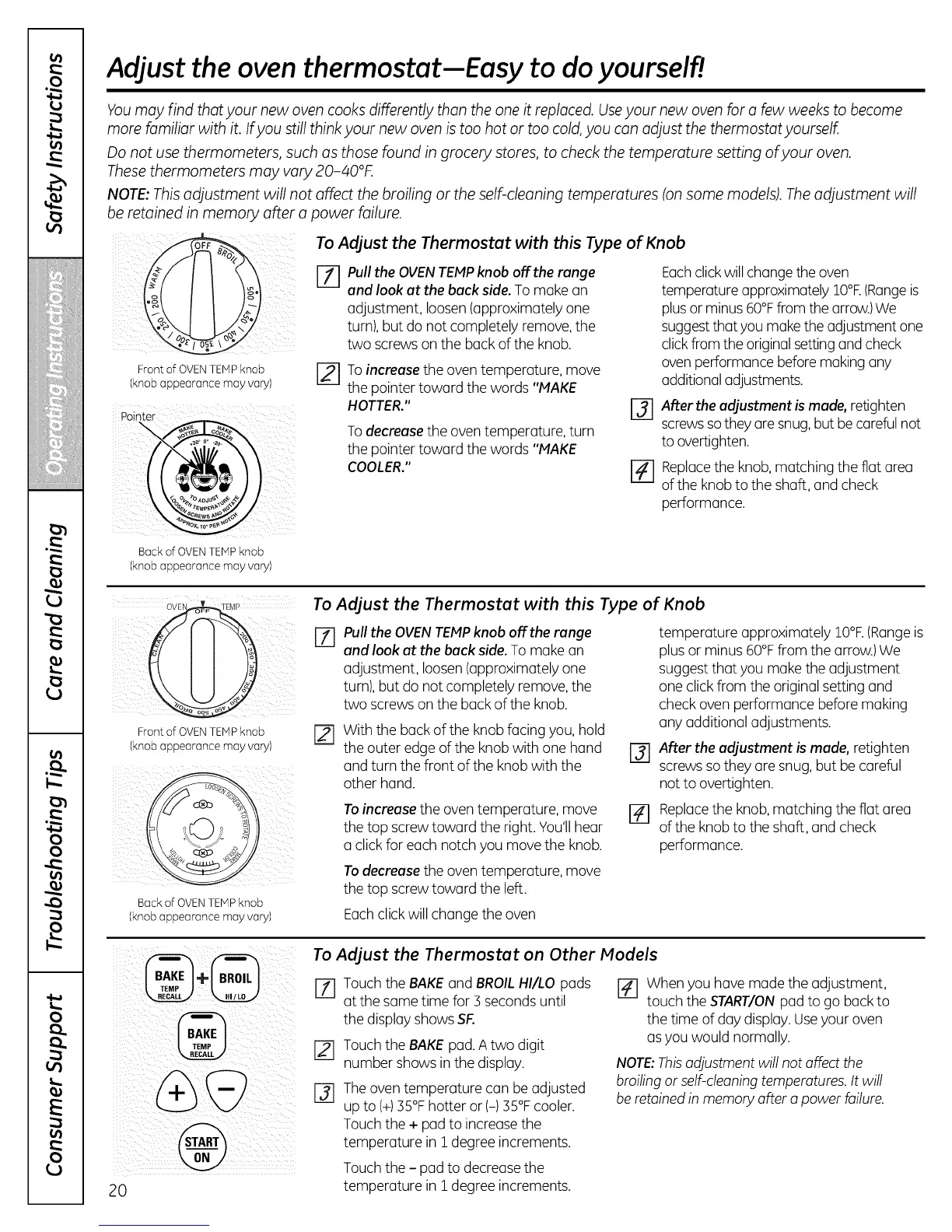
To Adjust the Thermostat with this Type of Knob
%
[]
Pull the OVENTEMPknob off the range
and look at the back side. To make an
adjustment, loosen(approximately one
turn), but do not completely remove,the
two screws on the back of the knob.
To increase the oven temperature, move
the pointer toward the words "MAKE
HOTTER."
To decrease the oven temperature, turn
the pointer toward the words "MAKE
COOLER."
%
%
Eachclickwill changethe oven
temperature approximately lO°R(Rangeis
plusor minus 60°Ffrom the arrow.)We
suggestthat you make the adjustment one
clickfrom the original settingand check
ovenperformance before making any
additionaladjustments.
After the adjustment is made, retighten
screws so they are snug, but be careful not
to overtighten.
Replace the knob, matching the flat area
of the knob to the shaft, and check
performance.
OVEB
Front of OVEN TEMP knob r_
(knob appearance may vary)
Back of OVENTEMPknob
(knob appearance may vary)
To Adjust the Thermostat with this Type of Knob
Pull the OVEN TEMP knob off the range
and look at the back side. Tomake an
adjustment, loosen(approximately one
turn), but do not completely remove, the
two screws on the back of the knob.
With the back of the knobfacing you, hold
the outer edge of the knob with one hand
and turn the front of the knob with the
other hand.
To increase the oventemperature, move
the top screw toward the right. You'llhear
a clickfor each notch you move the knob.
Todecrease the oven temperature, move
the top screw toward the left.
@
%
temperature approximately lO°R (Rangeis
plus or minus 60°Ffrom the arrow.)We
suggest that you make the adjustment
one clickfrom the original setting and
check oven performance before making
any additional adjustments.
After the adjustment is made, retighten
screws so they are snug, but be careful
not to overtighten.
Replace the knob, matching the flat area
of the knob to the shaft, and check
performance.
Eachclick will change the oven
To Adjust the Thermostat on Other Models
E_ Touch the BAKEand BROILHI/LO pads [] When you have made the adjustment,
at the same time for 3 seconds until touch the START/ONpad to go back to
r21
@
the display shows SF.
Touch the BAKEpad. A two digit
number shows in the display.
Theoven temperature can be adjusted
up to (+)35°Fhotter or (-) 35°Fcooler.
Touch the + pad to increasethe
temperature in i degree increments.
Touch the - pad to decreasethe
temperature in 1_degree increments.
the time of day display.Useyour oven
asyou would normally.
NOTE:This adjustment will not affect the
broiling or self-cleaning temperatures. It will
be retained in memory offer a power failure.


 To Next Page
 Loading...





