Installation Instructions
MOUNT THE MICROWAVE
OVEN (cont.)
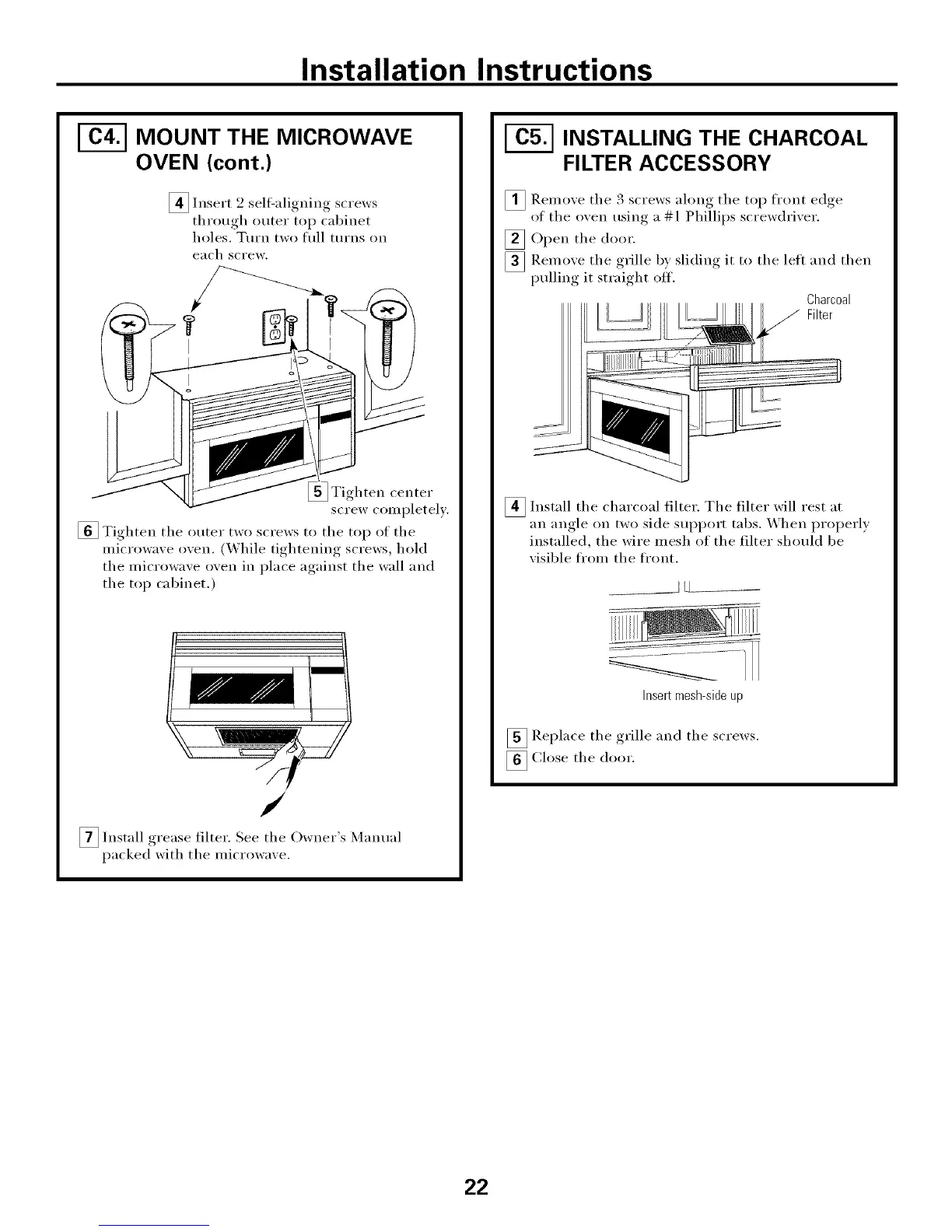
[]Insert 2 self-alioning screws
throuoh_ outer top cabinet
holes. TtlI'n two fllll ttlI'ns on
each screw.
_ Tighten center
screw completely.
[] Tighten the outer two screws to the top of the
microwave oven. (While tightening screws, hold
the microwave oven in place against the wall and
the top cabinet.)
/
S /
_lnstall filter. See the Owner Manualgrease
packed with the microwaxe.
INSTALLING THE CHARCOAL
FILTER ACCESSORY
[] Remoxe the 3 screws along the top front edge
of the oxen using a # 1 Phillips screwdrixer.
[]Open the door.
[] Remoxe the grille by slidim, it to the left and then
pulling it straight off.
Charcoal
Filter
_ Install the charcoal filter. The filter will
rest at
an angle on two side support tabs. X_hen properl,_
installed, the wire mesh of the filter should be
xisible from the front.
Insertmesh-sideup
_ Replace the grille and the screws.
_ Close the door.
22




 To Next Page