Installation Instructions
PLACEMENT OF THE MOUNTING PLATE
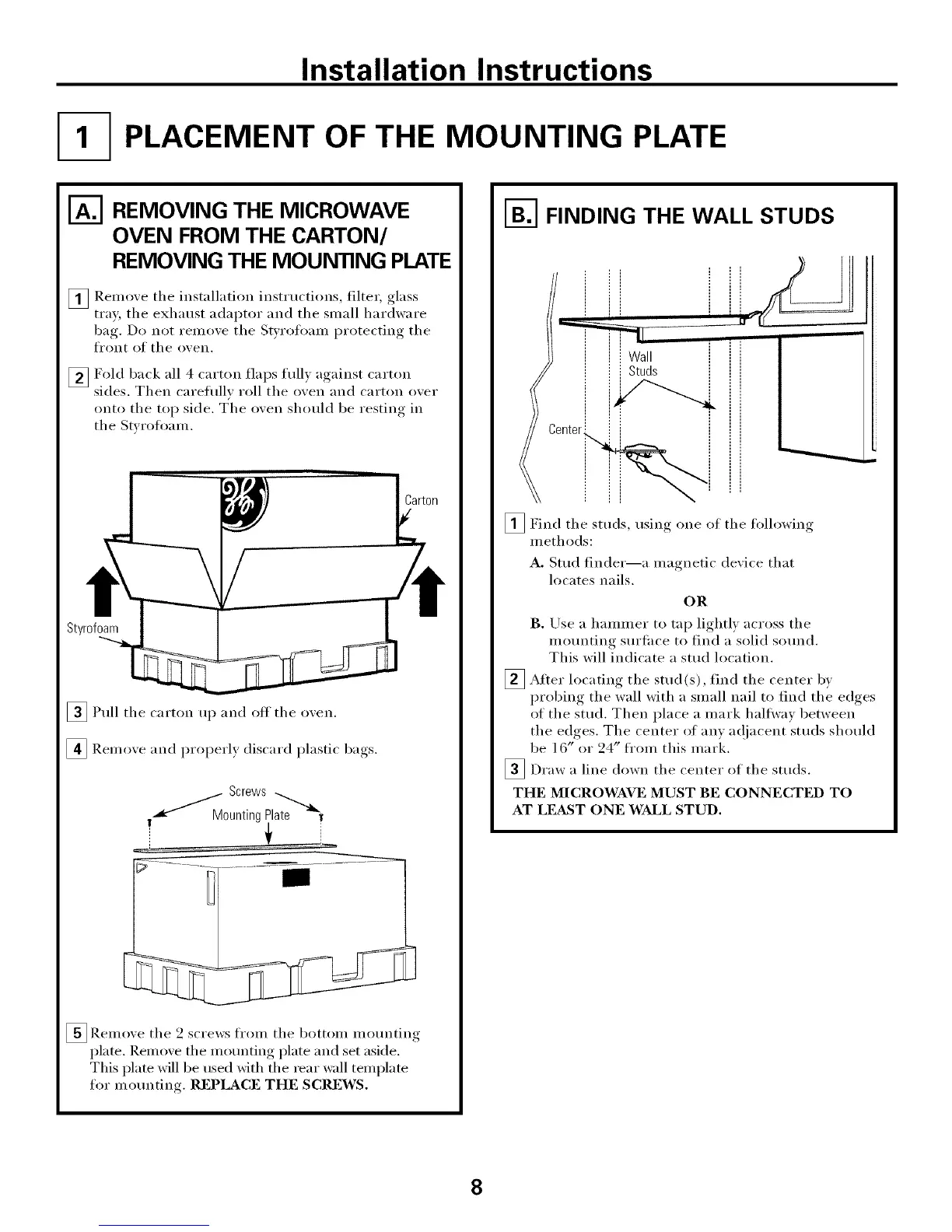
REMOVING THE MICROWAVE
OVEN FROM THE CARTON/
REMOVING THE MOUNTING PLATE
[]Remove tile installation instructions, filter, glass
tray the exhaust adaptor and the small hardware
bag,. Do not remo_e tile Styrofoam I)r°tecting, tile
front of tile o_,en,
_Fold back all 4 carton flaps full) against carton
sides. Then careflflE roll the oxen and carton oxer
onto tile top side. T'he oxen should be restin,*._ in
tile Stx roflmm.
Styrofoam
[]Pull tile carton up and off tile oven.
[] Remove and properly discard plastic bags.
._.._'MM Screws
0unting Plate 1
_ Remove tile 2 screws from tile bottom mounting
plate. Remoxe tile mounting plate and set aside.
This plate will be used with the rear wall template
for mo/mting. REPLACE THE SCREWS.
I-_ FINDING THE WALL STUDS
i
]Find tile studs, usino one of tile following
methods:
Wall
Studs
i
A. Stud finder--a magnetic device that
locates nails.
OR
B. Use a hammer to tap lightly across tile
mo/mting sm'face to find a solid so/md.
This will indicate a stud location.
_ After tile find tile bvlocating stud(s),
center
probing tile wall with a small nail to find tile edges
of tile stud, Then place a mark hallway between
tile edges, Tile center of any a(!jacent studs should
be 16" or 24" fl'om this mark.
_Draw a line down the center of the studs,
THE MICROWAVE MUST BE CONNECTED TO
AT LE&ST ONE WALL STUD,
8




 To Next Page