Quick Start Up Guide
To set daily times
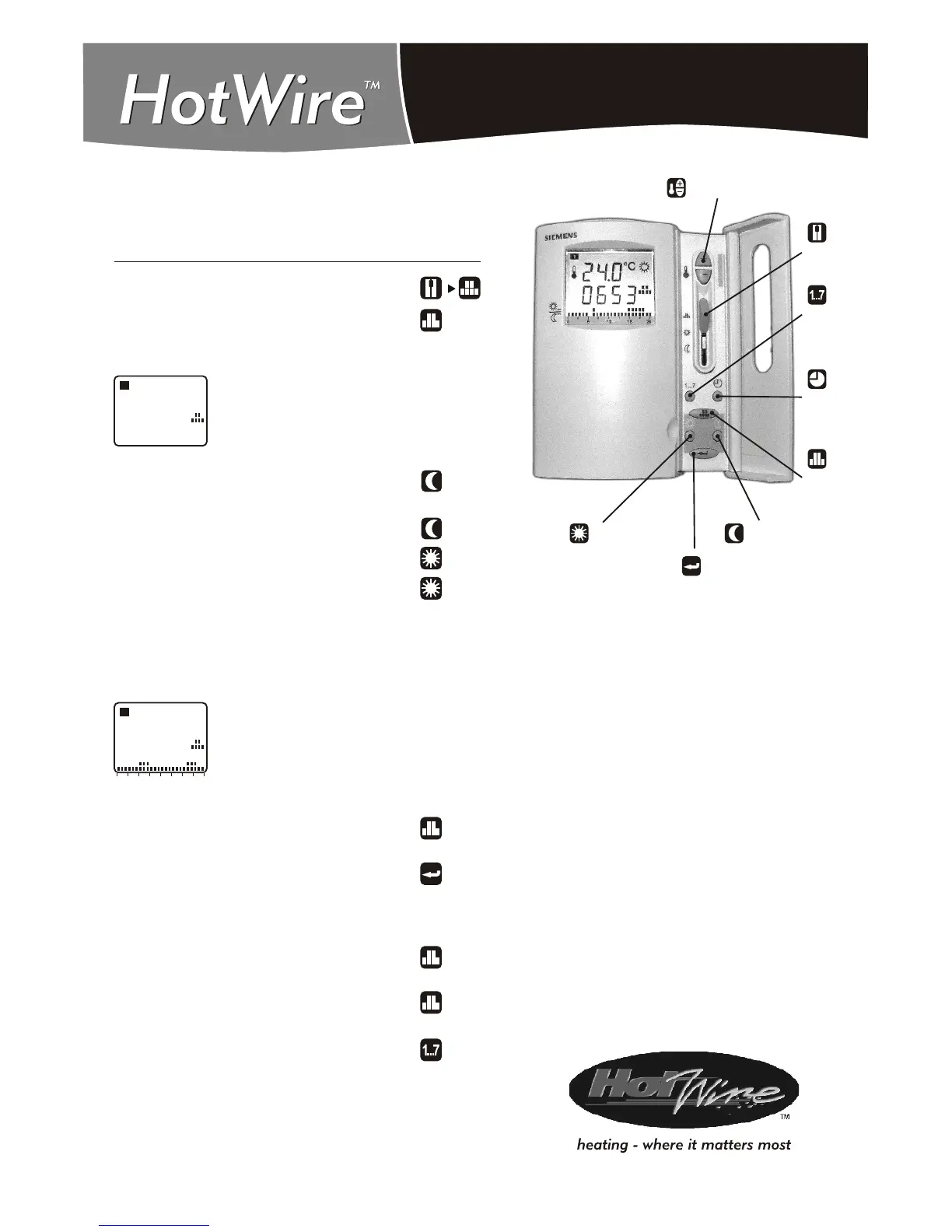
Move front SLIDER to the position shown.
Press the PROGRAM button.
Time setting starts from 00:00 in the morning.
00:00
1
Press the “Energy Saving” button for the
Economy Heating or OFF periods.
Keep pressing the button to increase the time.
Press the “Normal” button for the ON periods.
Keep pressing button to increase ON time.
The screen will look like this for the following
times:
If you make a mistake press the Program
button and start again.
When Day 1 is programmed press the
“Enter” button.
The Thermostat will move to day 2.
Program all 7 days then press the program
button to exit programming.
Note: To review your programming press the
program button.
Press the weekday button to review the
different days.
0 6 12 18 24
1
Economy Heating of OFF 00:00 to 06:00
Heating ON 06:00 to 10:00
Economy Heating or OFF 10:00 to 18:00
Heating ON 18:00 to 22:00
SLIDER
WEEKDAY
TIME
PROGRAM
SUN: NORMAL
ENTER
UP-DOWN
SIEMENS RDE20.1
MOON: ENERGY SAVING



 To Previous Page