EasyManua.ls Logo

HotWire RDE20.1 - User Manual

Default Icon
2 pages
Print Icon
To Next Page IconTo Next Page
Loading...
Quick Start Up Guide
Congratulations on the purchase of
your Hotwire Heating System.
The thermostat allows you to set the ideal room
temperature at the time you want. There are
several switching patterns available that can be
set to your specific needs. You can either rely
on the factory settings or make the settings that
suit your personal needs.
Set the clock
Press the TIME button
Adjust clock to current time
using the UP-DOWN button
Leave for 5 seconds to set.
1
Set day of the week
Press the WEEKDAY button
Adjust to current day of week
using the UP-DOWN button
M=1, T=2, W=3, TH=4, FR=5, SA=6, SU=7
Leave for 5 seconds to set.
2
Set heating temperature
This sets the normal temperature that
you would like your HotWire system to be
set at.
Press the SUN button
Adjust to required temperature
using the UP-DOWN button
Leave for 5 seconds to set.
3
Set minimum heating temperature
This setting determines the minimum temperature
you would like your floor to be.
i.e. Setting the temperature at which Hotwire will
activate.
Press the MOON button
Adjust to required temperature
using the UP-DOWN button
Leave for 5 seconds to set.
NOTE: This can be set to OFF.
Press the MOON button
Set to 5 degrees
Hold down the 'DOWN' button for 4 seconds until
the word 'OFF' appears.
4
To turn Hotwire on
If you find that you are cold and want to
turn the heating on, simply move the
slider to “Normal”.
If you want to turn it off again simply
move the slider back to “Energy Saving”
5
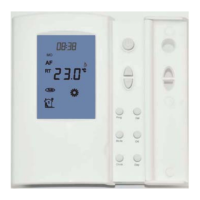
SLIDER
WEEKDAY
TIME
PROGRAM
SUN: NORMAL
ENTER
UP-DOWN
SIEMENS RDE20.1
MOON: ENERGY SAVING
Question and Answer IconNeed help?

Do you have a question about the HotWire RDE20.1 and is the answer not in the manual?

Summary

Setting the Clock

Adjust Clock to Current Time

Set the thermostat's clock to the current time using the UP-DOWN buttons.

Setting the Day of the Week

Set Current Day of the Week

Input the current day of the week using the UP-DOWN buttons.

Setting the Normal Heating Temperature

Adjust Normal Operating Temperature

Set the desired normal operating temperature for your Hotwire heating system.

Setting the Minimum Heating Temperature

Set Minimum Floor Temperature

Define the minimum temperature for the floor, activating Hotwire when needed.

Set Minimum Temperature to OFF

Disable the minimum temperature setting by holding the 'DOWN' button until 'OFF' appears.

Turning Hotwire On and Off

Activate Hotwire Heating

Turn the Hotwire heating system ON by moving the slider to 'Normal'.

Deactivate Hotwire Heating

Turn the Hotwire heating system OFF by moving the slider back to 'Energy Saving'.

Setting Daily Time Programs

Initiate Daily Time Programming

Move the slider and press the PROGRAM button to begin setting daily heating times.

Program Economy Heating Periods

Set 'Economy Heating' or 'OFF' periods using the Energy Saving button.

Program Normal Heating Periods

Set 'ON' periods for normal heating using the Normal button.

Confirm and Advance Day

Press 'Enter' after programming a day; the thermostat advances to the next day.

Exit Programming Mode

Complete programming all 7 days and press the Program button to exit.

HotWire RDE20.1 Specifications

General IconGeneral
BrandHotWire
ModelRDE20.1
CategoryThermostat
LanguageEnglish

Related product manuals