11Hoverzon
TM
Cruiser Folding E-Scooter User’s Manual
Indicators Setting
When the battery level is low, stop riding, turn off the Cruiser, and fully recharge it
before riding again.
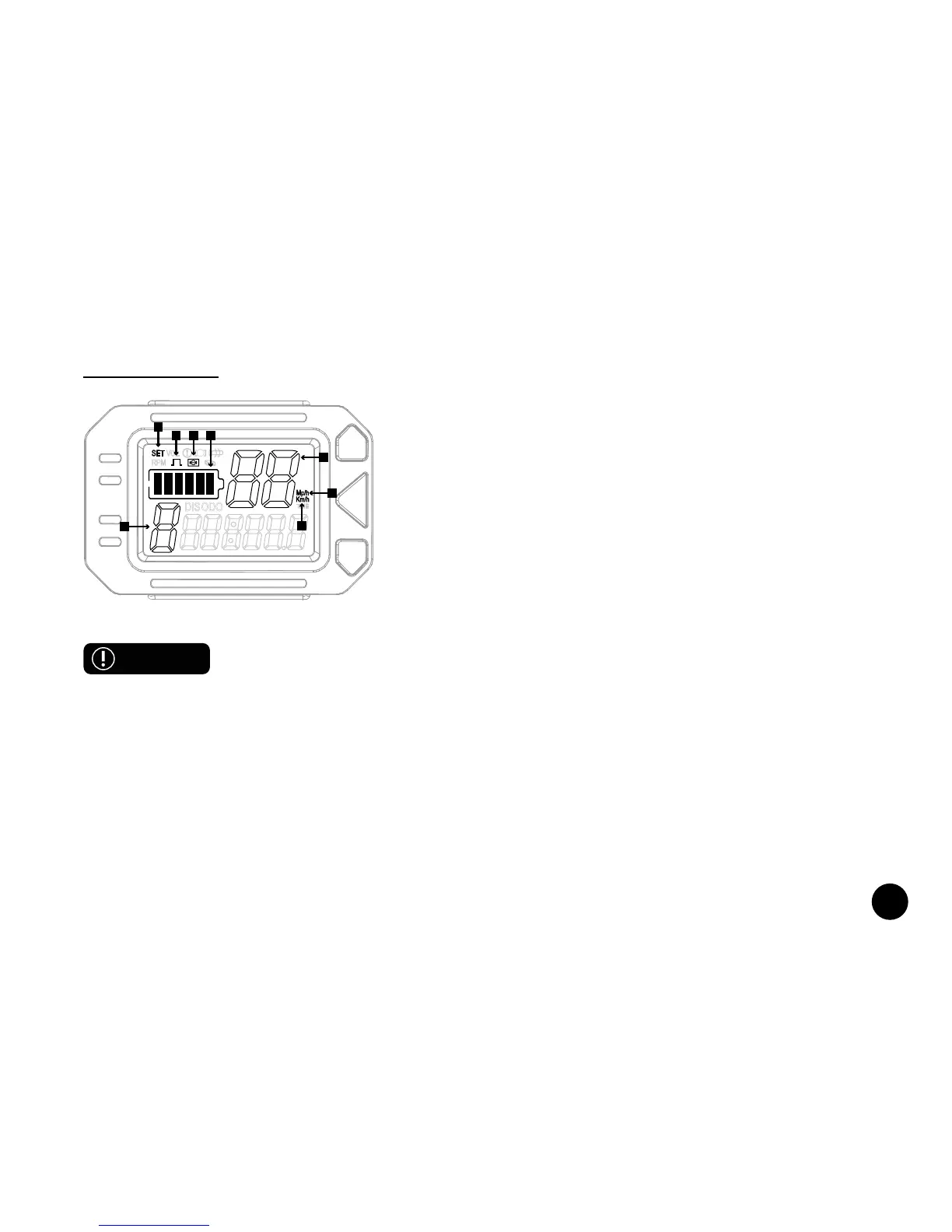
5. Speed: These numbers indicate current speed readings.
6. Gear Position: This icon indicates current gear. There are 5 gears. Gear 1 has an approx. speed
range of 0-5mph (0-8km/h). Gear 2 has an approx. speed range of 0-7.5mph (0-12km/h). Gear 3 has
an approx. speed range of 0-10mph (0-16km/h). Gear 4 has an approx. speed range of 0-12.5mph
(0-20km/h).Gear 5 has an approx. speed range of 0-15mph (0-24km/h). Use the UP ARROW and DOWN
ARROW buttons to adjust gears as desired.
7. Kilometers per Hour (KMH or Km/h): This icon indicates odometer readings and will appear if you
have selected speed to display with this unit of measurement.
SET
RPM
M
DISODO
VOL
Mp/h
Km/h
TIME
1
2
3
8
4
6
7
5
1. Setting: This icon will appear when modifying this setting.
Please see Display Mode Indicators for more information on
these settings.
2. Magnetic Settings: This icon will appear when modifying this
setting. This icon is related to magnetic settings. It should not
appear under normal circumstances.
3. Wheel Diameter: This icon will appear when modifying this
setting. This icon is related to wheel diameter and the Cruiser’s
motor. It should not appear under normal circumstances.
4. Battery Level: This icon indicates battery power level. As
power goes down, the icon will indicate different levels.
WARNING



 To Next Page