56
16533p10
Multi-Card Module
HP 16533/34A CalibrationHP 16533/34A Calibration
HP 16533/34A CalibrationHP 16533/34A Calibration
5
6
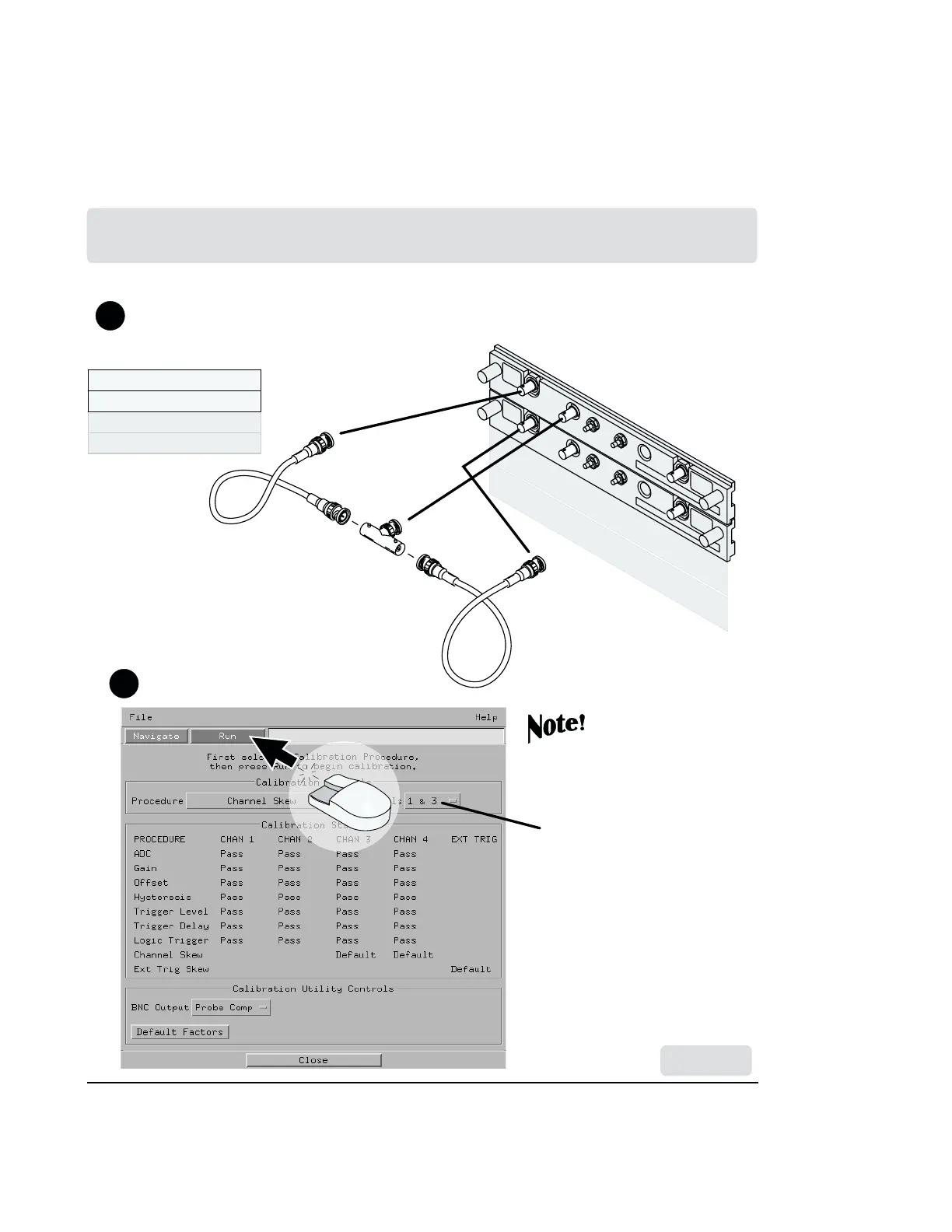
Connect the (equal length) BNC calibration between channel 1, AC/DC cal,
and channel 1 of the second card. (Channel 1 of the third card next time etc.
up to four cards.)
Repeat steps 3 through 6 for
each additional card in your
multi-card module.
Select the appropriate
combination for each
additional card.
Multi-Module
Calibration
Done
Done
Chan. 1Chan. 1
Chan. 1Chan. 1
Chan. 2Chan. 2
Chan. 2Chan. 2
Chan. 1
Chan. 1
Chan. 2
Chan. 2
for HP 16700A and HP 16702A
Remember to set the
PROTECTED/
UNPROTECTED
switch back to
PROTECTED.
Artisan Technology Group - Quality Instrumentation ... Guaranteed | (888) 88-SOURCE | www.artisantg.com



 To Next Page