6. Remove the bottom cover (see Bottom cover on page 35).
7. Remove the hard drive (see
Hard drive on page 38).
NOTE: When replacing the system board, be sure that the following components are removed from the
defective system board and installed on the replacement system board:
●
WLAN module (see
WLAN module on page 40)
●
Memory module (see
Memory module on page 42)
To remove the system board:
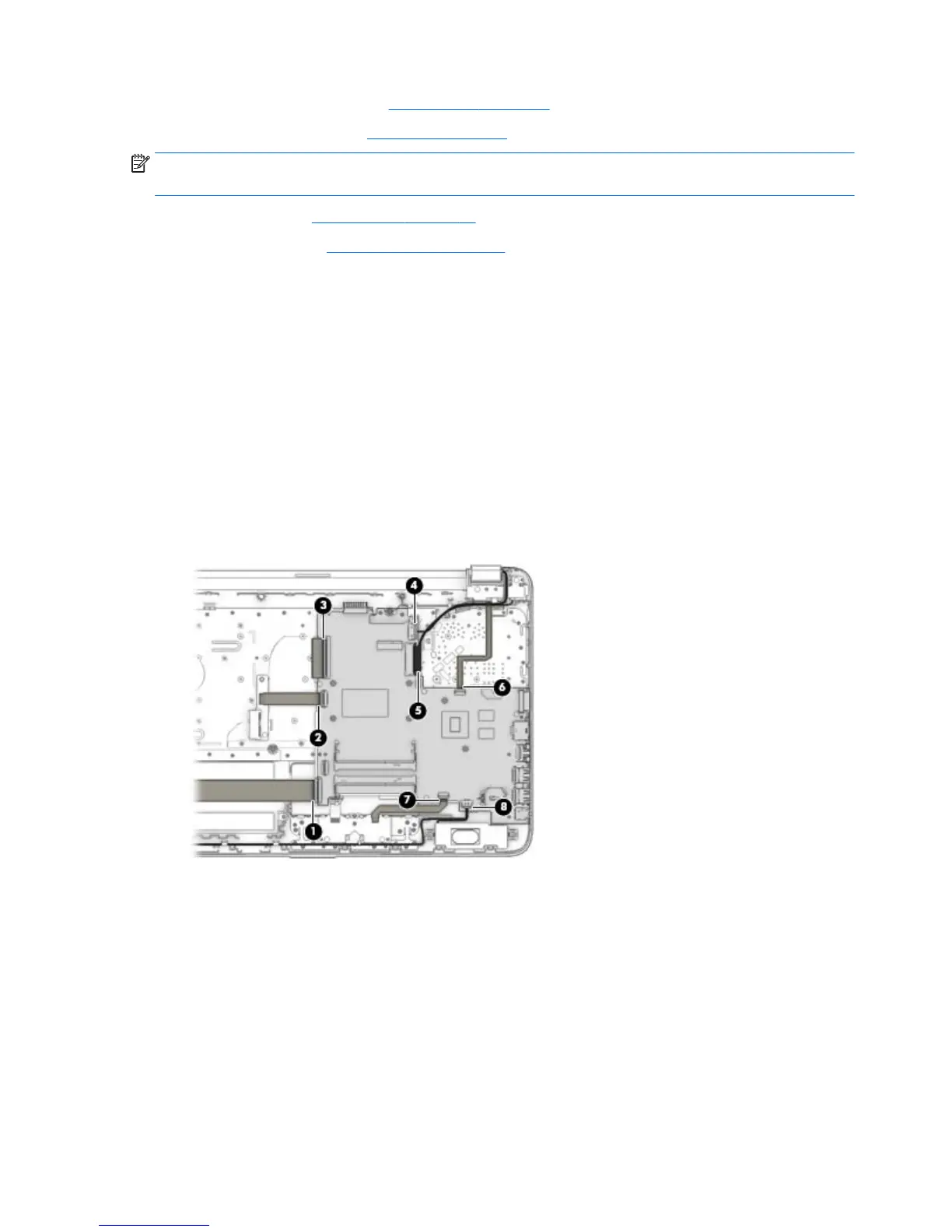
1. Position the computer upright, and then disconnect the following cables from the system board:
(1): USB board cable
(2): Optical drive connector cable
(3): Keyboard cable
(4): Power connector cable
(5): Display cable
(6): Power button board cable
(7): TouchPad button board cable
(8): Speaker cable
2. Remove the six Phillips PM2.5×2.5 screws (1) that secure the system board to the computer.
52 Chapter 6 Removal and replacement procedures for Authorized Service Provider parts


 To Next Page