EasyManua.ls Logo

HP 3455A - Page 180

HP 3455A
249 pages
Print Icon
To Next Page IconTo Next Page
To Previous Page IconTo Previous Page
Loading...
(
Start
)
I
With
A
Display
Reading
0( "V (Test 7
Failure),
,
Measure The Switch Drive
Voltage
A10U4.
On Pin 14 Of
Troubleshoot The Device
Troubleshoot The
Device
Select Circuit IA10U13,
Select Circuit (A10UI2,
U14, U26
And Associ-
U14, U26
And Associ-
ated
Components).
ated
Components).
Troulilcshool The Logic
The Device Select^.
Troubleshoot
The Logic
Circuit (A10U13, U22,
I
Sicnal
At
Pin
9
Of
I'Ab
^
Circuit (A10U12, U22,
U26
And Associated Com-
1
A10U12>4V 1
U26
And Associated Com-
ponents).
^\Peak-To -Peak^^ ponents).
Troubleshoot The Device Troubleshoot
The Device
Select Circuit (A10U13. Select Circuit (A10U16,
U14,
U26 And Associated U14, U26
And Associ-
ated Components).
3455
-D-5
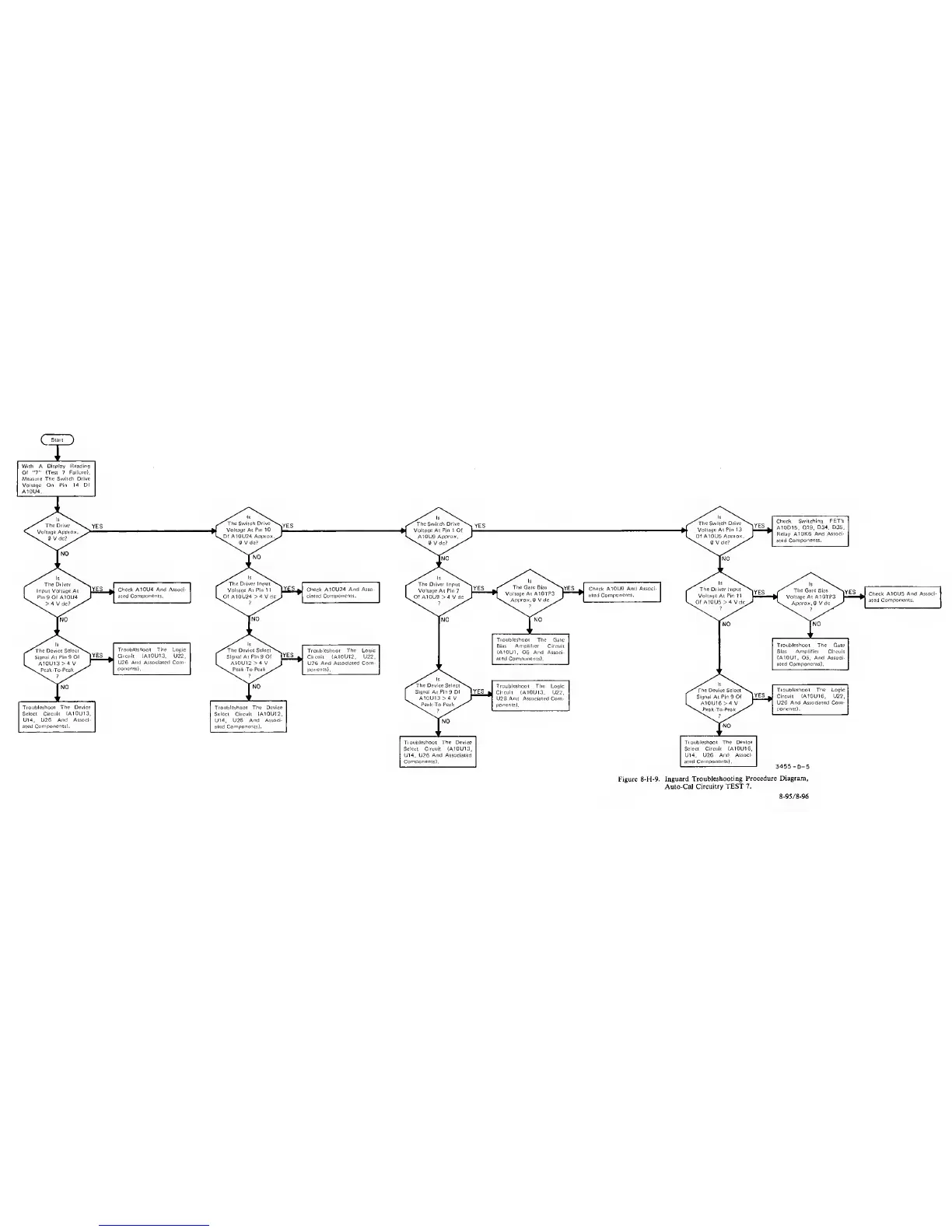
Figure 8-H-9.
Inguard
Troubleshooting Procedure
Diagram,
Auto-CaJ Circuitry
TEST 7.
8-95/8-96