EasyManua.ls Logo

HP 3455A - Page 190

HP 3455A
249 pages
Print Icon
To Next Page IconTo Next Page
To Previous Page IconTo Previous Page
Loading...
Turn The Instrument OFF.
Reconnect The
Plug
To
A1J7. Be
Certain That The
Test
Jumper On The A3
Assembly Is
Disconnected.
Turn The Instrument ON.
The Device Select
^
Signal
Present
At
Pln9O1A10U157
(This Signal Is A
Negatlve*Golng
Pulse
Approximately
1
psec
In
Duration And
>
4 Volts Pealt-To-
\
Peak.)
/
Are
\
The
Signals
At
Pins
2,
10.
And 12
Of A10U1S > 3.5
Volts Peak-To-Peak
\
?
/
Troubleshoot The Device
Select
Circuit (A10U14,
U26
And Associated
Com-
ponents).
Troubleshoot
The
A/0
Switching
Circuit
<A10U15. A14U1.
U2, Q1
Through
Q4 And
Associ-
ated
Components).
__X^The
Voiiage^Ss.^^
At
A14TP1 Greater
•s..,TI«n
+
10 Vdc^
The Voltage
At
Pin 14
Of
The
A14
Assembly
>
+
4
V dc
\
The Voltage At
Pin 15 Of The
A14
[
NO
Assembly
> + 4
Vde I
\ /
The Voltage At
Pins Of The
A14
Assembly
>
4 V dc
s.
7
^
Troubleshoot The
Inte-
grator Circuit
IA14U3.
U4,
05
,
04 And
Associated
Components).
Troubleshoot
The
.2 V
(5e-
1
tect And
Absolute Value
Circuits {A14US, U6, 06
And Associated
Compo-
nents).
Troubleshoot
The
10 V
Detect
And Absolute
Value Circuits (A14U5,
U6. 06
And Associated
Components).
The Voltage At
Pin 15 Of The A14
Assembly
<t
Volts
± .3 V dc?
^
Troubleshoot
The
10
V
Detect
And Absolute
Value
Circuits (A14U5.
U6, 06
And
Associated
Components).
The Voltage At
PinSOf TheA14
Assembly
0
Volts
. ±
.3 V dc?
^
Remove The
from
A14C2.
Troubleshoot The
0
Detect
Circuit
(A14U6
And
Associated
Components).
Troubleshoot
The
0
Detect
Circuit
(A14U6
And
Associated Components).
If.
At
This Point.
The Problem Has Not
Been Isolated To A
Circuit.
Recheck The
Symptonrrs To Be Certain
The Problem
Is
In The Inguard Section
Of The Instru-
ment. Refer
To
The Theory Of
Opera-
tion And Schematics To
Locate Prob-
lems Not
Covered
By
This Procedure.
The
A/0
Input
^
Voltage At A10TP4
\
-lOVdc?
^
Troubleshoot
The
DC
Preamp
And Input Switch-
ing Circuitry (Schematic
No. 1).
Be Certain That
10
V dc
Is Applied To
The 34S5A
Input Termi-
nals.
Force The
Integrator To
Auio-Zaro
By
Connecting
A
Clip Lead
Between
The
Cathode
Of A14CR8
And
Inguard Ground.
ReferenceN^.
Voltage
At
A10TP7
\
-lOVdc? /
x'^The Reference's
Voltage At
A10TP8
\
-f
lOVdc?
/
Troubleshoot
The Refer-
ence Supplies (All Assem-
bly, A10U7, A14U1. U2
And Associated Compo-
nents).
The Voltage At 1
A14TP1
0 Vdc
±
.2 Vdcf
\
?
>
Troubleshoot
The Inte-
grator Circuit (A14U3, U4.
4.
05
And Associated
Components).
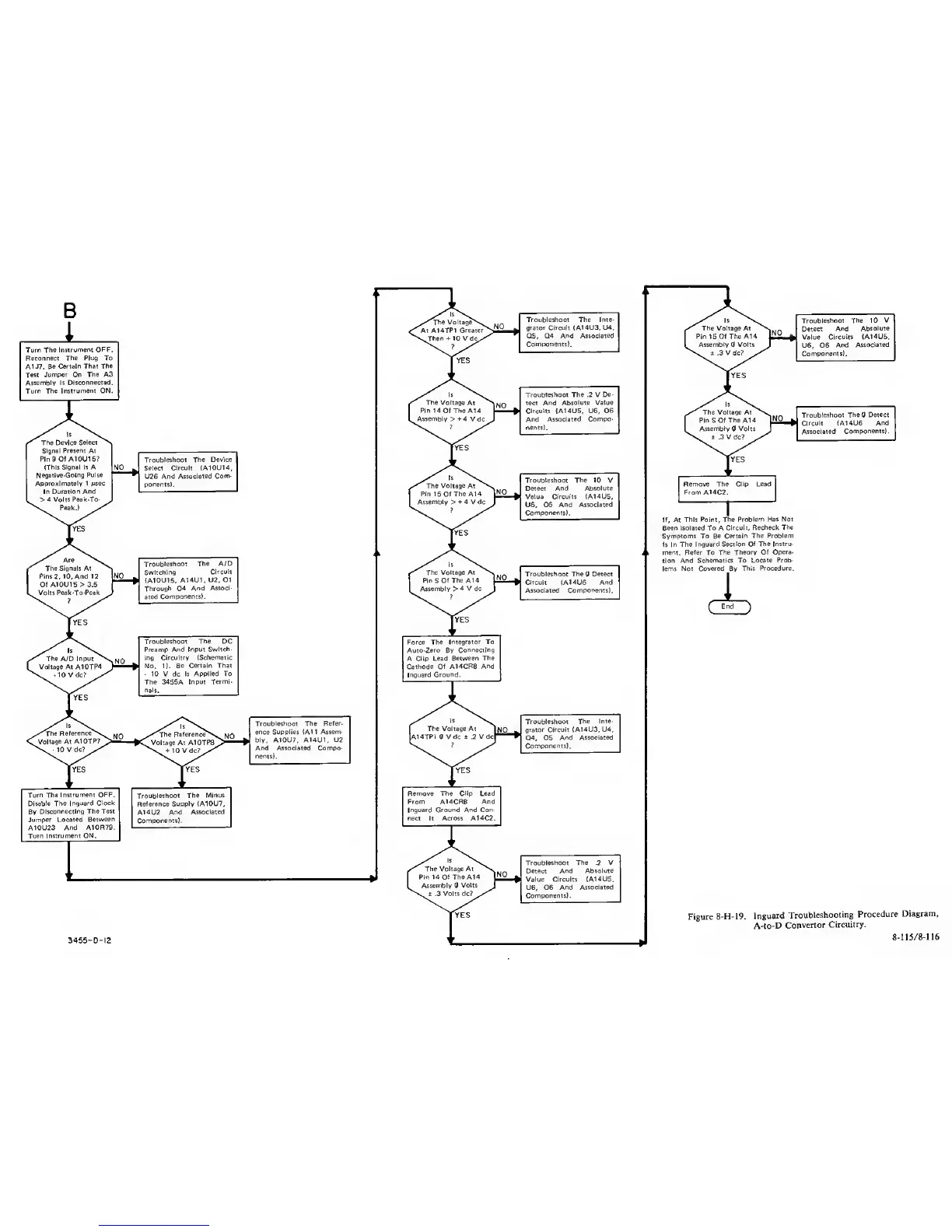
Figure
8-H-19.
Inguard
Troubleshooting
Procedure
Diagram,
3455
-
0-12
8-115/8-116