EasyManua.ls Logo

HP 3455A - Page 189

HP 3455A
249 pages
Print Icon
To Next Page IconTo Next Page
To Previous Page IconTo Previous Page
Loading...
A
Measure The\_
Inguard Power
Supplies 16 Labeled
Test
Points On The
A10
Assembly).
Are The Voltages
Within
± 6%
Of The
Marked Values
Also
Measure
±
1
0
V
Reference Supplies.
.
\
Connect The Oscilloscope
ToA10U26.Rn 27.
Troubleshoot
The
Ingusrd
Power
Supplies.
1s
The
Clock
Signal (Waveform
2)
\
Present?
/
NO
Troubleshoot
Clock Cir*
^
cult
(A10U21, A10U23.
"
A10U28 And Associated
Components).
Measure
^
The Bies
Voltage
On Pin 38
Of
A10U26.
Is
This Voltage
Within
t J25 Volts
Of The
Value Marked
On U26
Replace
A10R105
With
The Proper
Value.
The
Interrupt
^
Signal At
Pin 29
Of A10U26
Held
High
or Toggling
^
Troubleshoot The Inter-
^
rupt Circuit
(A10U9, 19.
21. 24, 21 28.
32 And
Associated Components).
/A10R105 The\
Proper Value For
The
Voltage Marked
On A10U267
2X1 V- 737
kn
-23V-6.04kn
3.0 V
-
4.75 kn
-3.5
V -392 kn
-4,0
V -3.32
kn
•4.5
V -230 kn
50 V
-
2.37 kn
.
Are
•^The
Oats Signals^
On
Pins 18 Through
26 Of
A10U26>4
Volts
Peek-To-Paak
\
?
/
NO
Troubleshoot The
I/O Cir-
- cult (AlOUn.
12. 13. 16.
16. 17. 22, 26,26,27
And
Associated Components),
Waveform
2
Volts/Oiv
1.0
iM.-
Turn Instrument OFF And
Carefully Remove
A10U26. Turn
Instrument
ON.
Time/Div
.5 usee
-^he
Bias Voltage^
On Pin 38 Of The
ICSocket Within
t .3 volts
Of The
Value
Marked On
U26?
U26
May Have Aged And
Replaced
Replace A10U26.
3455-B- 1
3
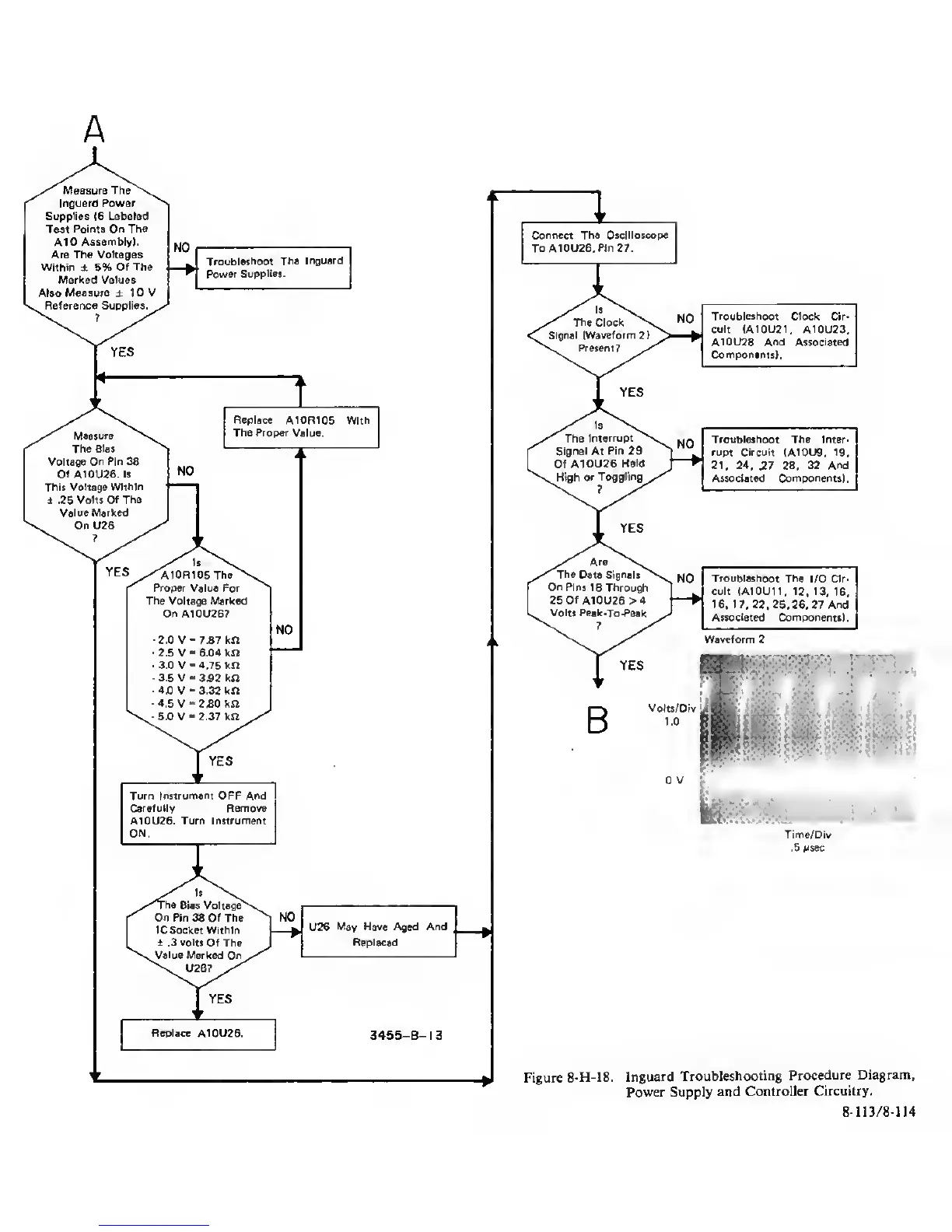
Figure
8-H-18.
Inguard
Troubleshooting
Procedure Diagram,
Power Supply
and Controller
Circuitry.
8-113/8-114