NOTE 1
The Signature
Analyzer Controls
Should
Be Set As Follows For This
Test.
LINE ON (IN)
START
"X.
(IN)
STOP
y
(OUT)
CLOCK.
y (OUT)
HOLD OFF(OUT)
SELF TEST. . . .OFF (OUT)
^
S^i
J
Turn The Instrument OFF.
Disconnect The Test
Jumper On The A3 Assem-
bly.
Disconnect
The Plug
From
A1J7.
Set All HP-IB
Address Switches To The
"9"
position (down). Turn
The Instrument
ON.
Proper Operation Of The
Outguard
Test
Routine Is Indicated By A
Number Or
Character Being Strobed Across
The
Display
And The Front Panel Enunci-
ators Being Alternately Lit-
NOTE:
The ALU
Circuitry Is Working Correctly.
i
Go To The Device Select
Troubleshooting
Pro-
cedure.
3455-B-I7
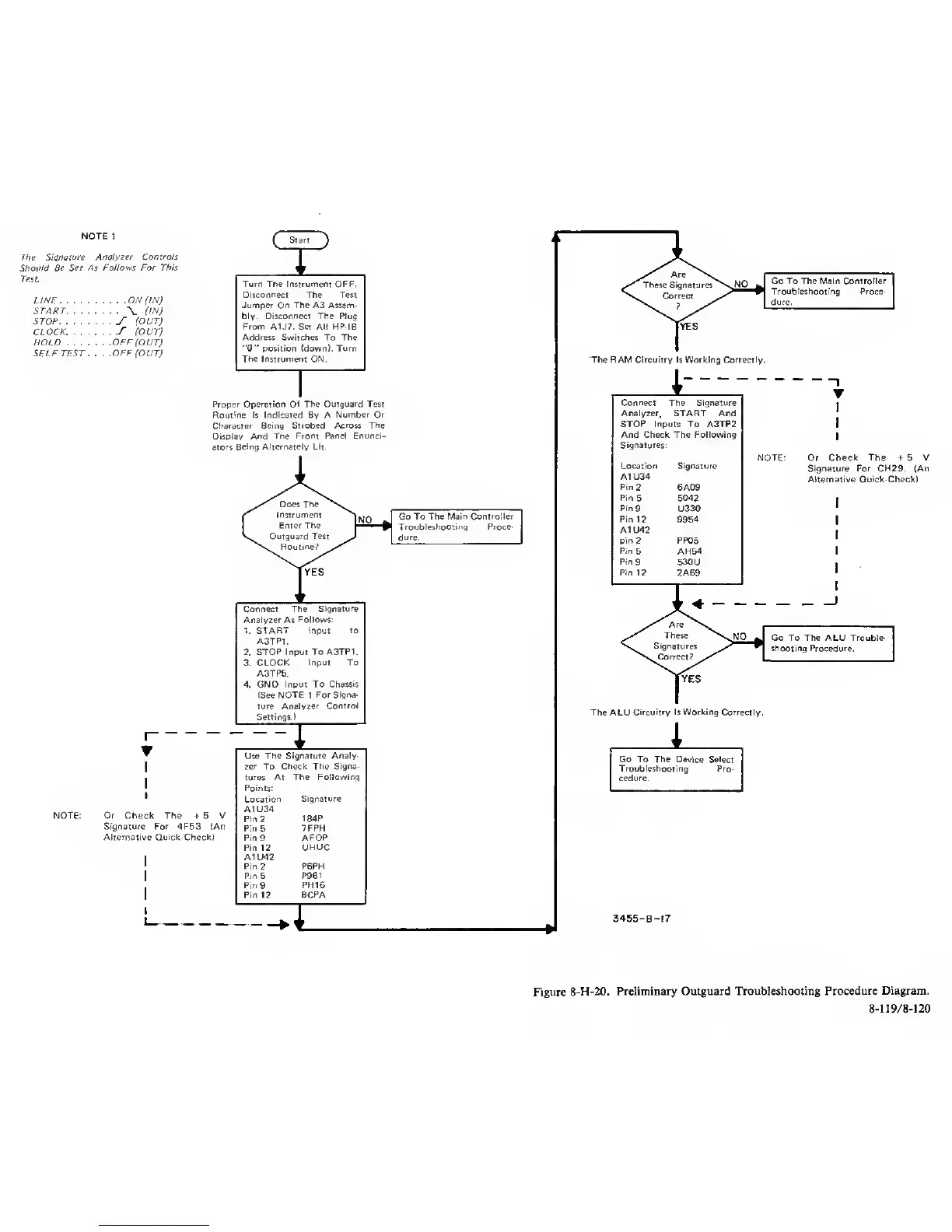
Figure
8-H-20.
Preliminary Outguard Troubleshooting
Procedure Diagram.
8-119/8-120



 To Next Page