EasyManua.ls Logo

HP 3455A - Page 193

HP 3455A
249 pages
Print Icon
To Next Page IconTo Next Page
To Previous Page IconTo Previous Page
Loading...
NOTE
1
Vw
Siqnaum
Aitalyier
CiiiHrols
Should
Be Set Ai
hollows for
I'liis
Test:
l.INt
0.\(l\')
SIAHI \.
I'/iV;
STOf
(out;
CLOCK y
(out;
iiol.o
on (OUT)
SLI.T
ThST OH (OUl)
NOTE 2
The hillowiuy Is A I
isi Ot
Compoiieuls
Whkh Arc
Cointeclcd
To
llie hrueessor
Inpi/I DjIij Hus.
Sdiemuiic 8
Schenwlk 9 .Si
hcnuilic
10
MUh
AWI
AIV39
AIV2I
41013 AIU60
AW2J
AIUI6
AW27
AIUI7
A
11/34
AWI8
AIV33 AIS!
AWhJ
AIU43
AIH-IO
WAVEFORM 1
OV
»
fc.
. -
I I
Time/Div.
.5
»^soc
Slai'
J
Be Certain
Tiiat: The Tost
Jumper On The A3
Assein-
biy Is
Disconnected, The
Ploi)
Is
Disconnected From
A1J7
And The
HPIB
Address Switches
Are All
Set To
The
”0"
position.
Torn The
Instrument ON.
I
Cheek The
Following
Pins
On A1J6
For
The Volt-
ages
Listed (A3
Assembly
Plugged
n):
Pin
Voltage
A
s
5 V
t .3 V
M
-•
9 V
i
.5
V
L
Equal To
The
Voltage
Stamped
On
A3U9
t .3 V
Turn The
(netrument OFF.
Warning: Make
Sure The
3455A Is
Turned Off Or
Incorrect Signatures
May
Be Present
When The A3
Board
Is Reconnected.
Remove The A3
Assem-
bly And Connect It
To An
Extender Board.
Place
Tape
Accross Pins B
Through
K
(6
Pins) Of The
Extender Board (To
Break
The Data
Bus Connec-
tions)
And Insert
It In
A1J6.
Connect The Sig-
nature
Analyaer
START
And STOP
Inputs To
A3TP3.
Connect The
CLOCK Input
To A3TP5
And
The GND To
The
Chassis. (See
NOTE 1 For
Signature Analyzer Con-
trol
Settings.
Turn In-
struments
ON.
I
Troubleshool The
Power
Supplies
II The Voltage
Al A1J6
Pm L Is
Incor-
reel. Be
Certain That
A3R3 Is
The Proper Value
For
The Voltage
Stamped
On
A3U9.
Voltage
Resistance
S.0
V
4.64 kn
4,5
V
2.87 kSt
4.0 V
156 kn
.
3.5 V
1 .37 kn
3,0
V
1 .00 kn
2.5 V
715 n
.
2.0 V
511
n
Troubleshoot
The Clock
Circuit
(Schematics).
1
Use The
Signature
Analy
^er To
Check The Signa-
tures
On The
Following
Pins Of The A3
Assembly:
Pm
Signature
B
3A9C
C
H3FH
D
P2F8
E
62PP
F
7078
H
F757
J
15FU
K
97C6
t-5
V: 4F53
Connect The
Signature
Analyzer
START
Anrf
STOP Inputs To
A3TP2
And Check
The Following
Signatu res:
Pin
Signature
B
8AAF
C 693A
D C304
E 4F60
F
C43U
H
4CHH
J 6C93
K 9H95
^5
V:
CH29
Connect The
Signature
Analyzer START And
STOP
Inputs To
A3TP3
And Check The
Following
Signatures:
Pin Signature
B
PC79
C
A102
D 7AAU
E OC52
F 6UAO
H
H8CH
J
1P29
K U478
+
5V; 02C2
I
Waveforms^
Replace The A3
Assembly.
<;
>4v
Replace The A3
Assembly.
k -To . P
eak./
Connect The
Signature
Analyror
START
And
Stop
Inputs
To A3TP4
And
Check The
Following
Signatures:
Pin
Signature
B
CHC4
C
6COP
D
A43P
E
129C
F OC93
H CP65
J
F517
K 6P03
tS V: 79FU
Connect The
Signature
Analyzer START And
STOP Inputs To
A3TP3
And Check
The Following
Signatures:
Pin Signet ure
4 U5P6
7
23F9
9
2A6F
10 3A9F
11
6242
-i-5
V: 02C2
Um An
Oscilloscope
To
Measure The Amplitude Of
The Waveforms Al
A3TP1
,
TP2.TP3,
And TP4.
I
The Mam
Controller Test
Routine
Is
Operating
Properly.
i
Use An Oscilloscope To
Measure
The Amplitude Of
The Signals On The Proces-
sor Date Bus Lines At
The
Following
Points:
A1U34
Pins
5.9,
12
A1U42 Pins2,5,9,12
The Processor Input
Operating Properly.
i
Turn The Instrument OFF.
Remove The A3
Assembly
From
The Extender Board
And
Replace It
In The
Instrument.
(Be Sure To
Remove
The Tape From
The Extender Board
!
Turn
The Instrument ON.
I
Go
To The RAM
Trouble-
shooting
Procedure.
3455-C-I8
Refer To
Schematic
3 To
Determine Which Data Bus
Lme (09
Through 071 Is
Being Held.
Troubleshoot
The
Components Which
Are
Connected To
This
Line. ISee
Note
2.1
In Most Cases, A
High
Resolution
Voltmeter
(1
pV
Resolution) May Be
Used To
Determine The
Bad
Component. If The
Data
Line Is
Being Held
Low, The
Component
With
The Lowest
Voltage
Reading Will Generally Be
The Faulty Part.
If The
Line
Is
Being Held
High,
The Bad Pan
Will Normal-
ly Have The
Highest
Voltage
Reading.
When
Troubleshooting The
Processor Data
Bus.
The
A3
Assembly Should
Be
Removed From
The Instru-
ment. IBcSureTo Remove
The Tape From
The
Extender Board.)
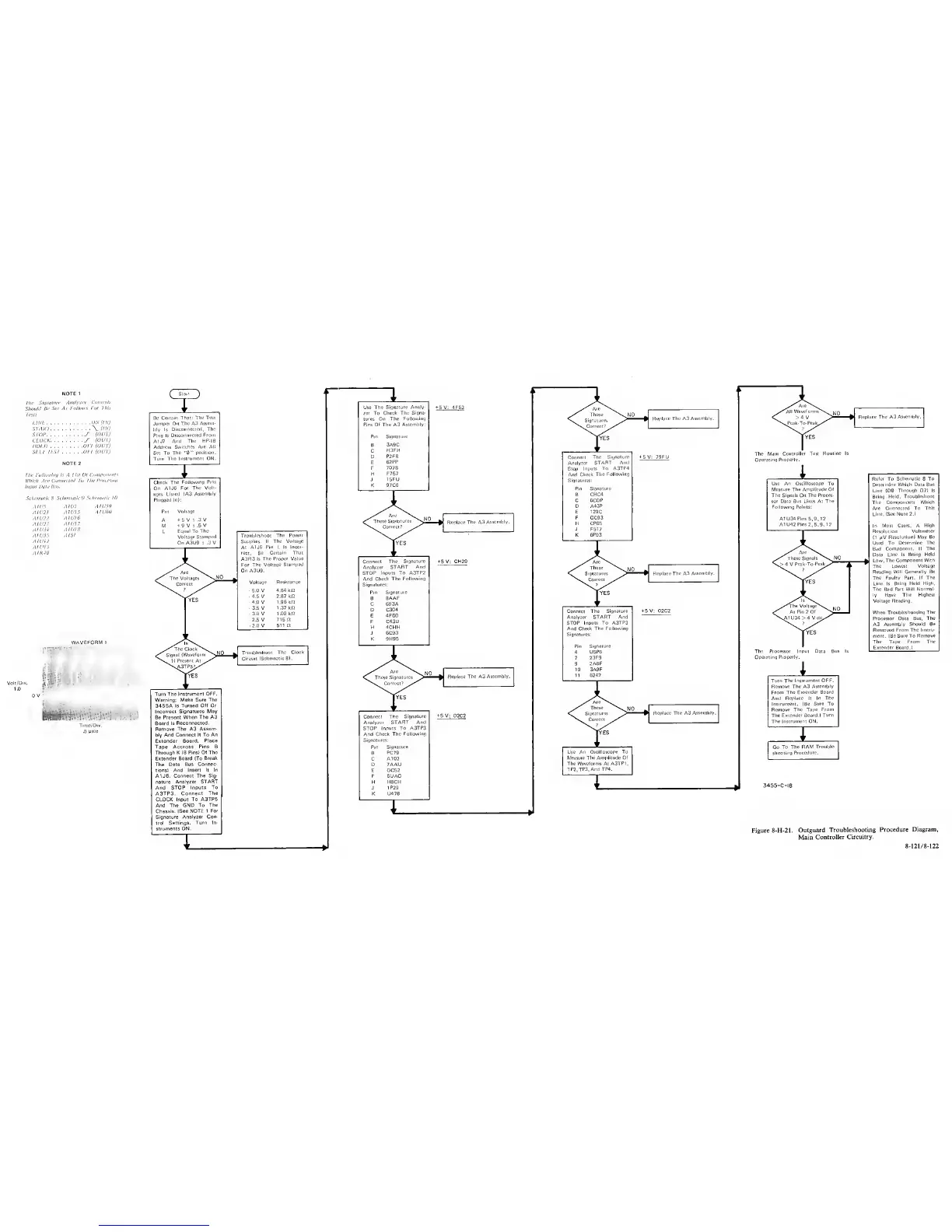
Figure 8-H-21.
Outguard
Troubleshooting
Procedure
Diagram,
Main
Controller
Circuitry.
8
-
121 /
8-122