EasyManua.ls Logo

HP 3455A - Page 197

HP 3455A
249 pages
Print Icon
To Next Page IconTo Next Page
To Previous Page IconTo Previous Page
Loading...
NOTE 1
The
Signature Analyzer
Should Be
Set As Follows For This
Test.
LINE. . . .
STAHr. . .
STOP. . . .
CLOCK. . .
HOLD . .
.
SELF TEST
. . ON
ON)
.
^ ON)
yfouT)
y(ouT)
OFF
(OUT)
OFF (OUT)
Check The Following
ALU
Output Signatures:
Location
Sigrtature
A1 U34
Pin
2 6A09
Pin
5
5042
Pin
9
U330
Pin
12
9954
¥
¥
The ALU Circuit Is
Operating Correaly.
.
.
I
-
_
Go To
The Device Select
Troubleshooting Proced-
ure.
3455- D- ISA
I
Check The Signatures
At
The Following Points:
Location Signature
A1U21
Pin
2 8CPU
Pin
5
UPUH
Pin
9 2131
Pin
12 HAF7
Check The
Signeiures
At
The
Following Points;
Location Sigrtature
A1U29
Pin 2 UCH6
Pin
5 87C2
Pin
7
H074
Pm 10 HHF5
Check The Signatures
At
The Following Points;
Location Signature
A1U25
Pin
2
6406
Pin S 9COF
Pin
7
H4UF
Pin
10
3P95
Input Latch A1U25 Or
ALU A1U28-
I
Check The
Signatures
At
The Following Points:
Location Signature
A1U22
Pin
2
9445
Pin
5
CPOH
Pin
9 P0F9
Pin
12
F84U
Check
The Signatures At
The
Following Points:
Location
Signature
A1U31
Pin 2
5H5C
Pin
5
1HHA
Pin
7
59H2
Pin to 3H92
Go
To The Device
Select
Troubleshooting
Pro-
cedure.
Are
These
Signatures
Correct?
Go To
The Device
Select
J
Select Signature
1^^^^
Troubleshooting
Pro-
1 At Pin
9
Of
I
A1U3125H1
cedure.
1
Check
The Signatures At
The Following
Points:
Location Signature
A1U24
Pin
2
A81P
Pin
5
37FH
Pin? 9P30
Pin 10
94AU
Input Latch
ALU A1U30.
A1U31 Or
'
Check The Signatures At
The Following
Points;
Location
Signature
A1U23
Pin
2
08U7
Pin
5
2762
Pin 7 3U52
9U2A
5C08
5673
Input Latch
ALU
A1U30.
I
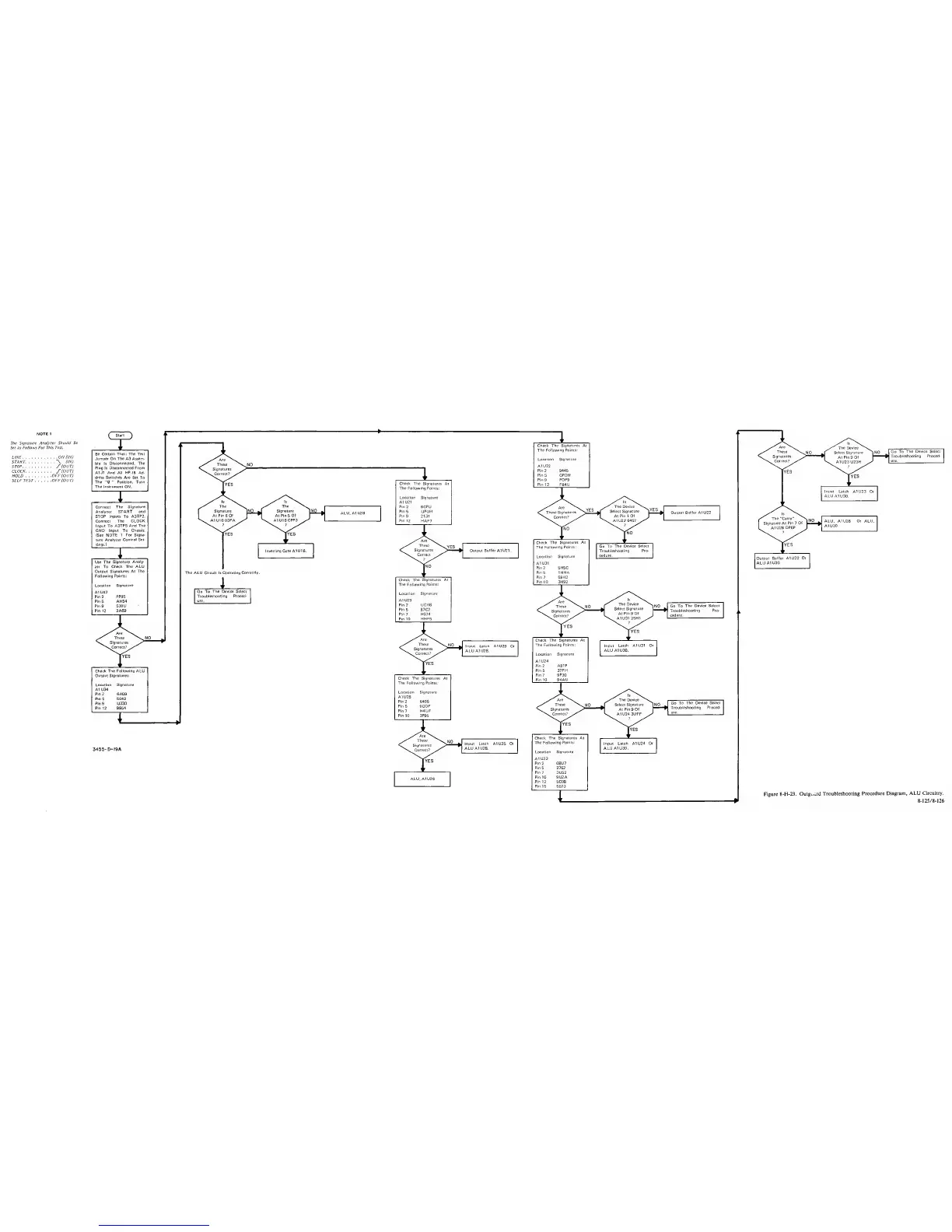
Figure 8-H-23.
Outgi.«rd
Troubleshooting
Procedure Diagram.
ALU Circuitry.
8-125/8-126