EasyManua.ls Logo

HP 3455A - Page 199

HP 3455A
249 pages
Print Icon
To Next Page IconTo Next Page
To Previous Page IconTo Previous Page
Loading...
NOTE 1
The Signature
Analyzer Controls
Should
Be Set
As
Follows
For This
Test:
LINE ON (IN)
START.
~\
(IhlJ
STOP /(OVT)
CLOCK.
y(OUT)
HOLD
OFF
LOUT)
SkLFTEST
OFF(OUT)
+
5V:
79FU
3455-D-
21A
Be
Certain That; The Test
Jumper On The A3
Assem-
bly Is
Disconnected, The
Plug Is
Disconnected From
A1J7 And The
HP-IB
Address
Switches Arc All
Set
To
The
"Q"
Position.
Turn The
Instrument
ON,
I
Connect
The Signature
Analyzer START And
STOP Inputs To A3TP4.
Connect
The CLOCK
Input To A3TP5 And
The
GNO Input To Chassis,
<See Note
I
For
Signature
Analyzer Control Settings.)
Use An
Oscilloscope To
Measure The
Display Inter-
rupt
Signal At
A1U53,
Pin
3. This Signal
Should Be A
Negative-Going
Pulse
Approximately
1 msec In
Duration Followed By A
Negative-Going
Pulse
Approximately 2.8
msec
In
Duration,
Amplitude
Should Be
About
4
V
Peak-To-Peak.
Connect The
Oscilloscope
To
A1U55 Pin 4. Press
And Hold One Of
The
Front
Panel
Keys
(Except
LINE, LOCAL And
GUARD). The Front
Panel
Interrupt
Signal Should Be
A
Negative-Going Puls^
Approximately 15 msec
In Duration And
4
V
Peak-
To-Peak
^*For instruments with
serial number
1
622A01
505
and below the
pulse is
5
msec wide.
Bpor
Instruments with serial number
1622A01S06 and above end
with
a
Rev.
D
of the A1 board. The
pulse is-.
positive when
keys are pushed and
negative when keys are released,
Cpor
instruments
with serial number
1
622A03538
and above or
where Ser-
vice Note 3455A-13
has been im-
plemented,
the negative pulse
is 1.5
msec
wide.
Go To
The HP-IB
Trouble-
shooting
Procedure.
Connect
The Signature
Analyzer
START AND
STOP
Input
To
A3TP3.
.
One-Shot Multivibrator
A1U48, A1C29, A1R42,
Gate A1U53, Or
Decoder
A1U56-
Decoder A1U41.
One-Shot
Multivibrator A1U48, Or
Latches A1U54
And
A1U63.
^
6>i$ec
If A1 C32
is
a .66 fiF
capacitor.
Connect
The LOGIC
TRACER START
And
t
STOP Inputs T3 A3TP3.
Press And Hold One
Of
The
Front
Keys.
Panel RANGE
AtA1U55Pin3
-
1
The Same As
L
The Signature
Gate
A1U55.
J
Connect
The Oscilloscope
To A1U55 Pin 3. Press
And
Hold One Of The
Front Panel Keys. The
En-
able
Sigrtal Should Be A
Negative-Going
Pulse Ap-
proximately 1
5
msec* In
Duration And
4
V
Peak-
To-Peak
^
Panel Interrupt
[mq Go To
The Display
Trou-
Signature
k.
AtAlU48Pin2 J
bleshooting Procedure.
42AP?
[YES
One-Shot Multivibrator
A1U48, A1C32, A1R41,
A1U40,
Latch
A1U58,
And Gates A1U47, Or
A1U55.
Connect A Clip Lead To
The EXTERNAL
TRIG-
GER Input (Rear Panel
BNC). Connect The Signa-
ture Analyzer Probe
To
A1U53 Pin 4, This Point
Should
Be Low
(Signature
Of
0000,
and Probe Light
OFF.) Momentarily Touch
The Clip Lead To
The
+5
V
Test Point And Then
To Chassis Ground.
Go To
The Display Trou-
bleshooting
Procedure.
Use The Signature
Analy-
zerTo
Read The Signature
At
A1U53 Pin
6.
Be Sure
The START And
STOP
Inputs
To The Signature
Analyzer Are
Connected
TOA3TP4.
NO
. Gate A1U53
Inverter
A1 U52
Gate A1U55.
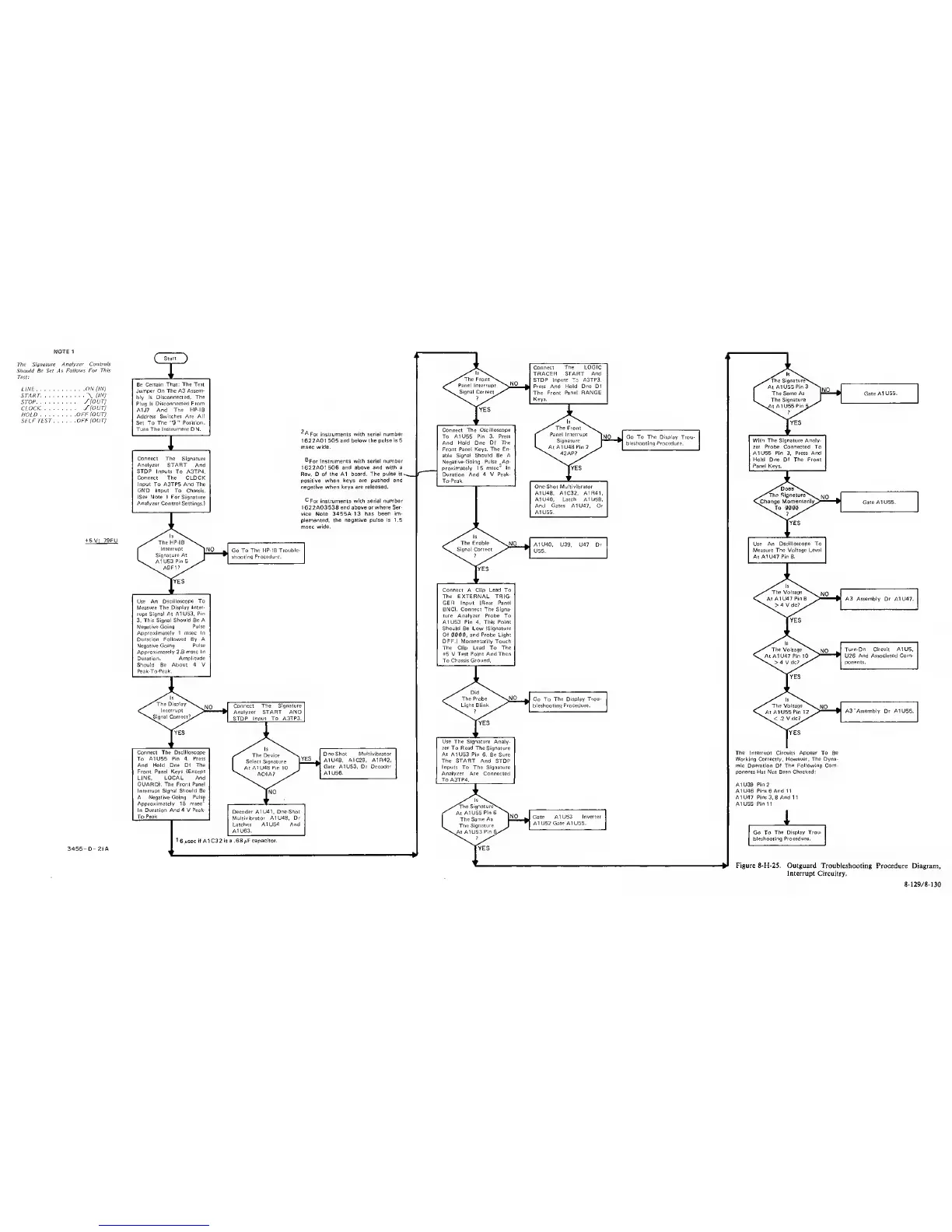
Figure 8-H-25. Outguard Troubleshooting
Procedure Diagram,
Interrupt Circuitry.
8-129/8-130