Appendix
A
Model 3455A
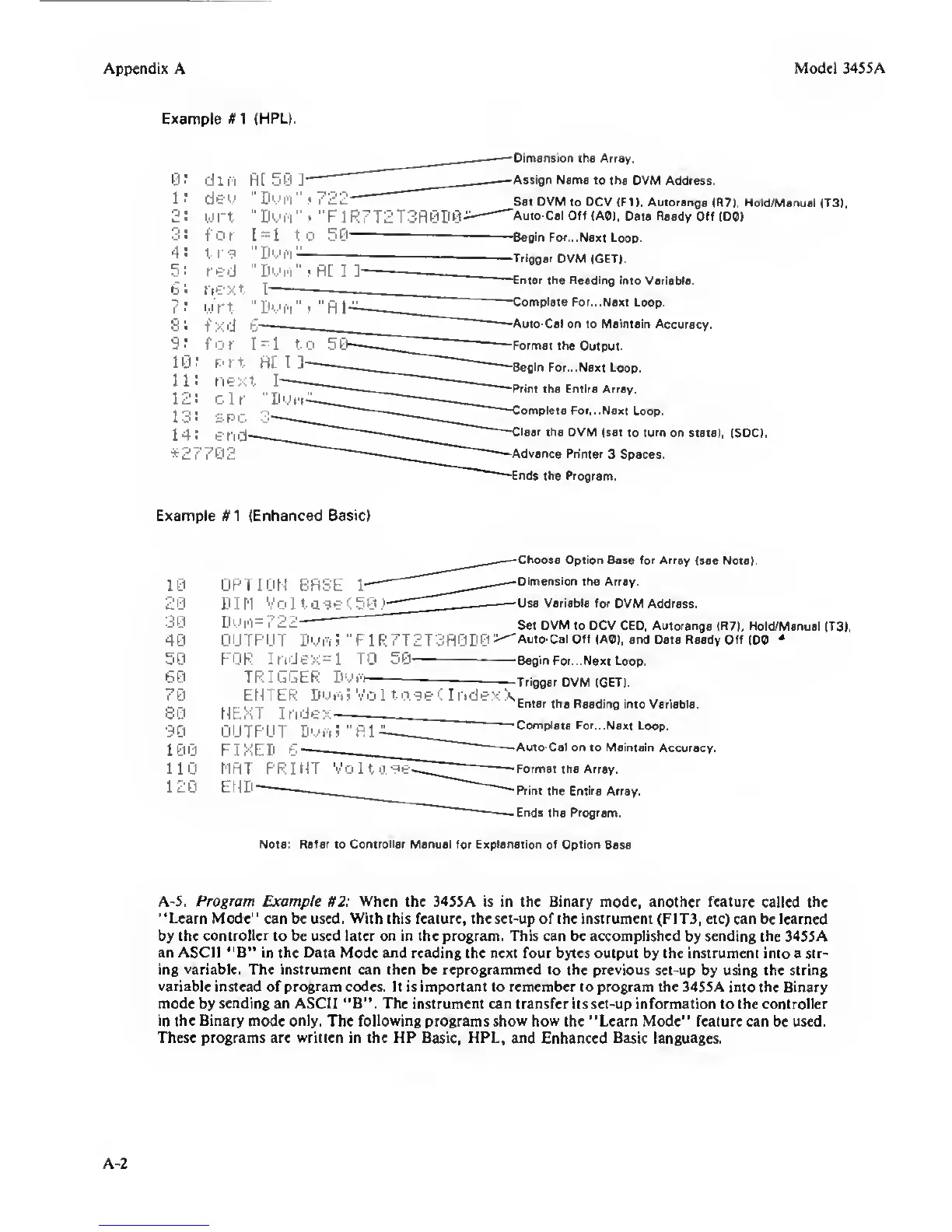
Example K
1
(HPL).
0:
d i n fi[ 50
J
l:
del/
"Doin"
2:
w
rt-
''Doi'i"
O
•
f' 0 r 1
=
1 t
4!
t rg "Dvi'i-
5!
red
"DMii'i"
6:
next I
7:
i.i'rt
"Dmi'i"
8:
Txd
r
—
9:
for
1^1
t
10:
r.-rt fl[ I ]
Dimension
iKe Array.
Assign Name to the
OVM Address.
Set DVM
to OCV (FI), Autorange
(R7I. Hold/Manuai {T3>.
Auto-Cal Off (AD),
Data Ready Off (DO)
'Begin
For. ..Next
Loop.
—Trigger
OVM (GET).
'—Enter the Readirtg
into Variable.
*27;
Complete
For. ..Next
Loop.
Auto-Cal on to Maintain
Accuracy.
Formal the
Output.
Begin For. ..Next Loop.
Print the Entire Array,
ompleie For.. .Next
Loop,
lear
the OVM
(set to
turn
on state). ISDC).
Advance Printer
3 Spaces,
nds the Program.
Example (Enhanced
Basic)
10
20
30
40
50
60
70
80
90
100
110
120
OPTION BfiSE
1-
DIM Volta-^e'-SO.'
Dui'i=722-
OUTPUT Dwii "F1R7T2T3PI0D0>
FOR Ir.dex=l TO
50
TRIuGER
EKv-f'i
Choose Option Base for Array
(see Note).
Dimension
the Array.
Use Variable for
OVM Address.
Set
DVM
to OCV CEO. Autorange
(R7I. Hold/Manuai (T3).
'Auto-Cai Off
(AO), and Data Ready Off
IDO
*
-Begin For. ..Next Loop.
-Trigger
DVM (GET).
ENTER Dm/'I? Vo
1
Index
.
„
..
T 1
Enter the Reading
into Variable.
NEXT Index-
OUTPUT Dyfi?
Complete
For...Next Loop.
F I XED 6
*
—Auto-Cal on to Maintain
Accuracy.
MRT
PRINT Vo 1 t
g-gi=-~
^
-Format the Array.
END—
-Print the Entire
Array.
.Ends
the
Program.
Note:
Refer
to Controiler Manuai for Explanation of Option
Base
A-5.
Program
Example H2:
When
the 3455A is in the Binary mode, another feature
called the
“Learn
Mode" can be used.
With
this feature, the set-up of the instrument (F1T3, etc) can
be
learned
by the
controller
to be used later on in the program. This can be accomplished
by
sending the
34S5A
an ASCII “B“
in
the Data
Mode
and
reading the next four bytes output by the instrument into a str-
ing
variable.
The instrument can then be reprogrammed
to
the previous
set-up by using the string
variable
instead of program codes. It is important to remember to program the 34SSA into the
Binary
mode
by
sending an ASCII “B“.
The instrument can transfer Us set-up information to the controller
in the Binary
mode only. The
following
programs
show how
the “Learn Mode" feature can
be
used.
These programs are written in the HP Basic, HPL, and
Enhanced Basic languages.
A-2


 To Next Page
 Loading...