RB SOFTKEY LABEL: AUTO/1pF/2pF/4pF/8pF/16pF/32pF/64pF/128pF/256pF/
512pF/1024pF (in `MEAS RANGE')
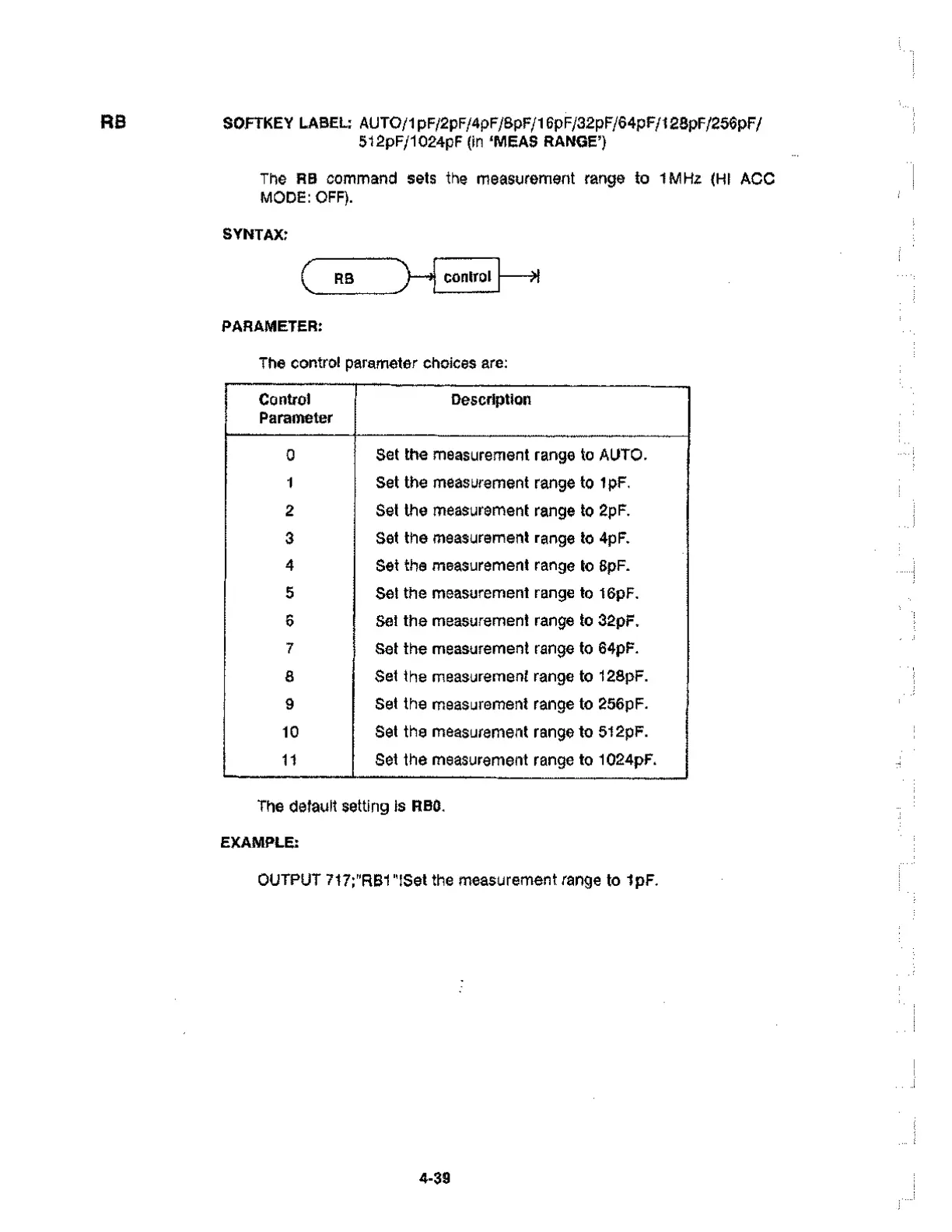
Control
Parameter
Description
0
Set the measurement range to AUTO.
1 Set the measurement range to 1pF.
2
Set the measurement range to 2pF.
3
Set the measurement range to 4pF.
4 Set the measurement range to 8pF.
5 Set the measurement range to 16pF.
6
Set the measurement range to 32pF.
7
Set the measurement range to 64pF.
8
Set the measurement range to 128pF.
9 Set the measurement range to 256pF.
10 Set the measurement range to 512pF.
11
Set the measurement range to 1024pF.
The RB command sets the measurement range to 1MHz (HI ACC
MODE: OFF).
SYNTAX:
RB
PARAMETER:
control
The control parameter choices are:
>1
The default setting is RBO.
EXAMPLE:
OUTPUT 717;"RB1"!Set the measurement range to 1pF.
4-39



 To Next Page