EasyManua.ls Logo

HP 436A - Page 31

HP 436A
102 pages
Print Icon
To Next Page IconTo Next Page
To Previous Page IconTo Previous Page
Loading...
Operation
Model 436A
3-10
OPERATOR'S
CHECKS
LOCAL
OPERATION
(cont'd)
(:_
~.
-:'
:::.
£3
.
~
2;~~~
:;...:.;.~::
...
.........
~:.?"';.;_;
-
v2~~·::::·
===-==::::.
i-;
~~«>,,.::;::t~
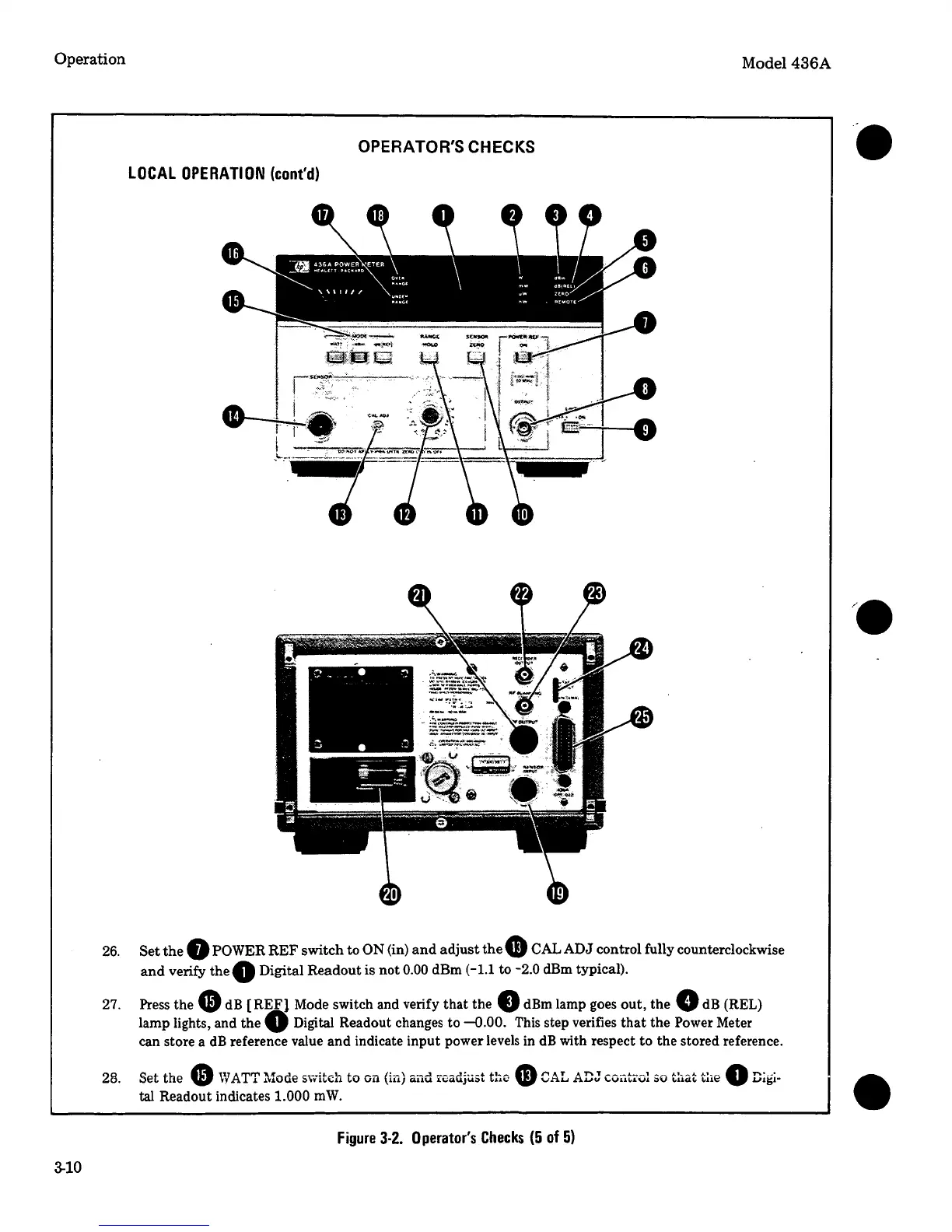
26.
Set
the
8
POWER
REF
switch to
ON
(in)
and
adjust
the
G
CAL
ADJ
control fully counterclockwise
and
verify the
Q
Digital Readout is not
0.00
dBm
(-1.l
to
-2.0
dBm typical).
27. Press the
G)
dB
(REF} Mode switch and verify that
the.
dBm
lamp goes out,
thee
dB
(REL)
lamp lights, and the
0
Digital
Readout changes to
-0.00.
This step verifies
that
the
Power
Meter
can store a
dB
reference value and indicate input power levels
in
dB
with respect to the stored reference.
28. Set
the
e
WATT
Mode switch
to
on (in) and
rcadju.5t
tte
CD
CAL
ADJ
Cviit•Gl
50
t:1at
t:rn
0
D~gi
tal
Readout indicates
1.000
mW.
Figure
3-2.
Operator's
Checks
(5
of
5)

Related product manuals