TROUBLESHOOT THE FAN AND THE A50 DC-DC CONVERTER
Perform the following procedure to troubleshoot the fan and the A50 DC-DC Converter.
1. Troubleshoot the Fan
a. Turn the analyzer power o.
b. Disassemble the rear panel.
c. Remove the fan power cable from the Motherboard A20J18.
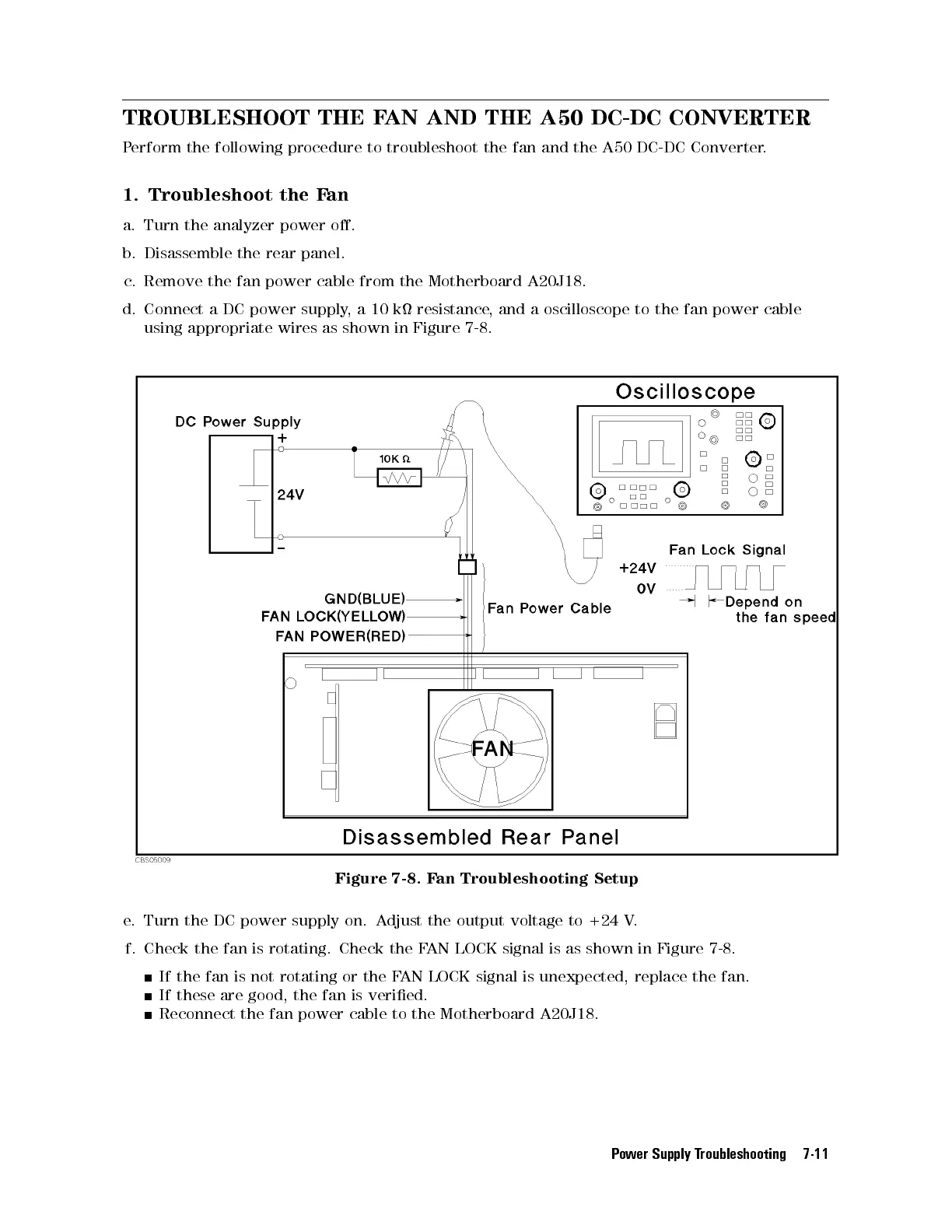
d. Connect a DC power supply, a 10 k resistance, and a oscilloscope to the fan power cable
using appropriate wires as shown in Figure 7-8.
Figure 7-8. Fan Troubleshooting Setup
e. Turn the DC power supply on. Adjust the output voltage to +24 V.
f. Check the fan is rotating. Check the FAN LOCK signal is as shown in Figure 7-8.
If the fan is not rotating or the FAN LOCK signal is unexpected, replace the fan.
If these are good, the fan is veried.
Reconnect the fan power cable to the Motherboard A20J18.
Power Supply Troubleshooting 7-11



 To Next Page