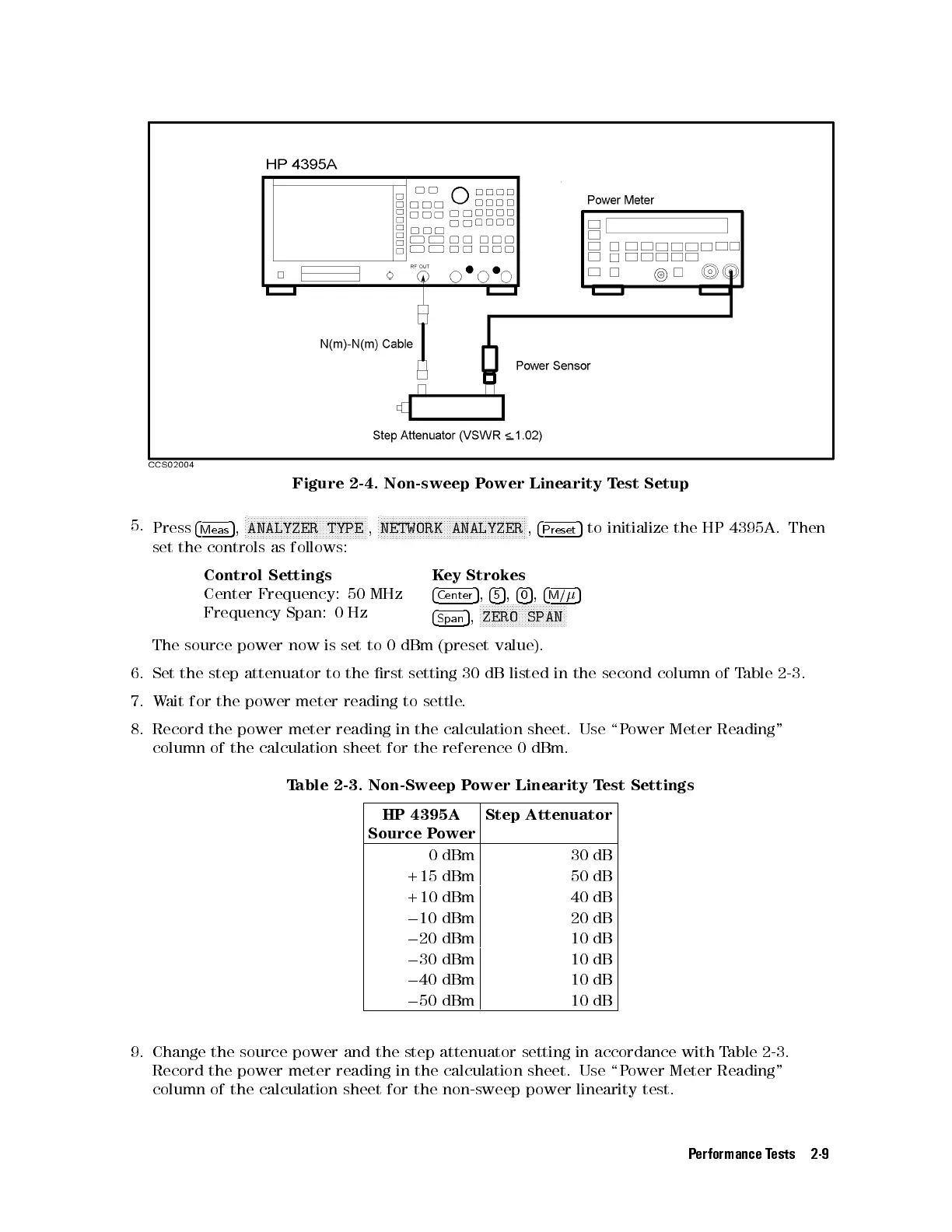
Figure 2-4. Non-sweep Power Linearity Test Setup
5.
Press
4
Meas
5
,
N
NNNNNNNNNNNNNNNNNNNNNNNNNNNNNNNNNNNNNNNN
ANALYZER TYPE
,
N
NNNNNNNNNNNNNNNNNNNNNNNNNNNNNNNNNNNNNNNNNNNNNNNNN
NETWORK ANALYZER
,
4
Preset
5
to initialize the HP 4395A. Then
set the controls as follows:
Control Settings Key Strokes
Center Frequency: 50 MHz
4
Center
5
,
4
5
5
,
4
0
5
,
4
M/
5
Frequency Span: 0 Hz
4
Span
5
,
NNNNNNNNNNNNNNNNNNNNNNNNNNNNN
ZERO SPAN
The source power now is set to 0 dBm (preset value).
6. Set the step attenuator to the rst setting 30 dB listed in the second column of T
able 2-3.
7. Wait for the power meter reading to settle.
8. Record the power meter reading in the calculation sheet. Use \P
ower Meter Reading"
column of the calculation sheet for the reference 0 dBm.
Table 2-3. Non-Sweep Power Linearity Test Settings
HP 4395A
Source Power
Step Attenuator
0 dBm 30 dB
+15 dBm 50 dB
+10 dBm 40 dB
0
10 dBm 20 dB
0
20 dBm 10 dB
0
30 dBm 10 dB
0
40 dBm 10 dB
0
50 dBm 10 dB
9. Change the source power and the step attenuator setting in accordance with T
able 2-3 .
Record the power meter reading in the calculation sheet. Use \P
ower Meter Reading"
column of the calculation sheet for the non-sweep power linearity test.
Performance Tests 2-9



 To Next Page