Control Settings Key Strokes
Reference Level:
0
40 dBm
4
Scale Ref
5
,
NNNNNNNNNNNNNNNNNNNNNNNNNNNNNNNNNNNNNNNNNNNNNNN
REFERENCE VALUE
4
-
5
,
4
4
5
,
4
0
5
,
4
x1
5
Input Attenuator R: 0 dB
4
Scale Ref
5
,
NNNNNNNNNNNNNNNNNNNNNNNNNNNNNNNNNNNNNNNNNNNNNNN
ATTENUATOR MENU
,
NNNNNNNNNNNNNNNNNNNNNNN
ATTEN R
,
4
0
5
,
4
x1
5
Input Attenuator A: 0 dB
4
Scale Ref
5
,
NNNNNNNNNNNNNNNNNNNNNNNNNNNNNNNNNNNNNNNNNNNNNNN
ATTENUATOR MENU
,
NNNNNNNNNNNNNNNNNNNNNNN
ATTEN A
,
4
0
5
,
4
x1
5
Input Attenuator B: 0 dB
4
Scale Ref
5
,
NNNNNNNNNNNNNNNNNNNNNNNNNNNNNNNNNNNNNNNNNNNNNNN
ATTENUATOR MENU
,
NNNNNNNNNNNNNNNNNNNNNNN
ATTEN B
,
4
0
5
,
4
x1
5
UNIT: WATT
4
Format
5
,
NNNNNNNNNNNNNN
WATT
Statistics: ON
4
Utility
5
,
NNNNNNNNNNNNNNNNNNNNNNNNNNNNNNNNNNNNNNNNNNNNNNNNNNNNN
STATISTICS on OFF
(Then the softkey label
changes to
NNNNNNNNNNNNNNNNNNNNNNNNNNNNNNNNNNNNNNNNNNNNNNNNNNNNN
STATISTICS ON off
.)
Detection: Sample
4
Meas
5
,
N
NNNNNNNNNNNNNNNNNNNNNNNNNNNNNNNNNNNNNNNNNNN
DETECTION[xxx]
,
N
NNNNNNNNNNNNNNNNNNN
SAMPLE
3.
Press
4
Meas
5
,
NNNNN
R
to set the HP 4395A to the R input.
4. Perform the following steps to test the displayed average noise level at the HP 4395A R
input.
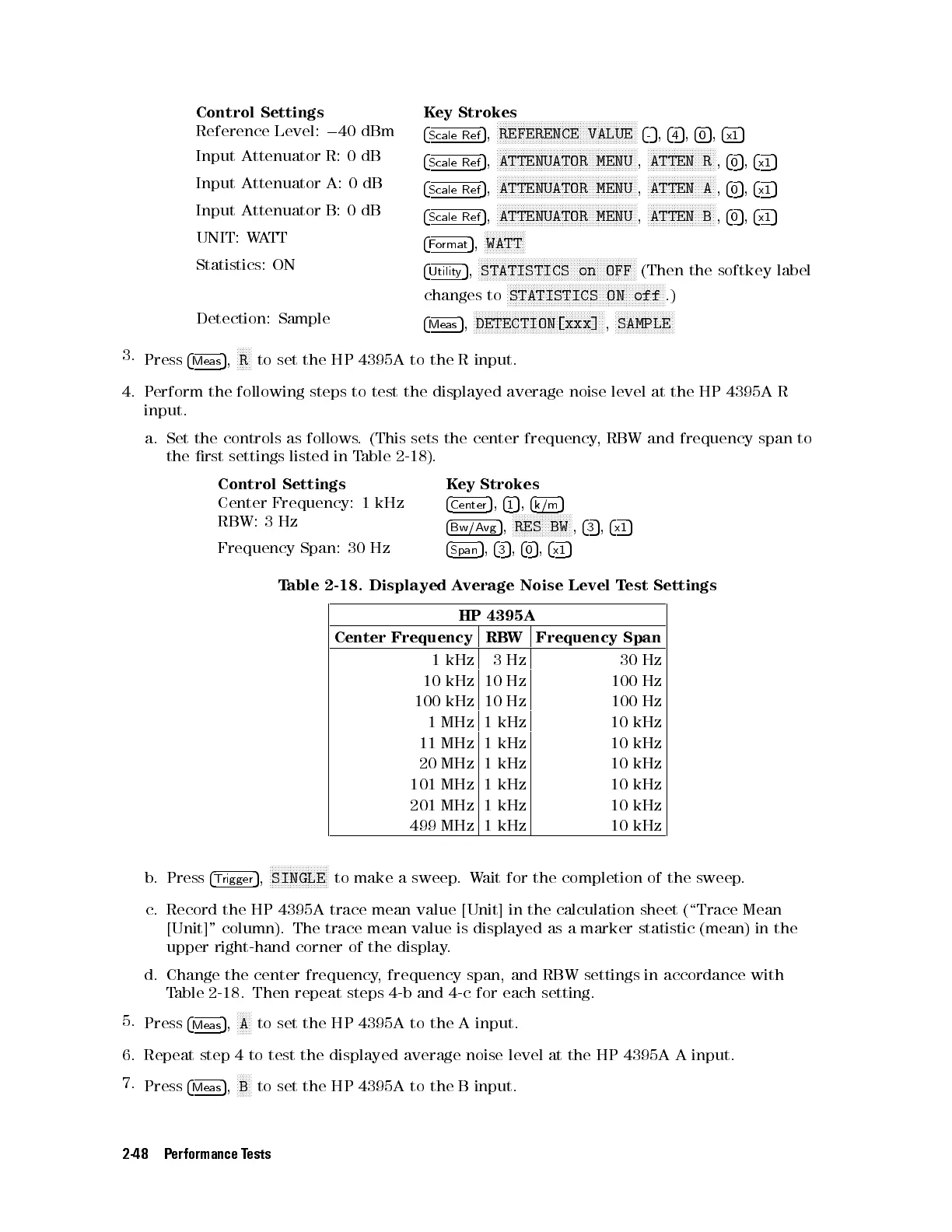
a. Set the controls as follows. (This sets the center frequency, RBW and frequency span to
the rst settings listed in Table 2-18).
Control Settings Key Strokes
Center Frequency: 1 kHz
4
Center
5
,
4
1
5
,
4
k/m
5
RBW: 3 Hz
4
Bw/Avg
5
,
NNNNNNNNNNNNNNNNNNNN
RES BW
,
4
3
5
,
4
x1
5
Frequency Span: 30 Hz
4
Span
5
,
4
3
5
,
4
0
5
,
4
x1
5
Table 2-18. Displayed Average Noise Level Test Settings
HP 4395A
Center Frequency RBW Frequency Span
1 kHz 3Hz 30 Hz
10 kHz 10 Hz 100 Hz
100 kHz 10 Hz 100 Hz
1 MHz 1 kHz 10 kHz
11 MHz 1 kHz 10 kHz
20 MHz 1 kHz 10 kHz
101 MHz 1 kHz 10 kHz
201 MHz 1 kHz 10 kHz
499 MHz 1 kHz 10 kHz
b. Press
4
Trigger
5
,
NNNNNNNNNNNNNNNNNNNN
SINGLE
to make a sweep.Wait for the completion of the sweep.
c. Record the HP 4395A trace mean value [Unit] in the calculation sheet (\Trace Mean
[Unit]" column). The trace mean value is displayed as a marker statistic (mean) in the
upper right-hand corner of the display.
d. Change the center frequency, frequency span, and RBW settings in accordance with
Table 2-18 . Then repeat steps 4-b and 4-c for each setting.
5.
Press
4
Meas
5
,
NNNNN
A
to set the HP 4395A to the A input.
6. Repeat step 4 to test the displayed average noise level at the HP 4395A A input.
7.
Press
4
Meas
5
,
NNNNN
B
to set the HP 4395A to the B input.
2-48 Performance Tests


 To Next Page
 Loading...







