EasyManua.ls Logo

HP 5335A - Page 15

HP 5335A
76 pages
Print Icon
To Next Page IconTo Next Page
To Previous Page IconTo Previous Page
Loading...
Installation
h.
Install
A9
Channel
C
board
into
A2XA9
connector
of
the
A2
amplifier
support
board
(see
assembly
locator.
Figure
8-24).
Secure
A9
with
a
pozidriv
screw
to
main
frame.
i.
Perform
Option
030
adjustment
as
described
in
paragraph
5-19.
j.
Replace
side
and
top
covers.
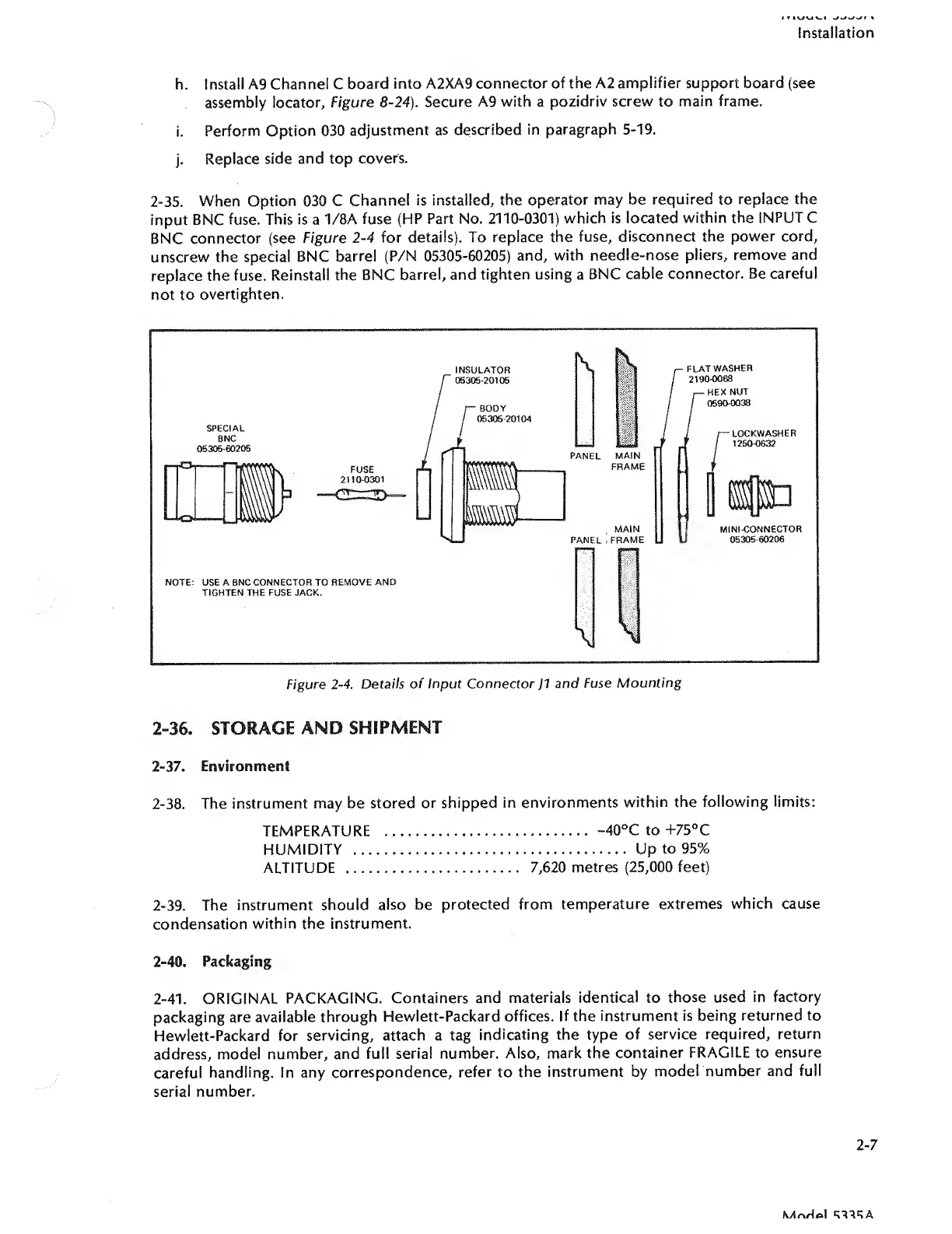
2-35.
When
Option
030
C
Channel
is
installed,
the
operator
may
be
required
to
replace
the
input
BNC
fuse.
This
is
a
1/8A
fuse
(HP
Part
No.
2110-0301)
which
is
located
within
the
INPUT
C
BNC
connector
(see
Figure
2-4
for
details).
To
replace
the
fuse,
disconnect
the
power
cord,
unscrew
the
special
BNC
barrel
(P/N
05305-60205)
and,
with
needle-nose
pliers,
remove
and
replace
the
fuse.
Reinstall
the
BNC
barrel,
and
tighten
using
a
BNC
cable
connector.
Be
careful
not
to
overtighten.
2-36.
STORAGE
AND
SHIPMENT
2-37.
Environment
2-38.
The
instrument
may
be
stored
or
shipped
in
environments
within
the
following
limits:
TEMPERATURE
.
-40°C
to
+75°C
HUMIDITY
.
Up
to
95%
ALTITUDE
.
7,620
metres
(25,000
feet)
2-39.
The
instrument
should
also
be
protected
from
temperature
extremes
which
cause
condensation
within
the
instrument.
2-40.
Packaging
2-41.
ORIGINAL
PACKAGING.
Containers
and
materials
identical
to
those
used
in
factory
packaging
are
available
through
Hewlett-Packard
offices.
If
the
instrument
is
being
returned
to
Hewlett-Packard
for
servicing,
attach
a
tag
indicating
the
type
of
service
required,
return
address,
model
number,
and
full
serial
number.
Also,
mark
the
container
FRAGILE
to
ensure
careful
handling.
In
any
correspondence,
refer
to
the
instrument
by
model
number
and
full
serial
number.
2-7

Related product manuals