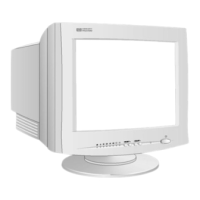
This document describes the HP 56 p4795 15-inch Color Monitor, which features a 13.8-inch viewable image. It is a high-resolution, multi-synchronous color monitor optimized for use with Hewlett-Packard computers.
Function Description
The HP 56 p4795 is designed to display visual information from a computer. It supports various video modes, allowing it to adapt to different display requirements. The monitor incorporates power management features to reduce energy consumption when not in active use, aligning with Energy Star guidelines. Its Plug and Play capability (VESA DDC1/2B standard) allows it to automatically identify itself to compatible HP computers, ensuring optimal refresh rates for the set resolution.
Important Technical Specifications
- Size: 15-inch flat square tube with a 13.8-inch viewable image (353mm).
- Phosphorous: Red, Green, Blue P22 (medium short persistence).
- Dot Pitch: 0.28mm, providing excellent graphics.
- Face Plate: Anti-glare, anti-static screen coating to minimize reflection.
- Input Signal: 0.7V p-p analog RGB video.
- Synchronization: TTL level separate synchronization (negative/positive).
- Input Connector: 15-pin mini D-SUB.
- Scanning Frequency:
- Horizontal: 30 to 54 kHz
- Vertical: 50 to 120 Hz
- Max Resolution: 1024 x 768 at 60 Hz.
- Recommended Resolution: 800 x 600 at 85 Hz, offering easy-to-read characters, a large amount of displayed information, and a flicker-free image.
- Display Size: 284 x 212 mm ± 1mm maximum viewable size.
- Warm-up Time: 30 minutes to reach optimum performance level.
- Pixel Clock: 66 MHz.
- Power Source: AC 100 to 240 V, 50 to 60Hz, Current 1.5 A.
- Operating Environment:
- Temperature: 0°C to 40°C
- Humidity: 10% RH through 80% RH (without condensation)
- Cabinet Dimensions: 362 (H) x 360(W) x 387(D) mm (including pedestal).
- Weight: 11.5 Kg.
- Tilt/Swivel Stand:
- Tilt Angle: 5° to +12.5°
- Swivel Angle: ±45°
- Power Management:
- On Mode: 75 W
- Stand-by Mode: 15 W
- Suspend Mode: 15 W
- Off Mode: 8 W
- Compliance:
- ISO 9241-3, ISO 9241-3/-7/-8 ergonomic standards.
- MPRII guidelines for upper limits of electrostatic and magnetic field emissions.
- Energy Star Computers Program.
Usage Features
The monitor is equipped with digital controls for image adjustment, located on the front panel. These controls include:
- Contrast: Adjusts the image white level.
- Brightness: Adjusts the image black level.
- H-Size: Adjusts the horizontal size of the displayed image.
- H-Center: Adjusts the horizontal position of the displayed image.
- V-Size: Adjusts the vertical size of the displayed image.
- V-Center: Adjusts the vertical position of the displayed image.
- Pincushion: Corrects vertical edges that appear to curl inwards or outwards.
- Trapezoid: Corrects vertical edges that do not appear to be parallel.
- Tilt: Rotates the left and right edges of the image.
To make adjustments, the user presses the "FUNC." button to select the desired adjustment type, then uses the "Adjustment buttons" (up/down arrows) to modify the setting. Pressing both adjustment buttons simultaneously returns the setting to its factory preset. The monitor automatically saves adjustments for each resolution used.
The monitor features an On/Off switch and a Status Indicator (LEDs) to show the selected adjustment control and power status. It comes with a tilt and swivel base that can be easily attached by sliding it into the slots on the underside of the monitor until it clicks into place.
For optimal viewing comfort and productivity, users are advised to set up their work area correctly and use the HP equipment properly, following established ergonomic principles. The monitor supports VESA monitor power management, which includes "Suspend mode" (less than 15W) and "Active off mode" (less than 8W), both indicated by an amber front panel light.
Maintenance Features
- Demagnetization: The monitor automatically demagnetizes each time it is switched on to ensure color purity. For continued color purity, it is recommended to switch the monitor off for at least 30 minutes each week before turning it on again.
- Cleaning:
- Turn off the monitor and unplug the power cord before cleaning.
- Use a soft cotton cloth dampened with a regular household glass cleaner to gently wipe the screen. Avoid spraying cleaner directly onto the screen to prevent liquid from dripping inside.
- Dry the screen with a clean, soft cotton cloth.
- Do not use cleaning solutions containing fluoride, acids, or alkalis, as these can damage the anti-glare, anti-static screen coating.
- Screen Longevity: To maximize screen life and prevent damage like "burned phosphor" (due to static images), it is recommended to:
- Use the monitor power management system or a screen saver program.
- Avoid setting contrast and brightness to their maximum levels for prolonged periods.
- Switch the monitor off or reduce brightness and contrast to minimum levels when not in use, if power management or a screen saver is not available.
- Environmental Responsibility: HP has a product take-back program for recycling old monitors at the end of their useful life. Collected equipment is sent to recycling facilities where parts are reused or recycled, and potentially toxic substances are processed to non-harmful components.

 Need help?

 To Next Page
 General