ENGLISH
FRANÇAIS
ESPAÑOL
PORTUGUÊS
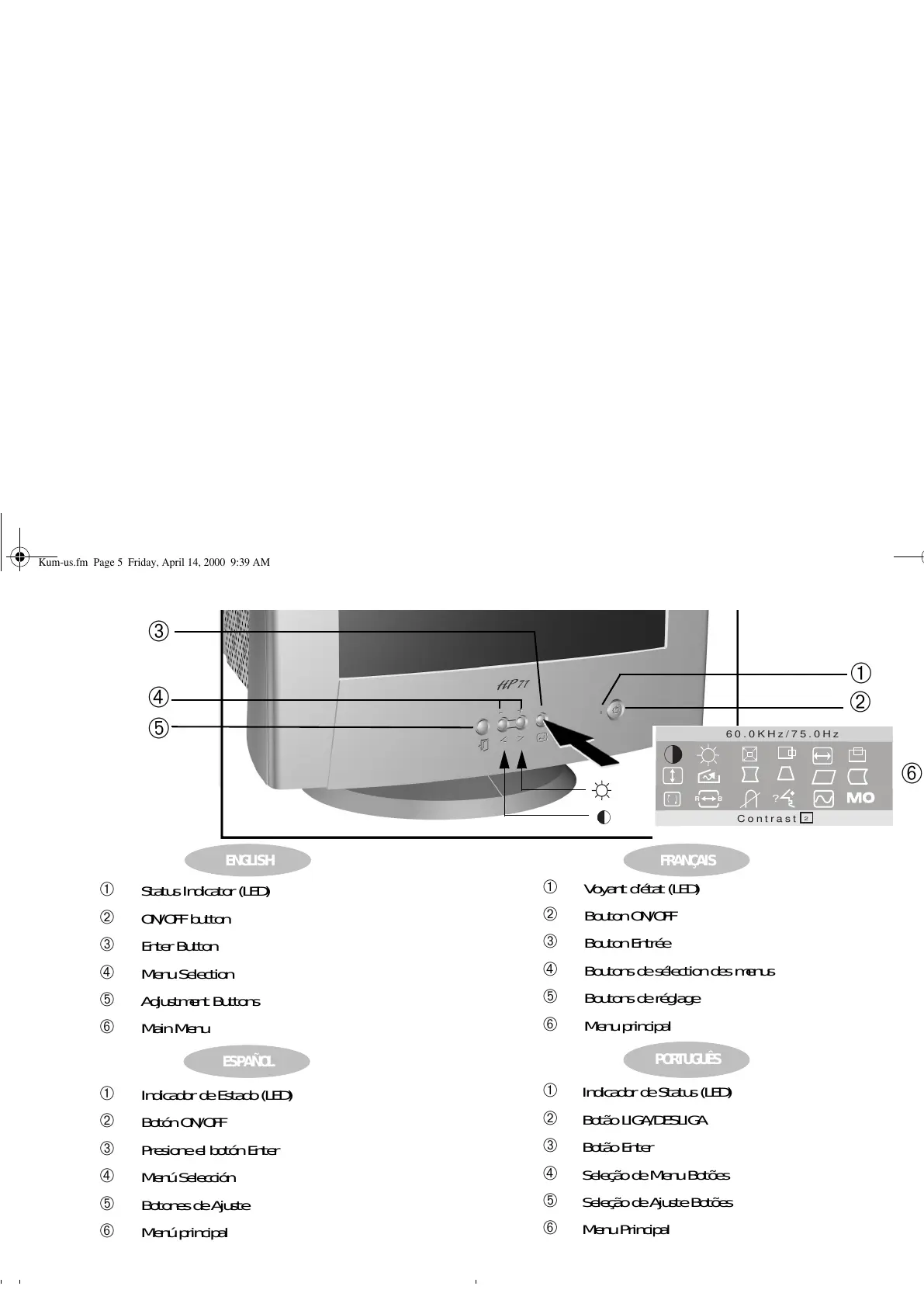
➀ Status Indicator (LED)
➁ ON/OFF button
➂ Enter Button
➃ Menu Selection
➄ Adjustment Buttons
➅ Main Menu
➀ Indicador de Estado (LED)
➁ Botón ON/OFF
➂ Presione el botón Enter
➃ Menú Selección
➄ Botones de Ajuste
➅ Menú principal
➀ Voyant d’état (LED)
➁ Bouton ON/OFF
➂ Bouton Entrée
➃ Boutons de sélection des menus
➄ Boutons de réglage
➅ Menu principal
➀ Indicador de Status (LED)
➁ Botão LIGA/DESLIGA
➂ Botão Enter
➃ SeleçãodeMenuBotões
➄ Seleção de Ajuste Botões
➅ Menu Principal
?
2
B
R
Contrast
60.0KHz/75.0Hz
➀
➁
➅
➃
➄
➂
Kum-us.fm Page 5 Friday, April 14, 2000 9:39 AM


 To Next Page